



Three months ago, a 180-employee distribution center called us in panic mode. Their payroll processor had rejected their entire time file for the fourth period in a row. Not because employees weren't clocking in—they were. Not because managers weren't approving overtime—they were doing that too. The problem was simpler and more frustrating: their time data was accurate but not payroll-ready.
The warehouse workers clocked in and out religiously. The system captured every punch. Managers reviewed hours weekly. Yet somehow, between time collection and payroll processing, something kept breaking. Their HR team was spending 30+ hours per pay period manually rebuilding time records that should have flowed straight through.
This disconnect between having time data and having payroll-ready time data costs businesses more than just processing hours. It creates a cascade of problems that compound with each pay period. Employees lose trust when paychecks are consistently wrong. Managers burn out from endless correction cycles. HR gets trapped in reconciliation work instead of strategic initiatives.
The operational gap nobody designs for
Most businesses treat time tracking and payroll as separate systems connected by a data export. Clock times go in one end, paychecks come out the other, and someone in the middle makes it all work through sheer determination and Excel wizardry.
That warehouse had seven different failure points between clock punch and payroll entry. Seven places where clean data became questionable data. Their time system recorded punches to the second, but payroll needed 15-minute increments. The system flagged any deviation from schedule as an exception, but payroll only cared about deviations that affected pay rates. Managers approved hours in the time system, but payroll needed different approval codes for different types of hours.
Each translation point introduced opportunity for error. And errors don't just affect the current period—they create ripples. An incorrectly coded overtime hour in week one affects the overtime threshold calculation in week two. A missed meal penalty in one period triggers a labor audit that disrupts the next three periods.
Building a payroll-ready time and attendance process means designing backwards from payroll requirements, not forward from time collection. Every field you capture, every rule you enforce, every approval you require should directly support clean payroll processing.
Process architecture that prevents problems instead of detecting them
Traditional time tracking focuses on capturing when work happened. A payroll-ready process captures why variations occurred, who authorized them, and how they affect compensation—all at the point of entry, not during reconciliation.
Accurate time tracking made effortless.
GoTimio empowers your team to log, monitor, and manage work hours seamlessly.
- Real-time time tracking
- Automated timesheet approvals
- Payroll and billing integration
No credit card required
The entry point controls everything downstream
When an employee deviates from their standard schedule, most systems just record the new times. But payroll needs context. Did they arrive early because their manager requested it? That might trigger shift differential. Did they stay late to finish a project? That needs overtime coding. Did they leave early for a medical appointment? That should deduct from PTO, not dock their pay.
A medical device manufacturer reduced their reconciliation time by 85% with one change: they required variation coding at clock-in, not during payroll review. If someone clocked in more than 15 minutes early, the time clock prompted them to select a reason from a short list. Each reason mapped to specific payroll handling rules. No more guessing, no more hunting down explanations after the fact.
Real-time validation beats batch correction
Most businesses discover time tracking errors when they run their preliminary payroll reports. By then, memories have faded, managers have moved on to other priorities, and that "quick fix" becomes a two-hour investigation.
The distribution center now validates time entries continuously throughout the day. If someone hasn't clocked in within 10 minutes of their shift start, their manager gets a mobile alert. Not HR, not payroll—the person who actually knows whether that employee is running late, called in sick, or swapped shifts with someone else. The manager can approve the absence, confirm the tardy, or flag a missing punch while the situation is still fresh.
This might seem like micromanagement until you realize each unaddressed exception creates 15-30 minutes of reconciliation work later. Fifty employees generating two exceptions per week equals 100 touch points that someone has to research and resolve during payroll crunch time.
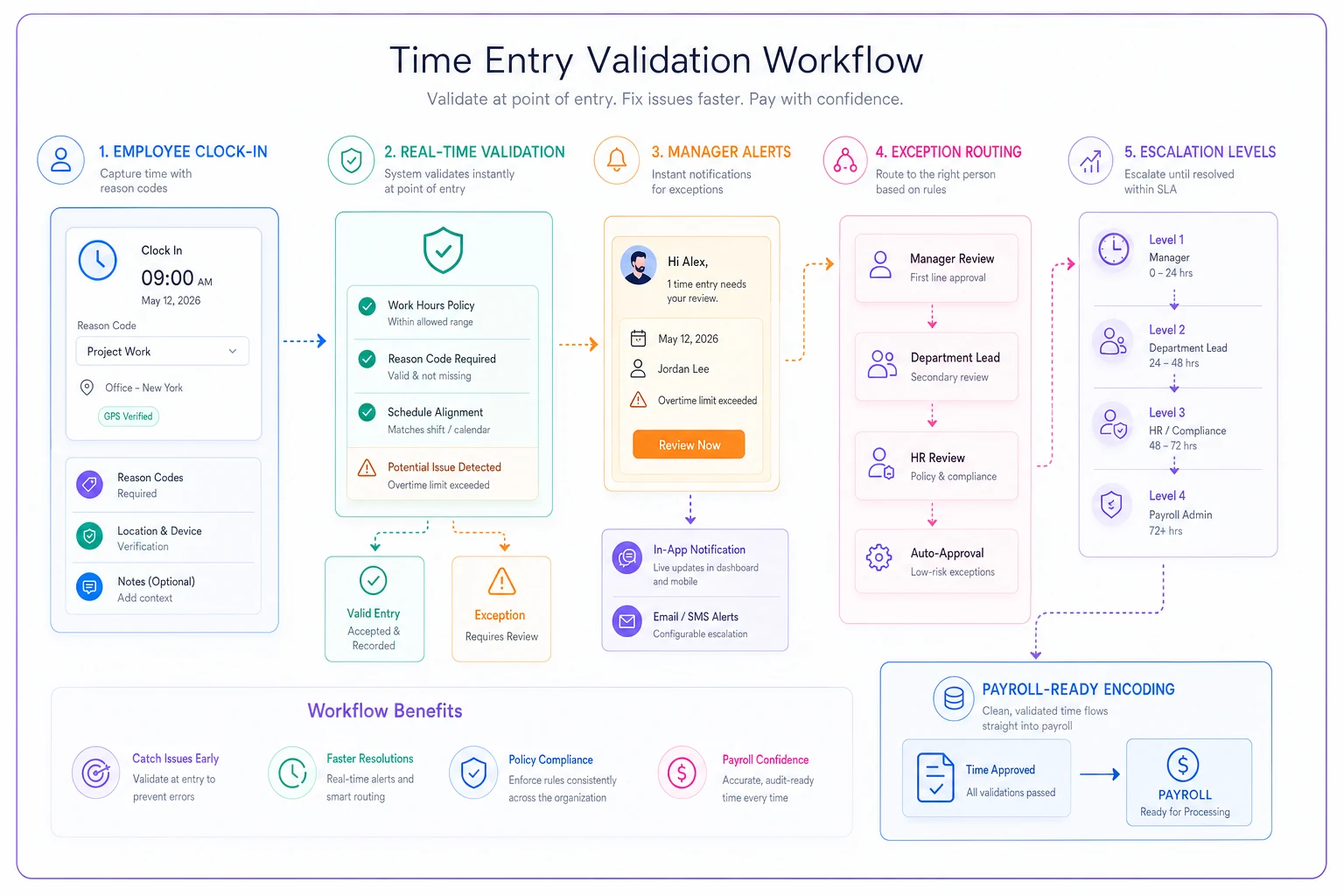
This workflow highlights validation at entry, manager-based resolution, and routing exceptions to payroll with encoded pay rules.
The data hierarchy that makes or breaks payroll processing
Clean payroll processing requires three layers of time data, each building on the last. Most businesses only capture the first layer and wonder why payroll is such a struggle.
Layer 1: Raw time data
-
Clock in/out times
-
Break punches
-
Meal periods
This is what every basic time clock captures. It tells you when someone was present but nothing about whether that presence was authorized, productive, or properly compensated.
Layer 2: Contextual validation
-
Schedule adherence status
-
Exception categorization
-
Variation approvals
-
Department/project allocation
This layer transforms time data into business data. It answers questions like: Was this overtime planned or emergency? Should these hours bill to the regular department or the special project? Did the early arrival require shift differential pay?
Layer 3: Payroll-ready encoding
-
Pay code mapping
-
Rate multipliers
-
Benefit impacts
-
Compliance flags
This final layer translates business decisions into payroll instructions. It's the difference between knowing someone worked 45 hours and knowing they worked 40 regular hours plus 5 hours at time-and-a-half with the overtime hitting project code 447 and triggering their monthly overtime bonus threshold.
A regional restaurant chain struggled with payroll until they realized they were trying to jump straight from Layer 1 to Layer 3. They had clock times and they had payroll requirements, but no systematic way to connect them. Adding Layer 2—the contextual validation—reduced their payroll processing from three days to four hours.
Control points that actually prevent reconciliation work
Identifying where your process breaks is useful. Preventing those breaks from happening is transformative. The most effective control points catch problems before they become payroll issues.
Schedule variance tolerance
Setting your variance tolerance too tight creates false positives. Too loose creates payroll surprises. The sweet spot depends on your business model, but the principle remains consistent: define acceptable variance by role, not globally.
A call center had different variance needs for different positions. Customer service reps needed strict schedule adherence for coverage requirements—more than 5 minutes late created genuine operational problems. Their IT support team had flexible start times within a two-hour window. Their maintenance crew worked until the job was done, regardless of schedule.
Define variance tolerance per role to reduce false positives.
Approval velocity requirements
Every hour an exception ages, the chance of accurate resolution drops. After 24 hours, managers start guessing. After 48 hours, they're just clicking approve to clear their queue. After 72 hours, nobody remembers what actually happened.
Your approval process needs velocity requirements, not just approval requirements. A construction company implemented a simple rule: all time exceptions must be addressed within one shift of occurrence. Not approved—addressed. Managers could approve, reject, or request more information, but they had to take action.
This single change eliminated their end-of-period approval scramble. Instead of processing 200+ exceptions on Friday afternoon, managers handled 8-10 exceptions per day. The quality of their decisions improved, their error rate dropped, and payroll stopped being a crisis event.
Cascading escalation triggers
| Time Period | Escalation Level | Action |
|---|---|---|
| 0-8 hours | Direct supervisor | Initial routing |
| 8-16 hours | Department manager | Copy notification |
| 16-24 hours | HR department | Visibility alert |
| 24+ hours | Senior management | Aging report |
This isn't about punishment—it's about preventing small problems from becoming payroll disasters. That missed punch on Tuesday morning becomes much harder to resolve accurately by Thursday afternoon.
Common failure patterns in time-to-payroll workflows
The same failure patterns appear repeatedly across industries. They're not random—they're structural weaknesses that manifest predictably.
The Monday Morning Surprise
Every Monday, payroll discovers overtime that wasn't authorized, schedule swaps nobody documented, and exceptions from the previous week that somehow never got approved. The Friday afternoon promise of "I'll handle it Monday" becomes Monday morning's crisis.
This pattern emerges when your process allows debt to accumulate. Friday's exceptions should be Friday's problem, not Monday's surprise. A transportation company fixed this by implementing a simple "Friday close" requirement: no one in management could leave Friday until all week's exceptions were resolved. Not reviewed, not acknowledged—resolved.
The Proxy Approval Problem
Sarah's on vacation, so Tom approves her team's time. Except Tom doesn't know that Jennifer swapped shifts with Marcus, that David was approved for early departure on Wednesday, or that Michelle's overtime was pre-authorized for the Henderson project.
This breaks when you rely on human knowledge instead of system documentation. Every approval should stand alone with enough context for any authorized approver to make the right decision. The question isn't "Would Sarah approve this?" but "Does this meet our documented criteria?"
The Retroactive Reality Revision
Wednesday: "Everyone worked their normal shifts."
Friday (payroll day): "Oh wait, actually Johnson worked a double on Monday, Smith left early Tuesday for a dentist appointment, and Williams covered the night shift Wednesday but forgot to clock in."
Memory-based time tracking doesn't work. By the time payroll rolls around, everyone's memory has been overwritten by more recent events. A manufacturing plant reduced retroactive corrections by 90% by requiring same-day exception documentation. If it wasn't recorded within 24 hours, it didn't happen.
Building SLAs that drive behavior, not just measure it
SLAs without consequences are just hopeful suggestions. Effective SLAs change behavior by making compliance easier than non-compliance.
The 15-Minute Rule
SLA: Clock punches must occur within 15 minutes of scheduled time or require immediate exception documentation.
This isn't about punctuality—it's about data quality. A retail chain implementing this rule discovered their "tardiness problem" was actually a parking problem. Employees were arriving on time but taking 10-15 minutes to find parking and reach the time clock. Moving to mobile clock-in for arriving employees eliminated 80% of their "late" punches.
The 95% First-Pass Accuracy Target
SLA: 95% of time records should process through payroll without manual intervention.
This seems aggressive until you realize the alternative. At 90% accuracy with 200 employees, you're manually fixing 20 records per pay period. Each fix takes 15-30 minutes between research, correction, and verification. That's 5-10 hours of reconciliation work that compounds with each period.
To hit 95%, you need:
-
Clean data at entry (validation rules, not post-processing)
-
Clear ownership (who approves what, when)
-
Defined escalation (what happens when things sit)
-
Regular calibration (why did the 5% fail?)
The Two-Touch Maximum
SLA: No time record should require more than two human touches between entry and payroll.
Touch one: Employee enters time Touch two: Manager approves exception
Anything beyond two touches indicates process failure. Either your rules are too complex, your data capture is incomplete, or your approval chain is broken. A logistics company tracking their touch count discovered some records were being handled seven times—employee, supervisor, manager, HR, payroll, back to manager, back to payroll. Streamlining to two touches saved 25 hours per pay period.
Technology architecture for sustainable operations
The technology stack you choose either enables or restricts your process improvement. Most businesses default to whatever time tracking system seems easiest to implement, then spend years working around its limitations.
Integration depth matters more than features
That facial recognition time clock might seem impressive, but if it can't pass properly coded data to your payroll system, you're still doing manual reconciliation. A regional healthcare provider learned this the hard way. They implemented a state-of-the-art biometric time system that could identify employees from 30 feet away. Impressive technology, except it couldn't differentiate between regular hours and on-call hours, forcing manual recoding of every physician's timecard.
The questions that matter:
-
Can the system enforce your business rules at entry?
-
Does it capture context, not just time?
-
Can it route approvals based on your organizational structure?
-
Does it integrate with payroll at the field level, not just file level?
Automation should eliminate steps, not accelerate them
Adding automation to a broken process just helps you fail faster. A distribution company automated their exception alerts, sending managers hundreds of notifications daily. The volume was so overwhelming that managers started ignoring them entirely. They automated their existing broken process instead of fixing the process first.
Effective automation removes human touchpoints from routine decisions while escalating only true exceptions. Your overnight shift always runs 15 minutes past scheduled end time for shift handoff? The system should know this and stop flagging it. Your warehouse team regularly starts 30 minutes early on Mondays for inventory? Build that into the expected pattern.
AI-powered recognition for pattern understanding
Traditional time systems follow rigid rules. Clock in early? Exception. Clock out late? Exception. Take lunch at 11:45 instead of noon? Exception. These systems generate noise, not insight.
AI-powered operational software can learn the difference between anomalies and problems. It recognizes that Jennifer always clocks in 3-4 minutes early because she's conscientious, while Tom's early clock-ins correlate with overtime padding. It notices that Department A's Thursday overtime is planned (inventory night) while Department B's Thursday overtime indicates scheduling problems.
This pattern recognition transforms time tracking from a compliance exercise into an operational intelligence tool. Instead of flagging everything that deviates from theoretical schedules, it identifies the deviations that actually matter for payroll accuracy and labor cost management.
Measuring what matters: Beyond error counts
Most businesses measure time and attendance success by counting errors. Fewer missing punches, fewer unapproved exceptions, fewer payroll corrections. These metrics matter, but they don't tell the whole story.
Processing velocity indicates process health
How fast can you close a pay period? Not how fast you do close it—how fast you could close it if needed. A healthy payroll-ready process can produce clean data within hours of period end, not days.
A 300-employee fulfillment center tested this. Under their old process, they needed three days minimum to prepare payroll data. After implementing proper controls and data structure, they could generate payroll-ready files within two hours of period close. They still took a day for review and verification, but the capability to move fast indicated a healthy process.
Manager engagement reveals trust in the system
Track how quickly managers respond to time approval requests. In broken systems, managers delay approvals because they don't trust the data. They want to verify everything manually before committing. In healthy systems, managers approve quickly because they trust the process to catch real issues.
As process quality improves, manager response time decreases. They stop treating every approval as a potential problem and start trusting the system to surface only genuine exceptions.
Employee-initiated corrections show system usability
In a well-designed process, employees proactively fix their own time errors. They notice a missing punch and add it immediately. They request schedule changes in advance rather than explaining them afterward. They take ownership of their time data accuracy.
This only happens when the system is easy to use and employees trust it will handle their corrections fairly. Complex correction processes or punitive approaches to time errors drive behavior underground—employees stop reporting problems and hope nobody notices.
Implementation without disruption
Rolling out a new payroll-ready time and attendance process while maintaining operations requires careful sequencing. You can't stop processing payroll while you redesign the system.
Start with parallel processing. Run your new process alongside the old one for at least one full pay period. This reveals gaps, builds confidence, and provides a safety net. Yes, it's extra work temporarily, but it's less work than recovering from a failed cutover.
A manufacturing client tried to skip parallel processing to save time. Their first payroll under the new system had 47 errors affecting 15% of employees. The recovery effort took three weeks and damaged employee trust that took months to rebuild. The parallel processing they skipped would have taken one week.
Focus your initial implementation on departments with the most pain or the most variance. These groups are motivated to make the new process work and will provide the most valuable feedback. Their success becomes your proof of concept for resistant departments.
Don't try to achieve perfection in version one. Get to "significantly better" first, then iterate. That distribution center? Their first implementation reduced reconciliation time by 60%. Good, not perfect. Six months of refinements got them to 90% reduction. The perfect system designed in a vacuum would never have survived contact with reality.
The compound effect of clean data
When time data flows cleanly into payroll, the benefits extend far beyond reduced reconciliation hours. Labor costing becomes accurate. Project profitability calculations actually mean something. Overtime trends reveal operational issues rather than data quality problems.
A construction company discovered they were underestimating project labor costs by 12% due to time tracking errors. Not intentional padding or missed hours—just the accumulated effect of miscoded time, incorrect project allocations, and delayed corrections. Clean time data revealed their true margins and fundamentally changed their bidding strategy.
Your payroll-ready time and attendance process becomes the foundation for operational intelligence. When you trust your time data, you can make decisions based on it. When you don't trust it, you're making guesses decorated with spreadsheets.
The path from time tracking chaos to payroll-ready data isn't complex, but it requires thinking systematically about the entire workflow. Every exception you prevent at entry is one you don't reconcile later
Ready to optimize your workforce time management?
Join 2,000+ companies using GoTimio to improve timesheet accuracy, reduce payroll errors, and boost team productivity.