


Most HR managers treat timesheet records like temporary paperwork. Store them somewhere, run payroll, maybe keep them around for a year or two. Then one Tuesday afternoon, you get an email from legal about a wage dispute from 2019. Or the Department of Labor shows up asking for overtime records from the past three years. Those "temporary" timesheets suddenly become the difference between a clean audit and a six-figure penalty.
The real issue isn't just keeping records — it's keeping them in a way that actually holds up under scrutiny. A pile of Excel files with different formats, missing approval signatures, and no clear audit trail won't save you when an investigator starts asking detailed questions about specific dates and times.
The three audits that catch businesses unprepared
Internal audits: The practice round nobody takes seriously
Internal timesheet audits typically happen quarterly or annually. Finance wants to verify labor costs. Operations checks productivity metrics. HR confirms compliance with company policies. These feel low-stakes because they're self-imposed and nobody's going to fine you for finding problems.
But internal audits reveal the gaps that external auditors will exploit later. That manager who's been approving timesheets without actually reviewing them? The employee who's been manually adjusting their hours weeks after the fact? The missing documentation for schedule changes? These aren't just internal issues — they're future audit failures waiting to happen.
A mid-sized logistics company discovered this during their annual internal audit. Roughly 15% of timesheets had retroactive edits with no documentation explaining why. Management treated it as a training issue and moved on. Six months later, during a Department of Labor investigation, those same undocumented changes triggered a full audit going back three years. What started as one employee complaint became an investigation examining every hourly worker's records.
Payroll audits: Where math meets reality
Payroll audits focus on calculation accuracy. Did overtime get computed correctly? Were deductions applied properly? Do the hours match what was actually worked? These audits seem straightforward until you realize most businesses can't actually prove their calculations were correct.
Sure, they can show you the final numbers. But can they demonstrate the exact rules that were applied? The approval chain? The original timesheet data before any adjustments were made?
Consider a healthcare staffing agency that faced a payroll audit last year. They could show total hours worked and wages paid for every employee. What they couldn't show was the shift differential calculations for night shifts, the holiday pay multipliers, or why certain employees received different overtime rates for the same type of work. Their payroll software had the right totals, but no audit trail explaining how it calculated them. The audit dragged on for four months while they manually reconstructed three years of calculations.
Legal audits: The nightmare scenario
Legal audits don't care about your internal processes or good intentions. They care about defensible evidence. Can you prove this specific employee worked these exact hours on these exact dates? Can you show who approved it and when? Can you demonstrate that your overtime calculations followed both federal and state law?
These audits often stem from employee complaints, wage disputes, or regulatory investigations. They look backward — sometimes several years — and demand documentation you might not have kept or documentation you have but can't trust.
A retail chain with 47 locations learned this during a class-action lawsuit alleging systematic underpayment of overtime. They had timesheet records. They had payroll records. What they didn't have was proof that employees actually approved their final timesheets, evidence that meal breaks were properly recorded, or documentation showing managers hadn't altered hours after the fact without employee knowledge. The lawsuit settled for $4.2 million, not necessarily because they did anything wrong, but because they couldn't prove they did everything right.
Retention schedules that actually protect your business
The typical advice says keep employment records for three years. That's the federal minimum under the Fair Labor Standards Act. But federal minimums don't account for state laws, industry regulations, or how lawsuits actually work in practice.
Accurate time tracking made effortless.
GoTimio empowers your team to log, monitor, and manage work hours seamlessly.
- Real-time time tracking
- Automated timesheet approvals
- Payroll and billing integration
No credit card required
| Record Type | Federal Requirement | Common State Requirements | Recommended Retention |
|---|---|---|---|
| Timesheet records | 3 years (FLSA) | 4-6 years (varies by state) | 7 years |
| Employment tax records | 4 years (IRS) | 4-7 years | 7 years |
| Payroll calculations | 3 years (FLSA) | 4-6 years | 7 years |
| Approval documentation | Not specified | Varies | 7 years |
| Edit histories | Not specified | Not specified | 7 years |
For timesheet audit trail retention:
Federal baseline (FLSA): 3 years for payroll and timesheet records
IRS requirements: 4 years for employment tax records
State variations: California requires 4 years, New York requires 6 years
Union contracts: Often specify 5-7 year retention periods
Legal reality: Statute of limitations for wage claims can extend to 6 years in some states
Smart businesses don't play retention roulette. They keep comprehensive timesheet audit trails for 7 years. Storage costs are minimal these days. Lawsuits are expensive. Having records from 2018 when someone claims they were underpaid in 2018 transforms a potential crisis into a straightforward document review.
Retention isn't just about duration — it's about completeness. Your 7-year archive needs to include original timesheet entries, all edits and adjustments with timestamps, approval records showing who approved and when, schedule assignments and changes, break and meal period records, overtime and special pay calculations, employee acknowledgments and disputes, manager notes and explanations, and system access logs showing who viewed or modified records.
This seems excessive until you're sitting across from an investigator who wants to know why an employee's hours were reduced by 45 minutes on March 15th, 2020. Without that audit trail, you're guessing. With it, you can show the exact edit, who made it, when it happened, and hopefully why it was justified.
Export templates that make auditors happy
When audit requests arrive, you typically have 72 hours to produce initial documentation. Sometimes less. The businesses that survive audits unscathed aren't the ones with perfect records — they're the ones who can produce their records quickly and completely.
Most businesses export their timesheet data as basic CSV files or PDF reports. These work fine for payroll but fail miserably for audits. Auditors want to see the complete story: what happened, when it happened, who was involved, and how decisions were made.
The core audit export structure
Dataset 1: Raw timesheet entries
-
Employee ID and name
-
Date and time of each clock in/out
-
GPS or location data if collected
-
Device or method used to clock in
-
Original entry (before any edits)
Dataset 2: Edit history
-
Original value
-
New value
-
Edit timestamp
-
Who made the edit (employee, manager, admin, system)
-
Reason code or note
-
Whether employee was notified
Dataset 3: Approval chain
-
Timesheet period
-
Employee submission timestamp
-
Manager review timestamp
-
Manager approval/rejection
-
Final approval timestamp
-
Any escalations or exceptions
Dataset 4: Schedule context
-
Scheduled shifts
-
Actual shifts worked
-
Variance explanations
-
Break allocations
-
Meal period compliance
-
Overtime pre-authorization
Dataset 5: Calculation audit
-
Regular hours
-
Overtime hours (with multiplier)
-
Holiday/special pay
-
Shift differentials
-
Gross pay calculation
-
Deductions applied
-
Net pay result
These datasets need to connect logically. An auditor should be able to trace from final pay back through calculations, approvals, edits, and original entries without gaps or contradictions.
Building your export templates
The fastest way to fail an audit is making the auditor work to understand your data. They won't. They'll just flag it as non-compliant and move on to the next issue. Your exports need to be self-explanatory to someone who's never seen your systems before.
A practical template structure that's survived actual audits includes a cover sheet summary with date range covered, number of employees included, total regular hours, total overtime hours, total gross wages, and any known issues or exceptions.
Employee detail pages should contain basic employee information, summary statistics for the period, detailed timesheet entries, edit history with explanations, approval records, calculation breakdown, and any disputes or issues noted.
Supporting documentation should include company timesheet policies, overtime authorization procedures, break and meal period rules, manager training records, system configuration settings, and any relevant communications.
Build these templates once, test them with a mock audit, then maintain them as your standard export format.
When a real audit hits, you're running a proven process instead of scrambling to create something new under pressure.
Here's a quick visual of the export-building workflow.
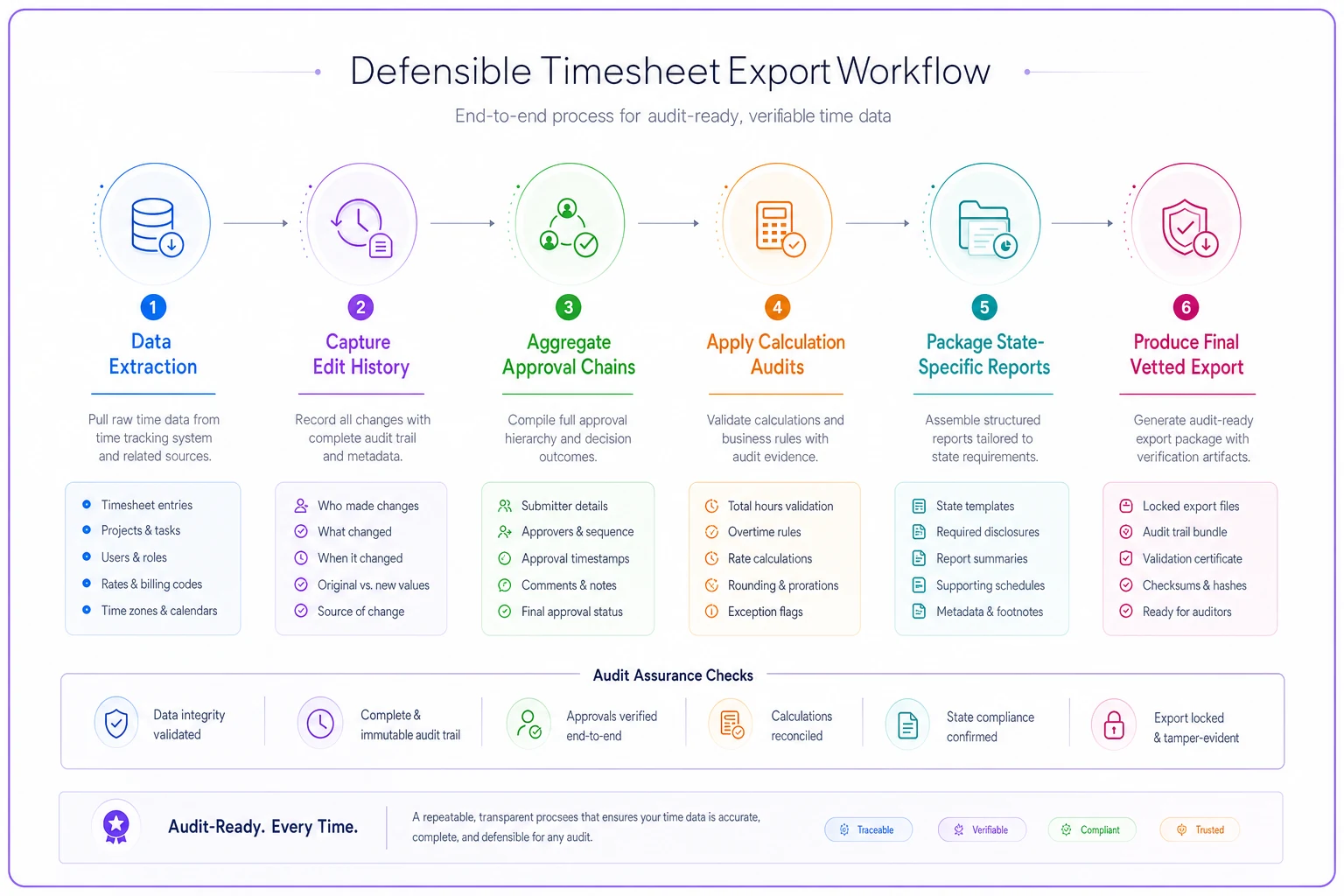
When a real audit hits, you're running a proven process instead of scrambling to create something new under pressure.
The hidden complexity of multi-state operations
Running operations across state lines transforms timesheet compliance from complicated to nearly impossible without proper systems. Each state has different rules that can conflict with each other. California requires meal breaks within the first 5 hours of a shift. New York mandates specific spread-of-hours pay. Illinois has unique overtime calculations for certain industries.
A construction company operating in six states discovered they'd been applying their home state's overtime rules everywhere. Seemed logical and kept things simple. Until a former employee filed a complaint in California, where the overtime rules are more stringent and complex. The investigation revealed three years of miscalculated overtime for their California crews. Not because they were trying to cheat anyone — they literally didn't realize the rules were different.
Your audit trail needs to track not just hours worked, but where they were worked and which specific rules applied. This means location tracking for each shift, state-specific rule applications, proper break and meal period compliance per state, correct overtime calculations based on applicable state law, and audit trails showing which rules were applied and why.
Export templates for multi-state operations get complex quickly. You need separate reports for each state, showing compliance with that specific state's requirements. A unified report showing all employees across all states won't cut it when the California Labor Commissioner wants to see only California employees with California-specific calculations applied.
Internal audit schedules that prevent external disasters
Most businesses only audit their timesheets when something goes wrong. An employee complains about their pay. Payroll numbers seem off. An external audit gets announced. By then, problems have been accumulating for months or years.
Businesses that handle external audits smoothly run internal audits regularly. Not comprehensive reviews every time — targeted checks that catch issues before they become patterns.
-
Weekly spot checks 5-10 random timesheets reviewed in detail
-
Monthly systematic reviews All employees with significant edits, all overtime over 12+ hours per week, all retroactive changes
-
Quarterly deep dives Export and review complete audit trails, test disaster recovery procedures
-
Annual compliance audits Full review mimicking an external audit, update policies and procedures
One manufacturing company implemented this schedule after barely surviving a Department of Labor audit that lasted eight months. Their weekly spot checks now catch 3-4 issues that would have been audit findings. Their quarterly deep dives have prevented two potential wage disputes by identifying and correcting calculation errors before employees even noticed them. The time investment: roughly 10 hours per month of HR time. The estimated savings: avoided approximately $180,000 in penalties and settlements over two years.
This regular review cycle creates a culture where accurate timesheet documentation becomes routine instead of an afterthought. Managers know their approvals will be reviewed. Employees know edits will be tracked and questioned. Systems know every transaction needs to be defensible.
Why standard HR software fails at audit trails
Traditional HR software was built for running payroll efficiently, not surviving legal scrutiny. They track current state — who worked when, what they got paid. They don't track the story of how that data evolved over time.
You can see that Jennifer worked 45 hours last week. But can you see that her timesheet originally showed 48 hours, was edited to 43 hours by her manager on Thursday morning, then corrected to 45 hours by HR on Friday afternoon? Can you prove Jennifer was notified of these changes? Can you show the manager's documented reason for that initial edit?
Most systems can't. They overwrite old data with new data. They might keep a simple change log, but not the complete context needed for an audit defense. When investigators ask for the full history, you get a basic report that raises more questions than it answers.
Modern operational software handles this differently. Instead of just tracking final outcomes, these platforms maintain complete audit trails automatically. Every clock in/out gets timestamped and geo-tagged. Every edit creates a new version while preserving the original. Every approval gets recorded with full context. Every calculation stores its inputs and rules used. Every export includes the complete history.
The automation handles the tedious parts: generating audit reports, flagging potential compliance issues, maintaining retention schedules, and organizing documentation. But more importantly, it ensures nothing gets lost or overwritten accidentally. Every piece of data that might matter in an audit gets preserved automatically.
A regional restaurant group made this switch after spending six months responding to a wage and hour audit with their old system. They were pulling data from three different sources, trying to match timestamps manually, and basically reconstructing their entire payroll history by hand. Their new system handles similar audit requests in hours instead of months. Every piece of data an auditor might want is already organized, timestamped, and exportable with a few clicks.
Building your audit response playbook
When audit requests arrive, panic is the enemy of compliance. Businesses that handle audits well have a documented playbook. They know exactly who does what, which documents to pull first, and how to respond without accidentally creating new problems.
Hour 1-4: Initial assessment
-
Who gets notified immediately (legal, HR, finance, operations)
-
Initial scope determination based on request
-
Preservation notice (stop deleting anything related)
-
Communication protocols (who can discuss what with whom)
Hour 4-24: Rapid response preparation
-
Pull standard export templates relevant to request
-
Run preliminary reports to assess scope
-
Identify any obvious issues that need immediate attention
-
Prepare initial document production
Day 2-3: Complete production
-
Generate comprehensive audit trails for requested period
-
Compile all supporting documentation
-
Review everything for completeness and accuracy
-
Submit with proper tracking and confirmation
Ongoing: Manage the audit process
-
Designate single point of contact for all communications
-
Track all requests and responses with timestamps
-
Maintain detailed audit log of all interactions
-
Coordinate any follow-up requests efficiently
-
Document lessons learned for next time
The playbook should include pre-written templates for common requests. When the Department of Labor wants three years of overtime records, you're not figuring out what that means — you're running Export Template DOL-3YR-OT. When a state agency requests meal break compliance data, you execute Export Template STATE-MEAL-BREAK.
Having these templates ready transforms audit response from a crisis into a manageable process. You're still taking it seriously, but you're not scrambling and making mistakes under pressure. The auditor gets complete, organized documentation instead of hastily assembled data dumps that raise red flags.
The real cost of poor audit trail hygiene
Bad audit trail practices cost way more than just penalties. Sure, there's the obvious stuff: fines, settlements, legal fees. The Department of Labor recovered $274 million in back wages in 2023 alone. State agencies collected millions more. Private lawsuits added billions in settlements.
But the hidden costs hurt more in the long run. During a messy audit, normal operations basically stop. Your HR team spends weeks pulling records instead of supporting employees. Managers waste entire days in depositions instead of actually managing. Employees lose trust when they discover records of their work can't be properly documented or explained.
A logistics company calculated their true audit costs after a particularly painful experience. The final penalty was $47,000. But they tracked 400+ hours of staff time at roughly $35,000 in lost productivity, legal fees of $78,000, delayed projects costing approximately $125,000 in missed opportunities, two key employees who left during the chaos costing $60,000 in replacement costs, and damaged reputation affecting client relationships that was hard to quantify but real.
Total documented cost: At least $345,000 for what started as a $47,000 penalty.
Good audit trail hygiene prevents these cascading costs. When records are clean, complete, and easily accessible, audits become routine administrative exercises instead of existential business threats. You provide the requested documents, answer questions confidently based on data, and move on. The auditor might even compliment your record-keeping.
Making audit trails automatic, not aspirational
The gap between knowing what good audit trails look like and actually maintaining them consistently is where most businesses fail. Every HR manager understands the importance in theory. Few have the time and tools to execute consistently in practice.
Manual audit trail maintenance doesn't scale past a certain point. When you're processing timesheets for 50+ employees, you can't personally verify every edit, document every approval, and organize every record. Things slip through the cracks. Corners get cut. "We'll clean this up later" becomes "we can't find records from six months ago."
Modern operational software changes this dynamic by making audit trail maintenance automatic instead of aspirational.
The system captures everything by default: every entry, every edit, every approval, every calculation. You don't have to remember to document changes — they're
Ready to optimize your workforce time management?
Join 2,000+ companies using GoTimio to improve timesheet accuracy, reduce payroll errors, and boost team productivity.