

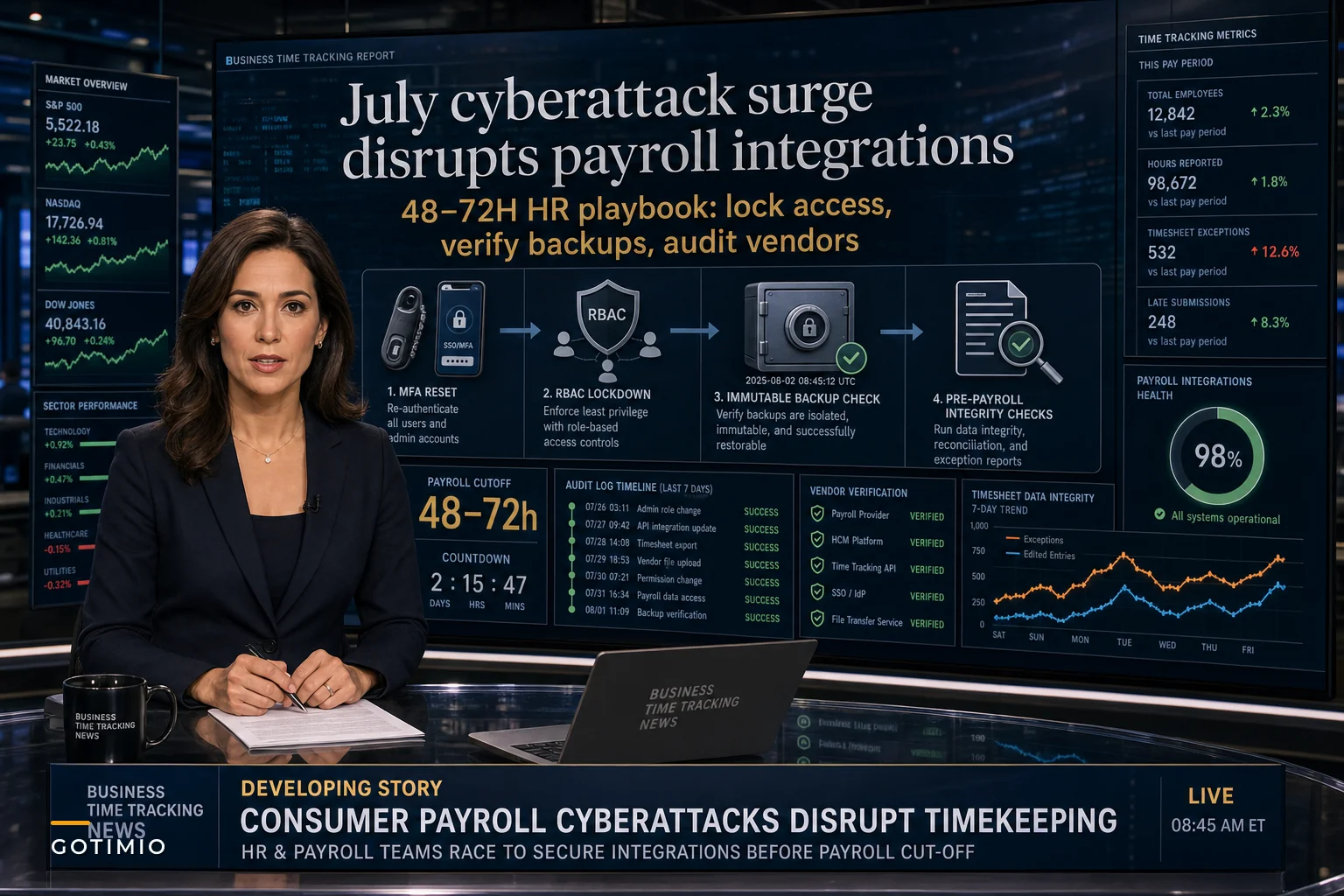

The July cyberattack wave isn't just a news story — it's actively targeting the exact systems you depend on for payroll. Reuters reported a sharp uptick in high-impact cyberattacks hitting U.S. companies this month, with ransomware groups specifically going after integrated business systems. And CISA's urgent advisory about SharePoint exploitations is particularly relevant since a lot of organizations still use SharePoint for timesheet approvals and payroll document workflows.
What makes this surge different is how targeted it is. Attackers aren't randomly spraying malware — they're mapping payroll cycles, identifying the integration points between timekeeping and payment systems, and timing attacks for maximum disruption. A compromised timekeeping system on Tuesday means scrambling to process payroll by Friday without reliable data.
It gets uglier when you dig into what actually unfolds during these attacks. Your timekeeping database holds every employee's personal information, work patterns, manager relationships, and compensation data. When ransomware locks these systems, you're not just dealing with encrypted files — you're looking at immediate payroll failures, potential wage theft claims from missed payments, and regulatory penalties for breaches involving employee PII.
The hidden attack surface in modern timekeeping architectures
Most HR teams vastly underestimate their actual attack surface. You probably think about your main timekeeping application and maybe your payroll system. But the real vulnerability map is messier than that.
Your timekeeping system talks to your payroll processor through API connections that likely haven't been audited since implementation. Those APIs authenticate using credentials stored somewhere — maybe in a config file, maybe in a database, maybe hardcoded by a vendor three years ago. Each integration point has its own session management, retry logic, and error handling.
Then there's the mobile app your field workers use to clock in. It syncs through a different API, probably uses different authentication, and stores data locally on devices you don't control. The web portal managers use for approvals runs on yet another stack with its own vulnerabilities.
The badge readers at your facilities? Likely running firmware that hasn't been updated since installation. Biometric scanners maintain their own internal databases that sync periodically. The Excel exports your finance team pulls every week? Those create data copies sitting outside your secure perimeter.
Each component has its own logs, user management, and update cycle. When attackers compromise one piece, they often gain lateral movement capabilities into the rest. That SharePoint site where supervisors upload schedule changes becomes the entry point to your entire payroll infrastructure.
When payroll disasters compound: the cascade effect
A manufacturing client got hit with ransomware on a Wednesday afternoon. By Thursday morning, they found out their automated backups had been encrypting corrupted data for six days — the ransomware had been sitting dormant, waiting.
Accurate time tracking made effortless.
GoTimio empowers your team to log, monitor, and manage work hours seamlessly.
- Real-time time tracking
- Automated timesheet approvals
- Payroll and billing integration
No credit card required
Here's what cascaded from that single infection:
The immediate payroll run failed because they couldn't pull timesheet data. They tried reconstructing hours from badge reader logs, but those systems integrated through the same compromised server. Manual paper timesheets? Nobody had used those procedures in two years, and half the supervisors didn't even know where the forms were.
They ended up processing an estimated payroll based on prior periods, which created its own mess. Employees who worked overtime didn't get paid correctly. Variable-schedule workers received wrong amounts. The union filed grievances. State labor departments started inquiries about wage violations.
The integration with their benefits provider failed, causing insurance premium calculations to error out. Their 401k contributions couldn't process. The garnishment system handling child support payments threw exceptions. Each failure created new compliance exposure and employee relations problems.
Recovery took three weeks and cost somewhere around $340,000 between emergency IT support, legal fees, compliance penalties, and damage control. That doesn't count the two employees who left for competitors during the chaos.
Your vulnerability assessment checklist for timekeeping systems
Before you can secure anything, you need to understand what you're actually protecting. Most organizations can't even list all their time-related data stores, let alone secure them properly.
Start with data mapping:
Primary data locations
-
Main timekeeping database and all replicas
-
Backup locations (including cloud storage)
-
Archive systems with historical timesheet data
-
Reporting databases and data warehouses
-
Mobile app local storage on devices
-
Temporary files created during exports
-
Email systems containing timesheet approvals
-
SharePoint or file shares with schedule documents
Integration inventory
-
Payroll processor connections (API and file-based)
-
Benefits administration links
-
Accounting system integrations
-
HR information system synchronization
-
Badge reader and biometric connections
-
Mobile app synchronization services
-
Reporting and analytics tool connections
-
Third-party staffing or contractor systems
Access point analysis
-
Web portal URLs and authentication methods
-
Mobile app endpoints and protocols
-
API endpoints (internal and external)
-
Database connection strings and methods
-
File transfer mechanisms (SFTP, shared folders)
-
Email-based approval workflows
-
Remote access paths for administrators
-
Vendor support access methods
The typical mid-size company discovers 3–4x more integration points than they initially thought existed. Each one is a potential entry vector.
Immediate hardening priorities for this week
You can't fix everything at once, but certain vulnerabilities need attention right now given what's happening. Here's the priority sequence:
Priority 1: Authentication and access control (24–48 hours)
Reset all service account passwords used for integrations. These accounts often have excessive permissions and passwords that never expire. Generate new API keys for all payroll integrations. Document who has access to these credentials and store them in a proper secrets management system — not spreadsheets or config files.
Get MFA on all administrative accounts this week. Not next month, not after the current project wraps. Focus on accounts that can modify pay rates, approve timesheets, or access bulk employee data. Include vendor support accounts — attackers specifically go after those.
Store new API keys and service account credentials in a secrets manager and document who has access.
Then revoke unnecessary access permissions. The supervisor who left six months ago but still has system access. The IT contractor whose project ended but kept admin rights. The finance analyst who got temporary access two years ago for a report. Clean it up.
Priority 2: Backup verification and isolation (48–72 hours)
Actually test your backup restoration process with real data. Not just confirming backups exist — restore timesheet data to a test environment and verify you can run payroll from it. Most organizations find their backups are incomplete, corrupted, or missing critical integration data when they actually try this.
Isolate backup systems from production networks. Modern ransomware targets backup infrastructure specifically. Your backups need different credentials, network isolation, and immutable storage. If someone with domain admin rights can delete your backups, they're not actually backups.
Create offline backup copies before critical payroll periods. Before each payroll run, create an air-gapped copy of timesheet data. Feels like overkill until you're facing encrypted systems on a Friday morning.
Priority 3: Integration security audit (Next 7 days)
Document every connection between your timekeeping and payroll systems. Include the authentication method, data flow direction, frequency, and failure behavior. You'll probably find legacy integrations nobody remembers setting up.
Review API security configurations. Check for:
-
Expired SSL certificates
-
Weak encryption protocols
-
Overly permissive API scopes
-
Missing rate limiting
-
Absent request validation
-
Poor error handling that leaks information
Set up integration monitoring so you know immediately when:
-
Authentication failures spike
-
Data volumes change dramatically
-
New IP addresses access APIs
-
Export patterns deviate from normal
-
Error rates increase
Here's a simple workflow to visualize the immediate hardening priorities.
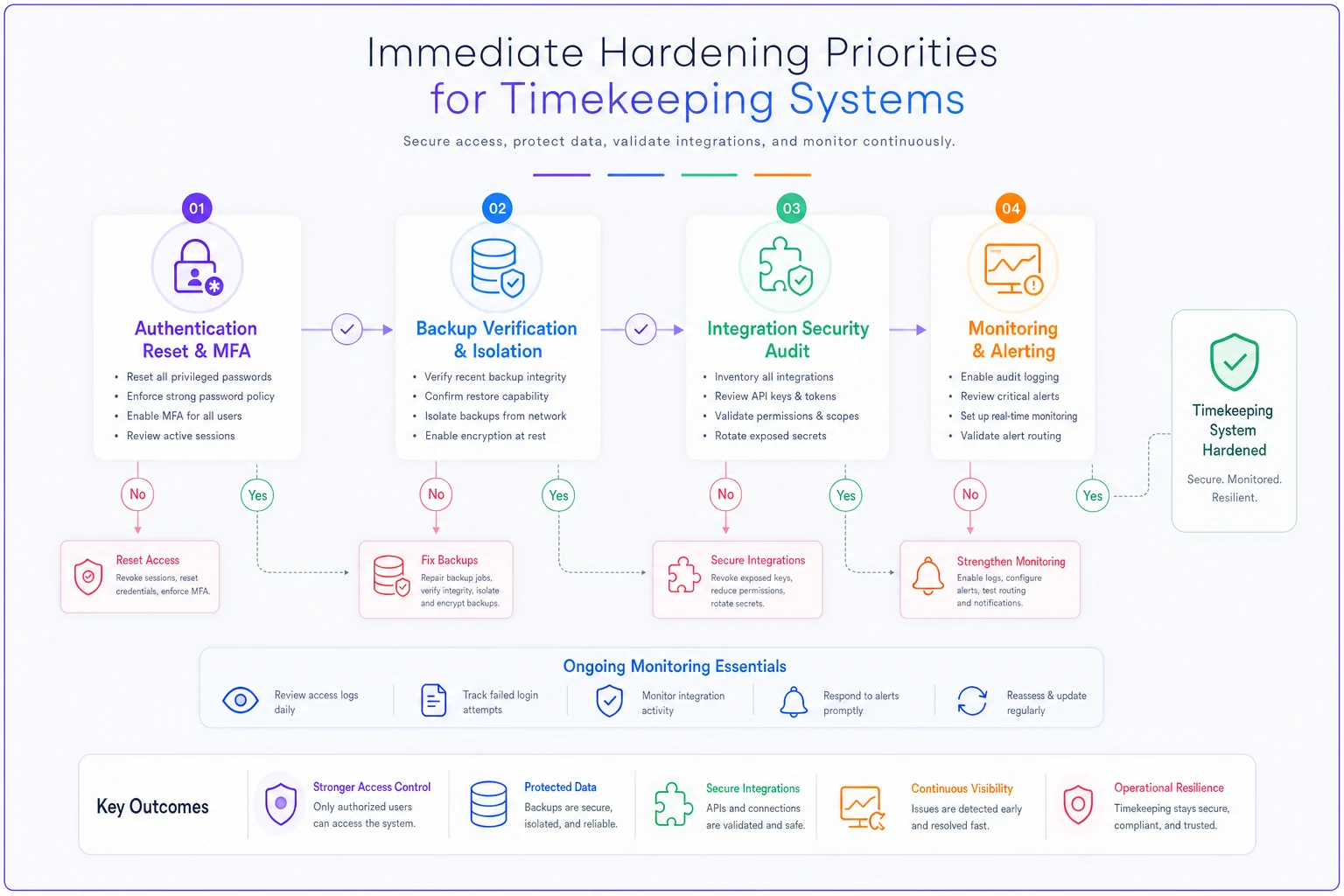
Set up integration monitoring so you know immediately when suspicious activity begins and act on failures quickly.
The secure timekeeping playbook for ongoing operations
Emergency response matters, but you need security practices that don't break your operational workflows long-term. That means building security into standard processes rather than bolting it on afterward.
Segmentation strategy for timekeeping data
Configuration data (high security, low change frequency)
-
Pay rules and calculation logic
-
Integration credentials and endpoints
-
User roles and permission sets
-
Compliance settings and audit rules
This data needs the strongest protection and minimal access. Changes should require multiple approvals and create detailed audit logs. Treat it like financial system configurations.
Transactional data (medium security, high change frequency)
-
Daily punch records
-
Timesheet entries and edits
-
Schedule assignments
-
Approval workflows
Balanced security that doesn't impede operations. Focus on anomaly detection, change tracking, and rapid recovery rather than locking everything down.
Reporting data (lower security, read-heavy)
-
Aggregated hours for analysis
-
Historical trend information
-
Exported datasets for planning
This can live in separate systems with one-way data flows from production. Breaches here shouldn't impact payroll processing.
Practical monitoring that actually catches attacks
Generic security monitoring misses timekeeping-specific attack patterns. You need detection rules built around your actual operational behavior:
-
Watch for mass data exports outside payroll cycles. Attackers often exfiltrate employee data before deploying ransomware. A query pulling all employee records on a Tuesday afternoon should trigger alerts.
-
Monitor for unusual modification patterns. Bulk updates to historical timesheets outside correction windows indicate potential fraud or compromise. Same with changes to pay rules or overtime calculations.
-
Track integration failures and retries. Attackers often probe access by triggering errors to understand system behavior. Multiple failed authentication attempts to your payroll API need immediate investigation.
-
Set up behavioral baselines per user role. Supervisors suddenly pulling reports they've never accessed, HR staff downloading data from unusual locations, administrators logging in at odd hours — these patterns matter.
Recovery procedures that actually work under pressure
Your incident response plan probably covers contacting law enforcement and preserving evidence. But does it actually explain how to run payroll if your systems are locked?
Emergency payroll processing
-
How to extract hours from alternative sources (badge logs, schedules, manager records)
-
Calculation methods for standard deductions and taxes
-
Communication templates for employees about payment delays
-
Approval chains for estimated payments
Temporary timekeeping methods
-
Paper or spreadsheet templates for time collection
-
Supervisor verification procedures
-
Data entry workflows for when systems recover
-
Retroactive adjustment processes
Integration workarounds
-
Manual file creation for payroll uploads
-
Alternative submission methods to processors
-
Backup contact lists for all vendors
-
Documented formats for each integration
Run through these quarterly. The middle of a ransomware attack is the wrong time to find out your manual processes don't account for remote workers, or that nobody knows the backup submission portal for your payroll processor.
Vendor management in the cyberattack era
Your timekeeping vendor's security posture directly affects your operations. Most vendor management programs focus on contract terms and SLAs rather than actual security outcomes.
Start asking for specific evidence:
-
Penetration test results from the last 12 months
-
Incident response procedures including notification timelines
-
Backup and recovery capabilities with actual RTO/RPO metrics
-
Employee security training completion rates
-
Details of their cyber insurance coverage
Pay attention to how vendors communicate about security. Do they proactively flag vulnerabilities? How fast do they patch critical issues? What's their track record with past incidents?
Review vendor access carefully. A lot of organizations give vendors excessive access for support purposes. Implement just-in-time access provisioning where vendors request temporary elevated permissions for specific tasks. Log everything they do during those sessions.
And consider some vendor diversity for critical functions. Using the same vendor for timekeeping, payroll, and HR creates a single point of catastrophic failure. Strategic separation limits breach impact.
Building resilient timekeeping operations
The goal isn't perfect security — it's resilient operations that can withstand and recover from attacks. That means rethinking how timekeeping and payroll processes are actually architected.
AI-powered operational software helps by building intelligent redundancy into your processes. Instead of relying entirely on system exports, these platforms continuously synchronize data across multiple secure endpoints. They maintain independent audit trails that are harder to corrupt and automate detection of anomalies that human reviewers might miss.
For example, AI automation can flag when timesheet patterns shift unexpectedly — an employee who normally works day shifts suddenly showing night hours, or overtime patterns that deviate from historical norms. These platforms learn your organization's normal operational behavior and surface deviations that could indicate compromise or fraud.
The integration layer becomes more resilient too. Instead of brittle point-to-point connections, AI-assisted platforms maintain intelligent routing that adapts when specific systems fail. If your primary payroll integration gets compromised, the system can route through backup channels while preserving data integrity and audit trails.
This isn't about replacing existing systems — it's about wrapping them in operational intelligence. Our previous deep dive into RBAC for timekeeping systems covers how proper access control architecture prevents lateral movement after initial compromise. Combined with AI-powered monitoring and automated response workflows, you get defense in depth that goes well beyond traditional security tooling.
Your 30-day security sprint plan
Week 1: Assessment and immediate hardening
-
Complete the vulnerability assessment checklist
-
Reset all integration credentials and service accounts
-
Implement MFA on critical accounts
-
Test backup restoration procedures
-
Document all system interconnections
Week 2: Monitoring and detection
-
Deploy timekeeping-specific monitoring rules
-
Set up alerting for anomalous behavior
-
Establish baseline activity patterns
-
Create incident communication templates
-
Brief key staff on response procedures
Week 3: Process hardening
-
Segment timekeeping data by criticality
-
Implement approval workflows for configuration changes
-
Create offline backups of critical data
-
Test manual fallback procedures
-
Review and update vendor access controls
Week 4: Validation and ongoing operations
-
Run a tabletop exercise for a ransomware scenario
-
Verify all monitoring and alerting works correctly
-
Document lessons learned and process gaps
-
Establish a monthly security review rhythm
-
Create an ongoing security metrics dashboard
| Week | Tasks |
|---|---|
| Week 1 | Complete the vulnerability assessment checklist; Reset all integration credentials and service accounts; Implement MFA on critical accounts; Test backup restoration procedures; Document all system interconnections |
| Week 2 | Deploy timekeeping-specific monitoring rules; Set up alerting for anomalous behavior; Establish baseline activity patterns; Create incident communication templates; Brief key staff on response procedures |
| Week 3 | Segment timekeeping data by criticality; Implement approval workflows for configuration changes; Create offline backups of critical data; Test manual fallback procedures; Review and update vendor access controls |
| Week 4 | Run a tabletop exercise for a ransomware scenario; Verify all monitoring and alerting works correctly; Document lessons learned and process gaps; Establish a monthly security review rhythm; Create an ongoing security metrics dashboard |
Create an ongoing security metrics dashboard
Security as operational excellence
The July cyberattack surge won't be the last coordinated push against payroll and timekeeping infrastructure. These systems hold too much valuable data and control too many critical business processes to stay off attackers' radar.
When security is built into operational workflows rather than treated as a separate IT concern, you create natural resistance. Secure timekeeping isn't about buying more security tools — it's about understanding your data flows, hardening integrations, and maintaining operational alternatives when primary systems fail.
The organizations that get through these attacks aren't the ones with perfect security. They're the ones who understand their vulnerabilities, have practical response procedures ready, and have designed operations that keep functioning even when specific components go down.
The steps above give you a concrete path to protect both — starting with actions you can take this week and building toward practices that become part of how you operate.
Your employees depend on accurate, timely payroll. Your organization depends on maintaining that trust even when systems are under attack. The steps above give you a concrete path to protect both — starting with actions you can take this week and building toward practices that become part of how you operate.
The question isn't whether your timekeeping and payroll systems will be targeted. It's whether you'll be ready when they are.
Ready to optimize your workforce time management?
Join 2,000+ companies using GoTimio to improve timesheet accuracy, reduce payroll errors, and boost team productivity.