

Most timekeeping systems ship with three default roles: admin, manager, employee. That works fine until someone edits 47 timesheets the night before payroll runs, nobody knows who approved what, and your auditor starts asking uncomfortable questions about segregation of duties.
The real problem isn't a lack of roles — it's that HR teams configure timekeeping access control RBAC without mapping it to actual payroll operations. They assign permissions based on org charts instead of workflows. Then they wonder why supervisors can approve their own overtime, or why terminated employees still punch in through SSO weeks after leaving.
The permission sprawl that breaks every growing business
Around 50-60 employees, things start getting messy. The HR manager gives supervisors edit access so they can fix missed punches — makes sense, right? Except now those supervisors can modify anyone's hours, including their own. The finance team needs read access for labor cost reports, so they get admin rights because it's easier than building a custom role. IT helpdesk needs to reset clock PINs, so they end up with full system access too.
Six months later, you've got 18 people with admin rights, no real audit trail, and your timekeeping access control RBAC looks like someone threw permissions at a wall. The payroll processor spends Tuesday mornings playing detective, trying to figure out why someone's hours jumped from 38 to 58 between Friday afternoon and Monday morning.
The scarier part? Most businesses don't even know this is happening. They assume their timekeeping system logs everything. It usually doesn't — or it logs actions but not the actual data changes, or it keeps logs for 30 days when your state requires three years.
Why role matrices fail when mapped to reporting structures
Traditional RBAC guides tell you to start with job titles. That's backwards. Job titles don't process payroll — workflows do.
Accurate time tracking made effortless.
GoTimio empowers your team to log, monitor, and manage work hours seamlessly.
- Real-time time tracking
- Automated timesheet approvals
- Payroll and billing integration
No credit card required
A retail store manager might need three completely different permission sets: schedule creation covering future dates for all employees, timesheet approval limited to direct reports and past dates only, and schedule viewing for the current week across all departments. Most systems force you to pick one role. So you either over-provision or create chaos. Neither supports proper timekeeping access control RBAC.
The separation problem gets worse with cross-functional processes. Who approves overtime when the supervisor is out? Can the assistant manager edit timesheets or just approve them? What happens when someone covers a different department for two weeks?
These aren't edge cases — they're daily operations. Yet most RBAC configurations act like they don't exist.
Building a role matrix that maps to actual payroll operations
Start with payroll workflows, not org charts. Map every step from clock-in to paycheck before touching any configuration settings.
> Payroll workflow → role mapping process
>
> Identify workflow stages → Assign primary actor per stage → Define minimum permissions needed → Add backup actor + restrictions → Document escalation paths → Configure roles in system
| Workflow Stage | Primary Actor | Required Permissions | Backup Actor | Restrictions |
|---|---|---|---|---|
| Time capture | Employee | Create own entries | — | Current day only |
| Daily review | Team lead | View team entries | Supervisor | Read-only |
| Correction request | Employee | Flag entries | Team lead | Cannot edit directly |
| Correction approval | Supervisor | Edit team entries | Manager | Cannot edit own |
| Weekly approval | Manager | Approve team timesheets | Director | Cannot approve own |
| Payroll processing | Payroll admin | Export approved data | HR manager | Cannot edit after export |
| Exception handling | HR specialist | Override locks | — | Requires second approval |
Each stage has a primary actor, specific permissions, and built-in restrictions. The supervisor can edit their team's entries but not their own. The payroll admin can export data but can't change it. Every override requires a second approval.
Here's a simple visual of the workflow-to-role mapping process.
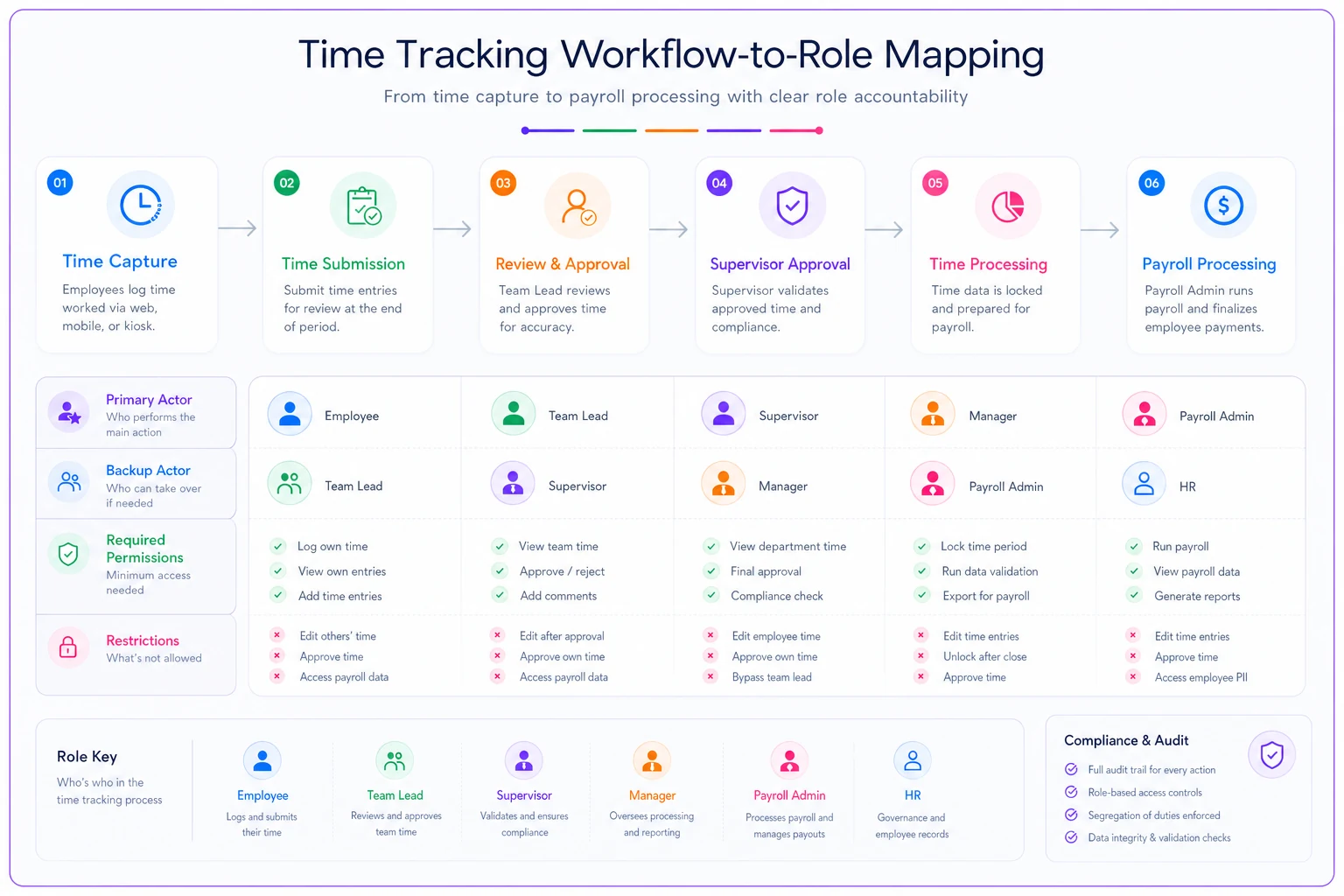
This matrix becomes your configuration blueprint. Instead of assigning broad roles, you're creating targeted permission sets that match actual work. It takes longer to set up — but it's the difference between a system people trust and one they work around.
SSO integration that doesn't become a backdoor
Single sign-on makes life easier until it doesn't. The marketing coordinator who got manager access "just to view schedules" still has it six months later. The contractor whose AD account wasn't properly terminated can still clock in through the mobile app.
A working SSO configuration that actually holds up starts with provisioning rules, not individual user assignments.
AD/LDAP groups should map to timekeeping roles — not individual users. Group membership should auto-expire after 90 days to force periodic reviews. Contractor accounts need tagged end dates from day one. Service accounts should never have access to time entry screens.
AD/LDAP groups should map to timekeeping roles — not individual users.
SSO timeout: 8 hours (matches shift length) Mobile app timeout: 15 minutes idle Kiosk mode: 30 seconds after punch Admin console: 30 minutes idle
-
Payroll exports
-
Bulk edits
-
Permission changes
-
Historical corrections beyond 7 days
The piece most businesses skip is deprovisioning. When someone changes roles or leaves, their timekeeping access should update immediately — not during the next quarterly review.
MFA requirements that don't slow down operations
MFA creates an interesting tension for timekeeping. You want security, but you can't have warehouse workers fumbling with authenticator apps every time they clock in.
Context-aware MFA handles this reasonably well. Always require MFA for first login from a new device, access from outside the corporate network, any administrative function, viewing or editing historical data older than 30 days, exporting data, and changing system configuration.
Skip MFA for kiosk punches from registered devices, view-only access to the current schedule, submitting time-off requests, and viewing your own current-period timesheet.
The warehouse worker clocks in quickly at the kiosk. Anyone trying to edit last month's timesheets hits additional verification. That's the balance worth building toward — friction where risk is highest, not applied uniformly across everything.
Change approval workflows that create real accountability
Most timekeeping systems treat all edits the same. Fixing a missed punch looks identical to changing 40 hours to 50 hours in the audit log. This is where proper timekeeping access control RBAC earns its value.
Build escalating approval requirements based on actual risk:
Level 1 — Auto-approved:
-
Clock in/out within grace period
-
Scheduled PTO usage
-
Corrections within same day
-
Changes under 15 minutes
Level 2 — Supervisor approval:
-
Missed punch additions
-
Next-day corrections
-
Schedule swaps
-
Changes between 15–60 minutes
Level 3 — Manager + HR approval:
-
Historical edits older than 7 days
-
Overtime authorization
-
Changes over 60 minutes
-
Pattern corrections across multiple days
Level 4 — Executive approval:
-
Post-payroll adjustments
-
Bulk corrections
-
Policy overrides
-
System configuration changes
Each level requires different documentation. A missed punch needs a reason code. Historical edits need written justification. Post-payroll adjustments need both an explanation and an impact assessment.
This structure makes abuse harder and investigations faster. When something looks wrong, you can trace exactly what was approved, by whom, and why.
Audit retention rules that satisfy both compliance and investigations
The typical business keeps audit logs for 30 days because that's the system default. Then something happens — a fraud investigation, a wage claim, a DOL audit — and they realize they needed three years of data.
Core audit data (7 years):
-
Final approved timesheets
-
Payroll export files
-
Approval chains
-
Permission changes
Operational logs (3 years):
-
All time entries (original and edited)
-
Edit history with before/after values
-
Login attempts (successful and failed)
-
Configuration changes
Temporary logs (90 days):
-
View-only access logs
-
Session details
-
API calls
-
System performance metrics
Structure your audit trail so it works for both compliance reviews and internal investigations. Each entry needs a timestamp with timezone, user ID for both actor and subject, action type, before and after values, justification or reason code, approval chain if required, and IP address or device ID.
That last point matters more than people expect. An audit log that shows what changed but not why it was approved is nearly useless during an investigation.
Integration patterns that maintain security across systems
Your timekeeping system connects to payroll, HR, scheduling, maybe project management. Each integration point is a potential security gap if you don't handle permissions intentionally.
Common mistakes include using admin credentials for API connections, giving integration accounts write access when read-only would work, not rotating API keys, and sharing service accounts across multiple integrations. Any one of these creates exposure that's hard to detect until something goes wrong.
A better approach: create purpose-specific service accounts with minimal permissions. The payroll integration gets read-only access to approved timesheets, nothing else. The scheduling system can read employee availability but can't touch historical time entries. Each integration gets its own credentials, its own audit trail, its own rate limits.
Monitor these integrations separately from human users. A service account downloading thousands of timesheets at 3 AM on a Saturday should trigger an alert. An integration attempting to modify data it normally only reads needs investigation — that behavior pattern doesn't show up by accident.
The automation opportunity most businesses miss
Implementing proper timekeeping access control RBAC has an unexpected side effect — it surfaces how much manual coordination is already happening behind the scenes. HR spends hours managing permission changes. IT handles password resets. Managers chase approvals. Payroll untangles edit histories before every run.
AI-powered operational software can handle a lot of this without the manual overhead. Instead of manually updating permissions when someone changes roles, the system reads from your HR database and adjusts access automatically. Approval workflows route requests based on your defined rules rather than relying on someone to remember who to email.
Pattern detection helps here too. An automated monitoring layer can flag when someone's access behavior suddenly shifts — a warehouse worker pulling executive reports, or an unusual spike in edit activity right before payroll closes. These are easy signals to miss when you're managing it manually across dozens or hundreds of employees.
The broader value comes from connecting timekeeping RBAC to your other operational systems. When someone gets promoted, permissions update automatically. When a compliance requirement changes, you adjust audit retention across integrated platforms from one place. When an investigation request comes in, you pull a comprehensive audit package in minutes rather than spending days hunting across disconnected systems.
Making this work in your actual business
The blueprint above looks clean on paper. Rolling it out in a real operation requires sequencing it carefully.
Start by documenting your current state — who has what access right now, what approval workflows actually happen versus what's supposed to happen, and where your audit gaps are. This baseline tells you how far you need to go before configuring anything new.
Then design your target state using the workflow-based approach above. Don't try to fix everything at once. Pick the highest-risk area — usually historical edit permissions or admin access sprawl — and start there.
-
Implement SSO/MFA for administrative functions
-
Create workflow-based roles for one department
-
Add approval workflows for high-risk changes
-
Expand successful patterns to other departments
-
Implement full audit logging
-
Add automated monitoring and alerts
Each phase should take roughly 2–4 weeks depending on your size. Test with actual workflows, not just clean scenarios. The supervisor covering three departments will find edge cases your plan missed — better to surface those during rollout than after go-live.
When segregation of duties actually matters
Not every business needs military-grade separation of duties. A 15-person marketing agency probably doesn't need four approval levels for timesheet edits. But past certain thresholds, proper timekeeping access control RBAC stops being optional.
That includes processing payroll for 50+ employees, operating across multiple locations or departments, holding government contracts with certified payroll requirements, having a history of timesheet discrepancies, preparing for a SOC 2 or similar audit, or approaching acquisition due diligence.
The cost of implementing proper controls seems high until you face your first wage claim or failed audit. Then a few weeks of RBAC setup looks like a bargain compared to legal fees, penalties, and whatever reputational damage follows.
Build the system that protects what matters without paralyzing operations. The best security framework is the one people actually follow — not the one that looks perfect in documentation while everyone quietly works around it.
Ready to optimize your workforce time management?
Join 2,000+ companies using GoTimio to improve timesheet accuracy, reduce payroll errors, and boost team productivity.