

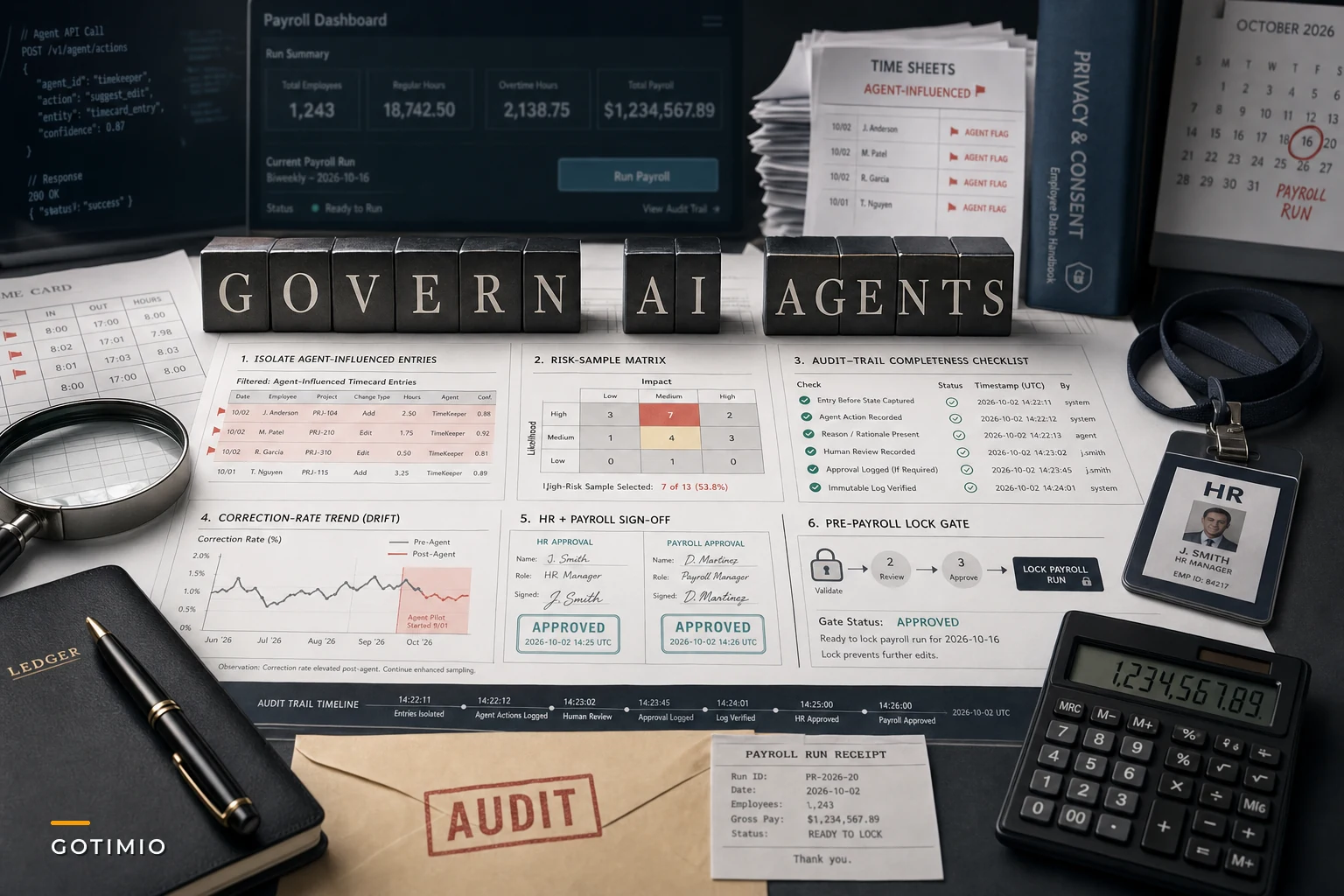

OpenAI's DevDay on September 29, 2026 put a spotlight on something HR and payroll teams can't ignore anymore. The company rolled out always-on "Dots" autonomous agents and expanded its enterprise tiers, as CNBC's live coverage detailed throughout the day. Almost simultaneously, Reuters reported that OpenAI pulled a planned frontier model release after internal safety tests raised concerns.
Same news cycle, two contradictory signals: we're shipping agents that run continuously and we're pumping the brakes on a model we weren't confident about. That tension is the whole story for anyone who owns payroll accuracy. Vendors are about to start wiring agent features into scheduling, time capture, approvals, and payroll prep — fast — while the people building the underlying models are openly cautious. If the model-makers are pausing, your governance posture around AI agents timekeeping governance needs to be at least as disciplined.
This isn't a piece about banning AI. Agents can genuinely cut down the grind of exception handling and punch corrections. The question is narrower: what are you actually going to let an agent do to a timecard before it hits payroll, and how do you prove — later, to an auditor or an employee — that it did the right thing?
Start with the thing most teams skip: what "agent access" really means
When a vendor says their new agent "helps with timekeeping," that phrase hides at least four very different levels of access. Most procurement conversations collapse them into one, which is where trouble starts. The distinction that matters operationally:
| Agent capability level | What it actually does | Payroll risk |
|---|---|---|
| Read-only / advisory | Surfaces anomalies, suggests edits a human approves | Low — no data changes without a person |
| Draft-and-queue | Prepares corrections, writes them to a pending queue | Moderate — depends entirely on who clears the queue |
| Conditional auto-apply | Applies edits automatically within defined rules | High — errors propagate before anyone sees them |
| Autonomous / always-on | Monitors and acts continuously without a trigger | Very high — this is the "Dots" category |
The mistake that comes up repeatedly is a team approving an agent as if it's read-only, then discovering six weeks later that someone enabled auto-apply during setup because it "saved a step." The access level isn't a checkbox — it's a policy decision that should require sign-off from both HR and payroll, not just whoever ran the integration.
A useful rule of thumb: any agent capability above draft-and-queue should be treated like a privileged service account, because functionally that's exactly what it is.
The underlying problem isn't the AI — it's the audit gap it creates
Timekeeping already has a mature correction model. Someone misses a punch, a supervisor edits it, the system records who changed what and when, and payroll reconciles against that trail. That audit trail is what makes a timecard defensible.
Accurate time tracking made effortless.
GoTimio empowers your team to log, monitor, and manage work hours seamlessly.
- Real-time time tracking
- Automated timesheet approvals
- Payroll and billing integration
No credit card required
Agents quietly break that model in a specific way. When a human makes an edit, the "why" lives in a comment field and a person's memory. When an agent makes an edit, the "why" is a model inference — and if you don't capture the inputs, the logic version, and the confidence level at the moment of the edit, you can't reconstruct it later. You just have a change with no story behind it.
In practice, this surfaces during disputes. An employee challenges two weeks of hours. You pull the audit log and it says "adjusted by Scheduling Assistant." That's not an answer. That's a liability. The supervisor who "approved" it clicked through forty queued items in one sitting and can't tell you anything specific about that entry.
The fix isn't complicated. Every agent-influenced change needs to log:
-
The raw time events the agent looked at
-
The rule or model version that produced the recommendation
-
A confidence or certainty indicator, if the vendor exposes one
-
The human who reviewed it — and whether they actually opened the detail or bulk-approved
-
A timestamp distinct from the original punch
If your vendor can't produce those fields, the agent isn't ready for payroll-adjacent work.
Where agents actually earn their keep (and where they don't)
Not every part of the time-to-payroll flow benefits equally. Some stages are low-risk and high-tedium — good fits for agent assistance. Others are exactly where you want friction.
Good fits:
-
Flagging missed punches and pairing them with likely correct times for human review
-
Spotting badge-vs-location mismatches and bundling the evidence for a reviewer
-
Catching overtime thresholds before they're crossed so a manager can decide
-
Surfacing timecards that won't reconcile cleanly against the schedule
Bad fits:
-
Auto-approving retroactive rate changes
-
Silently resolving split-shift ambiguities that affect premium pay
-
Applying meal-break penalties or waivers without a person confirming the facts
-
Anything touching a protected leave category
The pattern is pretty clear once you see it: agents are good at finding and preparing. They're risky at deciding anything with legal or pay consequences. Teams that get this right use agents to compress detection work — so the human spends time judging thirty real exceptions instead of hunting for them across three thousand clean entries.
When always-on agents are a bad idea
The "Dots"-style continuous agents were what DevDay pushed hardest, so it's worth being direct about where they don't belong.
An always-on agent monitoring your time data makes sense when you have genuinely high event volume, a stable ruleset that rarely changes, and mature downstream QA. A distribution center running three shifts with thousands of daily punches and a tight payroll cutoff might reasonably want continuous anomaly detection.
It's a bad idea when any of these apply:
-
Pay rules change frequently — you'll constantly be chasing the agent's behavior
-
You operate across multiple jurisdictions with different rounding and break rules
-
Your audit logging can't capture agent reasoning yet
-
You don't have a pre-payroll QA gate that can catch agent errors before they're paid
For small teams with low exception volume, it's a flat no. If your payroll run has maybe a dozen exceptions a cycle, a continuous autonomous agent is solving a problem you don't have while adding surveillance and audit risk you didn't need.
Build the QA gate before you turn anything on
The most effective control is boring: a pre-payroll checkpoint that specifically inspects agent-influenced changes before the run locks. Not a review of everything — a targeted review of what the agent touched.
[Pre-Payroll Agent QA Gate] Isolate Agent-Influenced Entries ↓ Sample by Risk (100% premium/OT/leave; partial for routine) ↓ Verify Audit Trail Completeness ↓ Check for Correction Rate Drift vs. Prior Cycles ↓ HR + Payroll Sign-Off → Lock Payroll Run
A workable sequence for a biweekly cycle:
-
Isolate agent-influenced entries. Tag every timecard the agent modified or recommended-and-had-approved so they're queryable as a group.
-
Sample by risk, not randomly. Pull 100% of anything affecting premium pay, overtime, or leave; sample a slice of the routine corrections.
-
Verify the trail is complete. Confirm each entry has its inputs, logic version, and a real human reviewer on record.
-
Check for drift. Compare the agent's correction rate this cycle against prior cycles. A sudden spike usually means a rule changed upstream or the model updated.
-
Sign off and lock. Payroll and HR both acknowledge the agent-touched set before cutoff.
The drift check in step four is the one people consistently forget. Vendors update models quietly. A silent update can shift behavior overnight, and the first signal you get is either a weird payroll variance or an employee complaint. Watching the correction rate turns that into something you catch before payday.
The drift check in step four is the one people consistently forget.
Here's a simple workflow to visualize the QA gate.
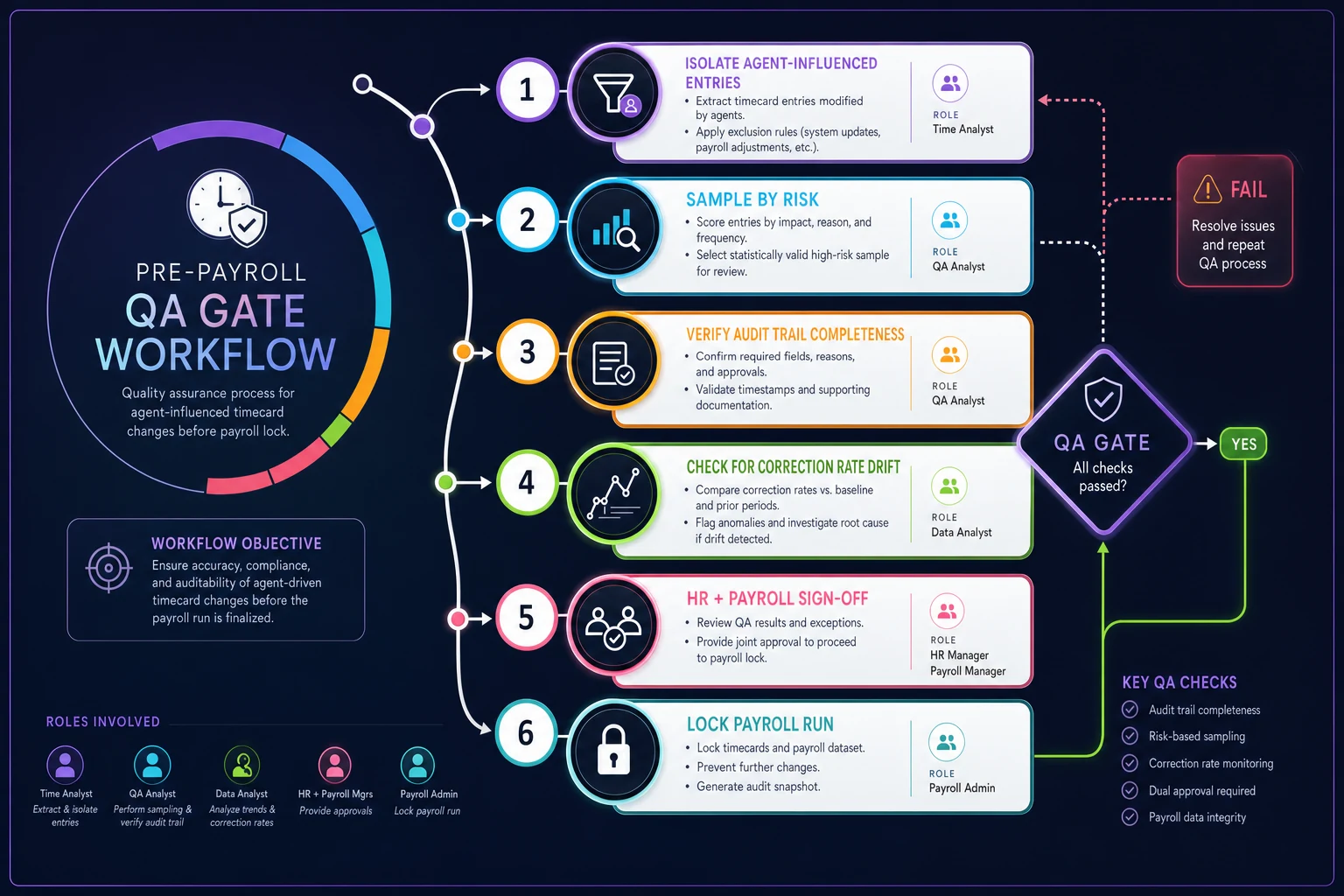
The drift check is the one people consistently forget; keep the gate targeted and focused on entries the agent touched.
A short real scenario
A regional facilities company — roughly 240 hourly field staff across a handful of states — enabled a vendor's agent to auto-resolve missed punches. The setup defaulted to conditional auto-apply, and nobody flagged it during onboarding.
For about five weeks it ran quietly. Then a cluster of workers noticed their early-morning start times were being nudged to the scheduled shift start instead of their actual (earlier) punches. The agent had been "cleaning up" what it read as stray early punches. Across the group, that shaved somewhere around 15–20 minutes a few times a week per person — small per entry, but it added up to a real back-pay exposure once legal got involved, plus weeks of reconstruction work on entries that had no proper reasoning logs.
What fixed it wasn't dropping the agent. They moved it to draft-and-queue, added the audit fields, and put a pre-payroll gate on anything the agent touched that affected start times. Same tool, same tedium reduction — just with a human owning the decisions that cost money. Correction disputes dropped off within two cycles, and the audit trail actually held up the next time an entry was challenged.
Consent and disclosure: the part that'll bite you later
Agents don't just edit time — they read employee behavior to do it. Location patterns, punch rhythms, break timing. That's exactly the kind of personal data that triggers disclosure and consent obligations in a lot of jurisdictions, and "an AI does it now" is not a defense that holds up.
Before an agent touches employee time data, your consent language and privacy notices need to reflect that automated processing is happening, what data it uses, and how an employee can contest an automated decision. If you've already built out an employee time-data governance framework for privacy and consent, slotting agent processing into it is mostly an update. If you haven't, do that first — before the agent, not after.
The practical tell that you're behind: if you can't answer "what does the employee get told, and how do they object?" in one sentence, you're not ready to enable automated edits on their hours.
A quick governance checklist before you sign anything
If you can't check most of these, the right move post-DevDay isn't to adopt faster — it's to run a limited pilot on read-only mode and earn your way up.
-
- [ ] Access level is explicitly set (read-only / draft-queue / auto-apply) and signed off by HR and payroll
-
- [ ] Every agent action logs inputs, logic version, confidence, and reviewer identity
-
- [ ] RBAC, SSO, and MFA cover the agent's service account like any privileged account
-
- [ ] Vendor SLA specifies notification before model updates that change behavior
-
- [ ] Pre-payroll QA gate isolates and reviews agent-touched entries
-
- [ ] Drift monitoring compares correction rates cycle over cycle
-
- [ ] Consent and disclosure language updated for automated processing
-
- [ ] A documented rollback plan exists if the agent misbehaves mid-cycle
-
- [ ] Clear line of what the agent may never decide without a human
If you can't check most of these, the right move post-DevDay isn't to adopt faster — it's to run a limited pilot on read-only mode and earn your way up.
The takeaway
The useful signal from DevDay wasn't the agents themselves — it was the pairing. New autonomous capabilities shipped the same week a frontier model got pulled over safety concerns. The people closest to this technology are moving carefully, and that's worth paying attention to.
Agents can take real friction out of exception handling, and for high-volume operations that's genuinely worth having. But payroll accuracy and employee trust both depend on one thing: the ability to explain, later, exactly why a number is what it is. Keep humans on the decisions that cost money or touch protected categories, make every agent action reconstructable, and gate anything agent-influenced before it hits a payroll run. Do that, and you get the efficiency without quietly trading away the defensibility that makes your time data worth anything in the first place.
Ready to optimize your workforce time management?
Join 2,000+ companies using GoTimio to improve timesheet accuracy, reduce payroll errors, and boost team productivity.