

Most companies treat employee time data as boring plumbing. Punches in, hours out, payroll runs, everyone moves on. Then a works council asks why the system logs GPS coordinates every ninety seconds, or an employee files a subject-access request and someone discovers eleven years of location history sitting in a warehouse nobody remembers provisioning. Suddenly the "boring plumbing" is a legal exposure with a board-level owner.
The uncomfortable truth is that timekeeping is one of the most privacy-sensitive datasets a business holds. It reveals where people are, when they work, how long they take for breaks, their health-related absences, their religious observance patterns, and — if you correlate badge and device data — who they spend time near. That's not payroll admin. That's behavioural surveillance data, and it needs to be governed like it.
This is a systems piece, not a compliance lecture. The goal is to give a board or exec team a working model for employee time data governance — one where privacy controls are wired into the operational artefacts you already run (timesheets, connectors, retention jobs, audit logs), not bolted on as a policy PDF nobody reads.
Why time data quietly becomes a governance problem
Nobody sets out to build a surveillance dataset. It accumulates.
A company starts with simple clock-in/clock-out. Then someone adds mobile capture, which brings GPS "for accuracy." Then a manager wants idle-time detection, so the system starts sampling activity. Finance wants project allocation, so now every minute is tagged to a client. Security wants badge logs correlated with timesheets to catch buddy-punching. Each decision is individually reasonable. Stacked together, you've built something that knows more about your employees' daily lives than most people are comfortable admitting.
The pattern that shows up repeatedly: privacy scope creeps through feature adoption, not through any deliberate policy change. Nobody ever approved "track employee location continuously." They approved "turn on mobile timesheets," and location tracking came bundled in the default config.
At small scale this stays invisible because the data volume is manageable and nobody's looking. At scale — more employees, more jurisdictions, more integrations — three things tend to break at once:
-
Legal basis fragments. What was lawful for 20 employees in one state becomes a patchwork of consent requirements, works-council agreements, and jurisdiction-specific rules once you cross borders or headcounts.
-
Data spreads. Time data gets copied into BI tools, forecasting models, spreadsheets on laptops, and vendor systems. Each copy is a new exposure with no governance attached.
-
Nobody owns deletion. Retention was never configured, so everything is kept forever "just in case," which is precisely the posture regulators penalise hardest.
At scale — more employees, more jurisdictions, more integrations — three things tend to break at once.
The privacy-by-design checklist for time systems
Privacy-by-design sounds abstract until you tie each principle to a concrete artefact. Here's the checklist worth handing a board reviewing their timekeeping stack. Every item maps to something you can actually inspect.
Accurate time tracking made effortless.
GoTimio empowers your team to log, monitor, and manage work hours seamlessly.
- Real-time time tracking
- Automated timesheet approvals
- Payroll and billing integration
No credit card required
-
- [ ] Purpose is written down per field. Every captured field (badge time, GPS, IP, device ID, activity sample) has a documented business purpose. If a field has no stated purpose, it gets removed — not archived.
-
- [ ] Location capture is event-based, not continuous. GPS is captured at punch events only, never as a background track. Continuous location is one of the fastest ways to convert a timekeeping system into an unlawful monitoring system.
-
- [ ] Consent is separated from employment. Where consent is the basis, it's genuinely optional and refusable without penalty. Consent bundled into an employment contract is usually not valid consent under stricter regimes.
-
- [ ] Access follows need, not title. A payroll clerk needs hours, not location breadcrumbs. Role definitions restrict field-level visibility, not just record-level.
-
- [ ] Retention is configured, not aspirational. There's an actual scheduled job that deletes or anonymises time data past its retention window, and someone can show you it ran.
-
- [ ] Every export is logged. When time data leaves the system — to BI, to a vendor, to a CSV — that movement is recorded and attributable to a person.
-
- [ ] DSAR/erasure is a one-click operation. You can locate, export, and delete one employee's full time-data footprint within a defined SLA, including copies in downstream systems.
-
- [ ] Vendors are contractually bound to the same rules. Any processor touching time data inherits your minimisation and deletion obligations in writing.
If a board can't check off at least six of these confidently, the system isn't governed — it's just running.
Data minimisation rules that actually hold up
Minimisation is where good intentions die, because "we might need it later" always wins the argument in the moment. The fix is making minimisation a rule set, not a judgment call.
| Data element | Necessary? | Less-invasive alternative | Default retention |
|---|---|---|---|
| Clock in/out timestamps | Yes — payroll basis | None | Payroll-legal window (often ~4–7 yrs) |
| GPS at punch | Sometimes — only for mobile/field roles | Geofence pass/fail flag instead of raw coordinates | 90 days, then flag only |
| Continuous location track | Almost never | Event-based capture | Do not capture |
| Activity/idle sampling | Rarely justified | Output-based metrics | Avoid; if used, aggregate only |
| Break-time detail | Yes for compliance | Duration only, not reason | Payroll window |
| Device ID / IP | For security only | Hashed identifier | Short (30–90 days) |
| Absence reason (medical) | Only as needed | Store category, not diagnosis | Strict, minimal |
The thing most teams miss: you can usually replace raw sensitive data with a derived flag.
The thing most teams miss: you can usually replace raw sensitive data with a derived flag. You don't need the exact GPS coordinate — you need to know whether the punch happened inside the approved geofence. Store the yes/no, discard the coordinate. That single substitution eliminates most location-privacy risk while keeping the operational value intact. When field teams work offline and sync later, this gets more important, not less — raw location payloads pile up in local caches during sync gaps. The reconciliation patterns in our offline-first capture playbook matter as much for privacy as they do for accuracy.
Consent templates that don't collapse under scrutiny
Bad consent is worse than no documented consent, because it creates a false sense of coverage. The most common failure is consent that's actually a demand — "by using this app you agree to location tracking" with no real ability to decline.
A defensible consent notice for time data has a specific shape. Here's a template structure worth adapting:
> What we collect: Clock in/out times, and — for field roles only — a location check at the moment you punch (a pass/fail against your assigned site, not a continuous track). > > Why: To calculate pay accurately and confirm work occurred at the correct location. > > What we do NOT do: We do not track your location between punches, monitor your device activity, or use this data to evaluate performance. > > Your choices: You may request access to your data, correction, or deletion at any time via [channel]. [Where consent applies:] You may decline location capture and use an alternative punch method without any impact on your role. > > Retention: Location flags are kept for 90 days; time records for [X] years as required by law.
Three principles make consent hold:
-
Specificity. Vague "we collect data to improve services" language is useless. Name the fields.
-
A real opt-out path. If declining consent has no consequence and an alternative exists, the consent is genuine.
-
A forbidden-use statement. Telling employees what you won't do with the data is often more trust-building than what you will — and it becomes a control you're held to.
Three principles make consent hold:
Forbidden-use examples: drawing the bright lines
Governance frameworks fail when they only describe permitted uses. People are creative, and "not explicitly forbidden" gets interpreted as "allowed." A board-level policy needs explicit forbidden-use examples that require exec sign-off to override.
-
- Using punch-location data for anything except pay or site verification. No feeding it into performance reviews, no "who's usually late" heat maps, no correlating with productivity scores.
-
- Continuous or off-hours location tracking. If the app can see location when someone isn't clocked in, that's a defect, not a feature.
-
- Inferring protected characteristics. Using absence or break patterns to guess at pregnancy, disability, religion, or union activity. This happens accidentally through "helpful" analytics far more than through malice.
-
- Correlating time data across employees to map social relationships. Badge co-location analysis to see who spends time together is a hard line.
-
- Sharing raw time data with managers who only need summaries. Line managers rarely need field-level detail; they need aggregates.
-
- Retaining data past its purpose for "possible future analytics." The classic justification that turns a lawful dataset into a liability.
The pattern behind almost every one of these: sensitive inference emerges from combining otherwise-mundane fields. Time data is dangerous mostly in aggregate. A governance framework that only reviews fields individually will miss the risks that live in the joins.
Tying privacy risk to KPIs and operational artefacts
This is what separates a real governance framework from a policy binder. Privacy commitments have to be measurable against things the operation actually produces, or they decay the moment attention moves elsewhere.
| KPI | What it measures | Tied to which artefact | Warning threshold |
|---|---|---|---|
| Retention compliance rate | % of records past their window that have been deleted/anonymised | Retention job logs | < 98% |
| Excess-field ratio | Fields captured without a documented purpose | Data dictionary | > 0 |
| Raw-location dwell | Avg days raw GPS held before flag-conversion | Storage/ETL logs | > 90 days |
| DSAR fulfilment time | Time to satisfy an access/erasure request | Ticket system | > agreed SLA |
| Unlogged export count | Data movements without an audit entry | Export/audit logs | > 0 |
| Consent-refusal penalty flags | Cases where declining consent affected an employee | HR case records | > 0 |
| Downstream-copy count | Known copies of time data outside the system of record | Data-flow inventory | Trending up |
The key move is anchoring each KPI to an artefact you already generate — audit logs, retention job output, DSAR tickets. Privacy metrics that require a separate manual survey never survive the second quarter. Metrics pulled automatically from operational logs keep working whether or not anyone's paying close attention.
Two of these deserve special attention. Retention compliance only means something if you've defined the lifecycle properly first — the recovery objectives and disposal rules in a time-data lifecycle blueprint are the foundation the retention KPI sits on. And the unlogged export metric depends entirely on your logging discipline; if audit records are patchy or overwritten, the metric lies to you. Getting audit-trail hygiene right — proper retention schedules and defensible export templates — is what makes the whole privacy dashboard trustworthy rather than decorative.
A real scenario: services firm cleaning up location scope
A mid-sized field-services company — roughly 140 technicians across three regions — rolled out mobile timesheets and, without much deliberation, enabled continuous background location "to verify job sites." Eighteen months later, a technician's complaint escalated, and a legal review found the app had been logging location roughly every two minutes, around the clock, for anyone who left the app running. Retained indefinitely. That was several hundred thousand location points per employee sitting in a warehouse with no defined purpose and no retention schedule.
The remediation wasn't technically dramatic, but it reset the whole risk posture:
-
Background tracking was switched off; location capture was reduced to a geofence pass/fail at punch events only.
-
Historical raw coordinates were purged after a 90-day legal-hold check, keeping only anonymised site-verification flags.
-
A consent notice with a genuine opt-out (photo-verified punch as the alternative) replaced the buried contract clause.
-
Retention jobs were scheduled and monitored, with the compliance rate added to the ops review.
The operational cost was minor — site verification still worked fine on pass/fail flags. But the exposure dropped from "years of continuous surveillance data on 140 people" to "90 days of purpose-bound flags." When a regulator or works council asks questions now, there's a defensible answer instead of a discovery nightmare.
The lesson isn't specific to that company. The risky configuration was the default, and nobody chose it deliberately. Governance is mostly the discipline of noticing defaults.
When strict governance is worth it — and when it's overkill
When this fully makes sense: You operate across multiple jurisdictions, employ field or mobile workers with location capture, have works councils or unions, run analytics on workforce data, or handle enough headcount that DSARs and audits are inevitable. At that point governance isn't optional; it's cheaper than the alternative.
When lighter-touch is fine: A single-location business with a dozen employees clocking in on a wall terminal, no GPS, no analytics, standard retention. You still want purpose documentation and retention rules, but a full KPI dashboard and consent machinery would be over-engineering.
Who should not skip it entirely: Anyone capturing location, activity, or biometric data — regardless of size. The moment your system can infer where someone is or what they're doing beyond "clocked in," you're in surveillance territory, and small headcount won't protect you from the exposure.
Building the system, not the policy
The recurring mistake is treating privacy as a document to publish rather than a set of behaviours wired into daily operations. A policy PDF changes nothing about what your system captures at 2 a.m. A retention job, a field-level access rule, an export audit log, and a KPI that surfaces drift — those actually govern.
Start from the artefacts you already have. Your audit logs, retention jobs, and data dictionary are the raw material for a governance framework; you mostly need to point them at privacy questions and put the outputs somewhere the board can see them.
Here's a simple workflow view you can share with ops and the board.
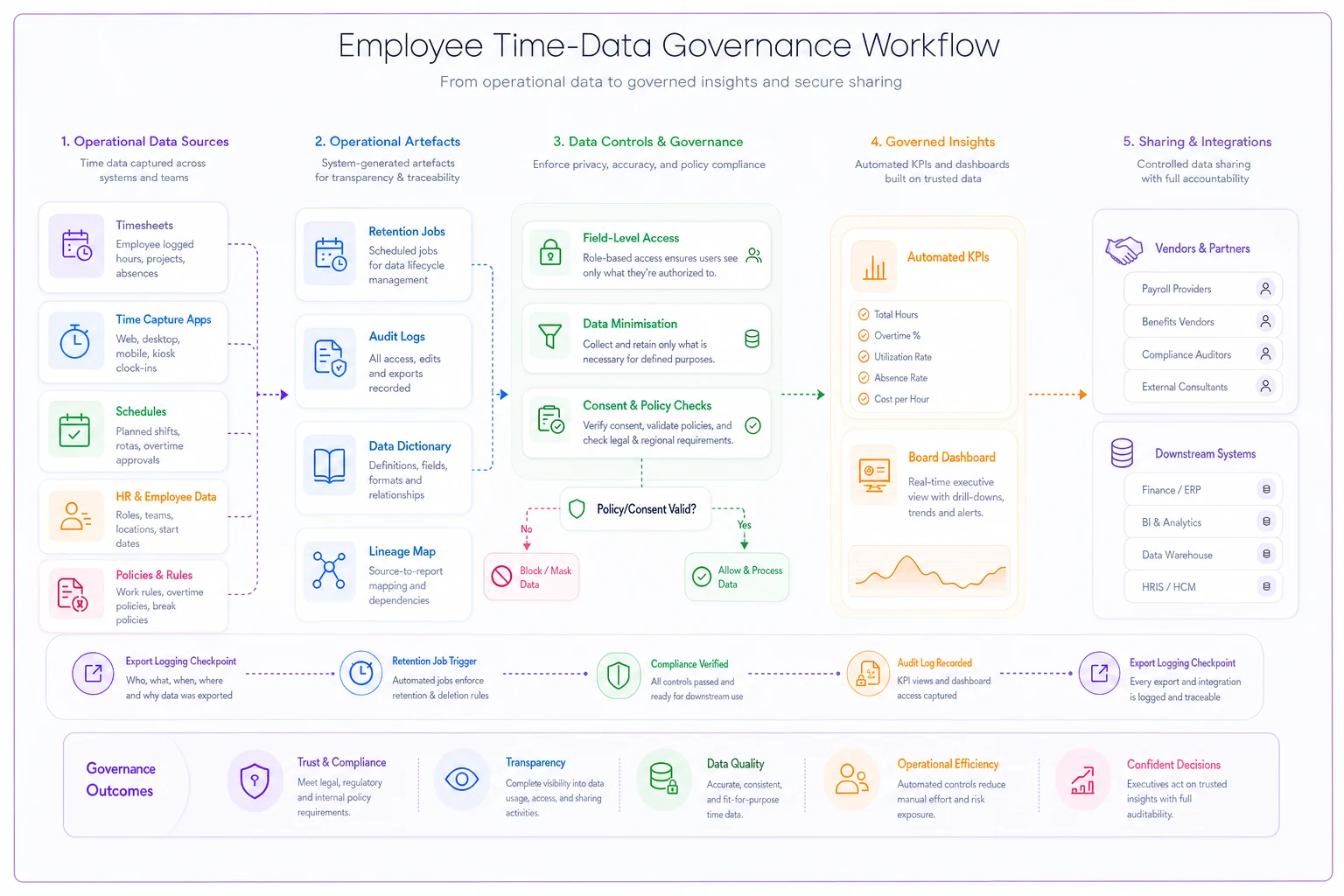
Employee time data governance done well is invisible to most staff and boring on the dashboard — no excess fields, retention compliant, exports logged, DSARs inside SLA. Boring is the goal. The exciting version is the one where an employee's location history turns up in a legal filing and nobody can explain how it got there.
Get the defaults right, tie the controls to things that already run, and measure the handful of KPIs that map to real artefacts. That's a framework a board can actually stand behind — not because it's comprehensive on paper, but because it's checkable in production.
Ready to optimize your workforce time management?
Join 2,000+ companies using GoTimio to improve timesheet accuracy, reduce payroll errors, and boost team productivity.