

Your payroll processor just flagged 47 employees with missing time entries. It's Wednesday afternoon, payroll runs Friday morning, and now someone has to chase down supervisors, reconstruct schedules, and hope the corrections are even close to accurate.
This keeps happening because most companies treat time entry data quality as a post-process cleanup task instead of continuous monitoring. You're flying blind until payroll processing forces you to confront the mess.
The operational reality of time data decay
Time entries deteriorate through completely normal business operations. A supervisor approves overtime verbally but forgets to log it. An employee's badge reader fails silently for three days. Someone switches from hourly to salary mid-pay-period and the system keeps accepting punches anyway.
Each decay point compounds. That missing Monday punch becomes a missing day on the timesheet, which becomes an incorrect payroll calculation, which becomes either an overpayment you'll struggle to recover or an underpayment that triggers compliance issues.
The worst part? These problems hide in plain sight. Your time tracking system shows green checkmarks, supervisors approve timesheets that look reasonable at a glance, and payroll discovers the gaps only during final processing.
Building early-warning infrastructure
Effective time entry data quality starts with understanding that different problems require different detection windows. A missing punch needs flagging within hours. Duplicate entries can wait until end-of-day. Pattern anomalies might only surface during weekly reviews.
Accurate time tracking made effortless.
GoTimio empowers your team to log, monitor, and manage work hours seamlessly.
- Real-time time tracking
- Automated timesheet approvals
- Payroll and billing integration
No credit card required
Here's a detection framework organized by urgency:
Real-time alerts (within 2 hours):
-
Missing clock-in past expected start time
-
Clock-out without corresponding clock-in
-
Entries outside geofenced locations
-
Punches during blocked timeframes
Daily reconciliation (end of shift):
-
Incomplete shift pairs
-
Overlapping time entries
-
Unauthorized overtime accumulation
-
Manager approval gaps
Weekly pattern analysis:
-
Deviation from standard schedules
-
Unusual hour patterns by role
-
Cost center allocation mismatches
-
Leave balance conflicts
Prioritize real-time alerts for missing punches — they're cheap to fix and prevent payroll rework.
The key is matching detection frequency to fix complexity. Reminding someone to clock in is easy. Reconstructing a week of missing entries requires investigation, documentation, and multiple approvals.
SQL tests that actually catch problems
Most time tracking systems store data in ways that make quality issues invisible until aggregation. Your database might show clean records while hiding fundamental problems in the relationships between those records.
Start with entry completeness testing:
-- Find orphaned clock-outs (no matching clock-in) SELECT employeeid, punchtime as orphanedout, DATE(punchtime) as workdate FROM timepunches WHERE punchtype = 'OUT' AND NOT EXISTS ( SELECT 1 FROM timepunches tp2 WHERE tp2.employeeid = timepunches.employeeid AND tp2.punchtype = 'IN' AND DATE(tp2.punchtime) = DATE(timepunches.punchtime) AND tp2.punchtime < timepunches.punchtime ) AND punchtime >= CURRENTDATE - INTERVAL '7 days';
This query catches a common pattern where employees clock out at lunch but forget to clock back in, creating orphaned records that most systems accept without question.
For duplicate detection, look beyond exact timestamp matches:
-- Detect suspicious duplicate patterns SELECT employeeid, workdate, COUNT() as entrycount, STRINGAGG(punchtime::text || '-' || punchtype, ', ') as allpunches FROM ( SELECT employeeid, DATE(punchtime) as workdate, punchtime, punchtype, LAG(punchtime) OVER (PARTITION BY employeeid ORDER BY punchtime) as prevpunch FROM timepunches ) t WHERE punchtime - prevpunch < INTERVAL '5 minutes' GROUP BY employeeid, work_date HAVING COUNT() > 1;
Duplicate entries often happen when systems retry failed submissions or when employees use multiple input methods. A five-minute window catches most legitimate duplicates without generating false positives from actual quick corrections.
For outlier detection, establish baseline patterns first:
-- Calculate normal hour ranges by role WITH baseline AS ( SELECT e.role, PERCENTILECONT(0.25) WITHIN GROUP (ORDER BY dailyhours) as q1, PERCENTILECONT(0.75) WITHIN GROUP (ORDER BY dailyhours) as q3 FROM ( SELECT employeeid, DATE(punchtime) as workdate, SUM(CASE WHEN punchtype = 'OUT' THEN EXTRACT(epoch FROM punchtime) ELSE -EXTRACT(epoch FROM punchtime) END) / 3600 as dailyhours FROM timepunches WHERE punchtime >= CURRENTDATE - INTERVAL '30 days' GROUP BY employeeid, DATE(punchtime) ) t JOIN employees e ON t.employeeid = e.id GROUP BY e.role ) -- Flag current anomalies SELECT t.employeeid, e.name, e.role, t.workdate, t.dailyhours, b.q1, b.q3, CASE WHEN t.dailyhours < b.q1 - 1.5 (b.q3 - b.q1) THEN 'Suspiciously Low' WHEN t.dailyhours > b.q3 + 1.5 (b.q3 - b.q1) THEN 'Suspiciously High' END as flagtype FROM ( SELECT employeeid, DATE(punchtime) as workdate, SUM(CASE WHEN punchtype = 'OUT' THEN EXTRACT(epoch FROM punchtime) ELSE -EXTRACT(epoch FROM punchtime) END) / 3600 as dailyhours FROM timepunches WHERE DATE(punchtime) = CURRENTDATE GROUP BY employeeid, DATE(punchtime) ) t JOIN employees e ON t.employeeid = e.id JOIN baseline b ON e.role = b.role WHERE t.dailyhours < b.q1 - 1.5 (b.q3 - b.q1) OR t.dailyhours > b.q3 + 1.5 (b.q3 - b.q1);
This approach adapts to your actual patterns rather than fixed thresholds. A warehouse worker logging 12 hours might be normal during busy season but suspicious for an office administrator.
Alert thresholds that balance noise with risk
Setting alert thresholds wrong creates two problems: too sensitive and you train people to ignore alerts, too loose and you miss real issues until they explode during payroll processing.
Base your thresholds on operational reality, not arbitrary limits:
| Issue Type | Detection Threshold | Alert Threshold | Escalation Threshold |
|---|---|---|---|
| Missing clock-in | 15 min past schedule | 30 min past schedule | 2 hours past schedule |
| Missing clock-out | End of scheduled shift | 1 hour past schedule | 3 hours past schedule |
| Daily hours variance | >20% from average | >35% from average | >50% or under 2 hours |
| Weekly hours total | <32 or >50 for FT | <30 or >55 for FT | <25 or >60 for FT |
| Consecutive days worked | 6 days | 7 days | 10+ days |
| Unapproved entries | 24 hours old | 48 hours old | Before payroll cutoff |
Each threshold tier serves a different purpose. Detection thresholds trigger data collection. Alert thresholds notify supervisors. Escalation thresholds require immediate intervention.
Thresholds also need context awareness. A retail location might run 10-hour shifts during holidays. A professional services firm might see 60-hour weeks during project launches. Build in seasonal and role-based adjustments rather than forcing everything through the same rigid rules.
Remediation workflows that actually get followed
The best data quality system fails if nobody acts on the alerts. Most remediation workflows fall apart because they dump problems on supervisors without clear ownership or process.
Structure your remediation around clear ownership and minimal friction:
Level 1: Employee self-service (immediate)
-
Push notification about missing punch
-
One-click correction option
-
Pre-filled with expected values
-
Auto-approved if within variance limits
Level 2: Supervisor intervention (same day)
-
Dashboard of team exceptions
-
Batch approval interface
-
Context from schedules and historical patterns
-
One-click acceptance of system suggestions
Level 3: HR/Payroll review (next day)
-
Unresolved exceptions report
-
Pattern analysis across departments
-
Compliance flag highlighting
-
Escalation to department heads
Level 4: Executive visibility (weekly)
-
Departments with chronic issues
-
Cost impact of corrections
-
Compliance risk assessment
-
Process improvement recommendations
Each level needs different information. An employee just needs to know they forgot to clock out. A supervisor needs to see if it's a pattern. HR needs to understand compliance implications. Executives need to know if entire departments have process failures.
Here's a remediation assignment matrix that actually works:
| Exception Type | Primary Owner | Backup Owner | Resolution SLA | Auto-Resolution |
|---|---|---|---|---|
| Missing punch | Employee | Direct supervisor | 4 hours | Use schedule default |
| Duplicate entry | System admin | Supervisor | End of day | Keep latest entry |
| Overtime unexpected | Supervisor | Department head | Same day | Flag for review |
| Schedule deviation | Supervisor | HR | Next day | No auto-resolution |
| Location mismatch | Employee | Security/IT | 2 hours | Log and monitor |
| Role mismatch | HR | Payroll | Before cutoff | Block time entry |
The auto-resolution column matters more than most people realize. Some problems you can safely default. Others require human judgment. Smart defaults reduce the remediation burden without sacrificing data integrity.
Visualizing the escalation flow helps teams understand ownership.
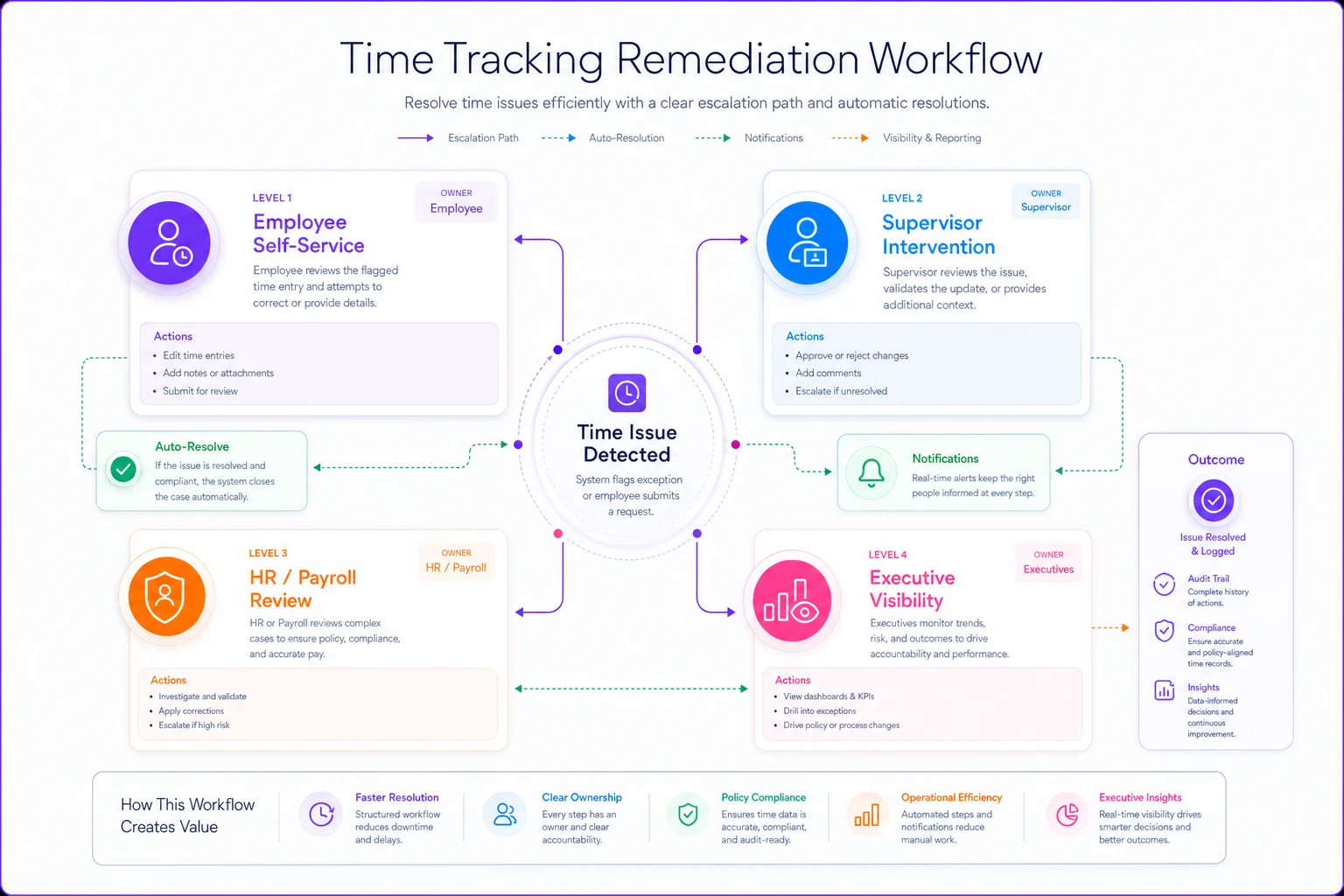
This diagram clarifies who acts at each level and how issues escalate if unresolved.
Sample dashboards that drive action
Dashboards fail when they show everything instead of focusing on what needs immediate attention. Your time entry data quality dashboard should answer three questions instantly: What's broken right now? Who needs to fix it? What's the deadline?
Organize your dashboard into action zones:
Red Zone - Immediate Action Required
-
Missing entries approaching payroll cutoff
-
Compliance violations detected
-
System integration failures
-
Unapproved overtime accumulating
Yellow Zone - Review Before End of Day
-
Unusual patterns detected
-
Pending supervisor approvals
-
Schedule vs actual variances
-
First-time exceptions from usually compliant employees
Green Zone - Monitor Trends
-
Department compliance rates
-
Average correction time
-
Most common exception types
-
Process improvement opportunities
Within each zone, show actionable information:
-
Employee name and ID
-
Specific issue and when it occurred
-
Business impact if not resolved
-
One-click link to fix
-
Time remaining before escalation
Avoid aggregated metrics in operational dashboards. "87% time entry compliance" doesn't help anyone fix problems. "John Smith - missing Tuesday clock-out - approve standard 5pm?" drives immediate action.
The hidden cost of bad time data
Poor time entry data quality costs more than just payroll errors. When project managers can't trust hours data, they stop tracking project profitability accurately. When employees see incorrect paychecks, even once, trust in the entire system takes a hit that takes months to rebuild.
One mid-sized healthcare facility found their time entry issues were costing them roughly $180K annually — not from time theft, but from defensive over-corrections. Supervisors routinely approved maximum possible hours rather than investigating discrepancies because the research took too long. Proactive monitoring cut those defensive approvals by around 70% within three months.
The real damage happens in decision-making. You might be making operational decisions based on flawed metrics because your underlying time data has quality issues. That scheduling optimization showing 15% efficiency improvement might just be phantom gains from cleaner data, not actual process changes.
Integration with AI-powered operations
Modern operational platforms can shift time entry data quality from reactive cleanup to proactive prevention. Instead of running SQL queries manually, AI-powered monitoring continuously scans entry patterns and flags anomalies before they cascade into payroll problems.
These systems learn your specific operational patterns over time. They understand that your warehouse team legitimately works split shifts during inventory week. They recognize when certain employees consistently miss afternoon punches and send preemptive reminders. When an integration failure causes missing entries, they can automatically request resubmission rather than waiting for someone to notice.
The advantage is contextual intelligence. Rather than applying rigid rules uniformly, AI-assisted monitoring adapts to your actual patterns while maintaining audit trails that satisfy compliance requirements. The goal isn't replacing human oversight — it's focusing human attention on exceptions that genuinely need investigation instead of routine cleanup.
Building sustainable data quality culture
Time entry data quality ultimately depends on people following processes. The best technical infrastructure fails if employees see time tracking as bureaucratic burden rather than operational necessity.
Make good data quality the path of least resistance:
-
Pre-populate expected entries based on schedules
-
Send reminder notifications before typical miss times
-
Show employees their own patterns and accuracy rates
-
Recognize departments with clean data, not just flag the ones with problems
-
Make corrections easier than leaving errors sitting there
Some organizations gamify data quality with team scorecards, though that tends to work better in competitive cultures than collaborative ones. Others tie department data quality to operational autonomy — clean data earns more scheduling flexibility.
The critical shift is treating time data quality as an operational metric, like safety or customer satisfaction, not just a payroll input. When front-line supervisors understand how bad time data enables fraud patterns or creates billing disputes, they become allies in maintaining quality rather than obstacles to it.
Beyond compliance to operational excellence
Strong time entry data quality creates compound benefits across your operation. Accurate labor costs enable better project bidding. Reliable attendance patterns improve scheduling. Clean overtime data supports better workforce planning.
The elements outlined here — SQL tests, alert thresholds, remediation workflows — form a foundation for operational visibility. You'll spot problems while they're still fixable, reduce payroll processing from a frantic scramble to routine verification, and actually trust the labor metrics you're making decisions on.
Start with the highest-impact, lowest-friction improvements. Implement missing punch detection first. Add duplicate screening once that's stable. Layer in outlier detection after establishing baselines. Build remediation workflows incrementally, starting with the most common exceptions.
The goal isn't perfect data — it's trustworthy data with clear accountability when issues arise. Every organization has time entry challenges. The ones that manage it well catch and fix problems before they cascade into payroll disasters, compliance violations, or decisions made on numbers that were never accurate to begin with.
Ready to optimize your workforce time management?
Join 2,000+ companies using GoTimio to improve timesheet accuracy, reduce payroll errors, and boost team productivity.