

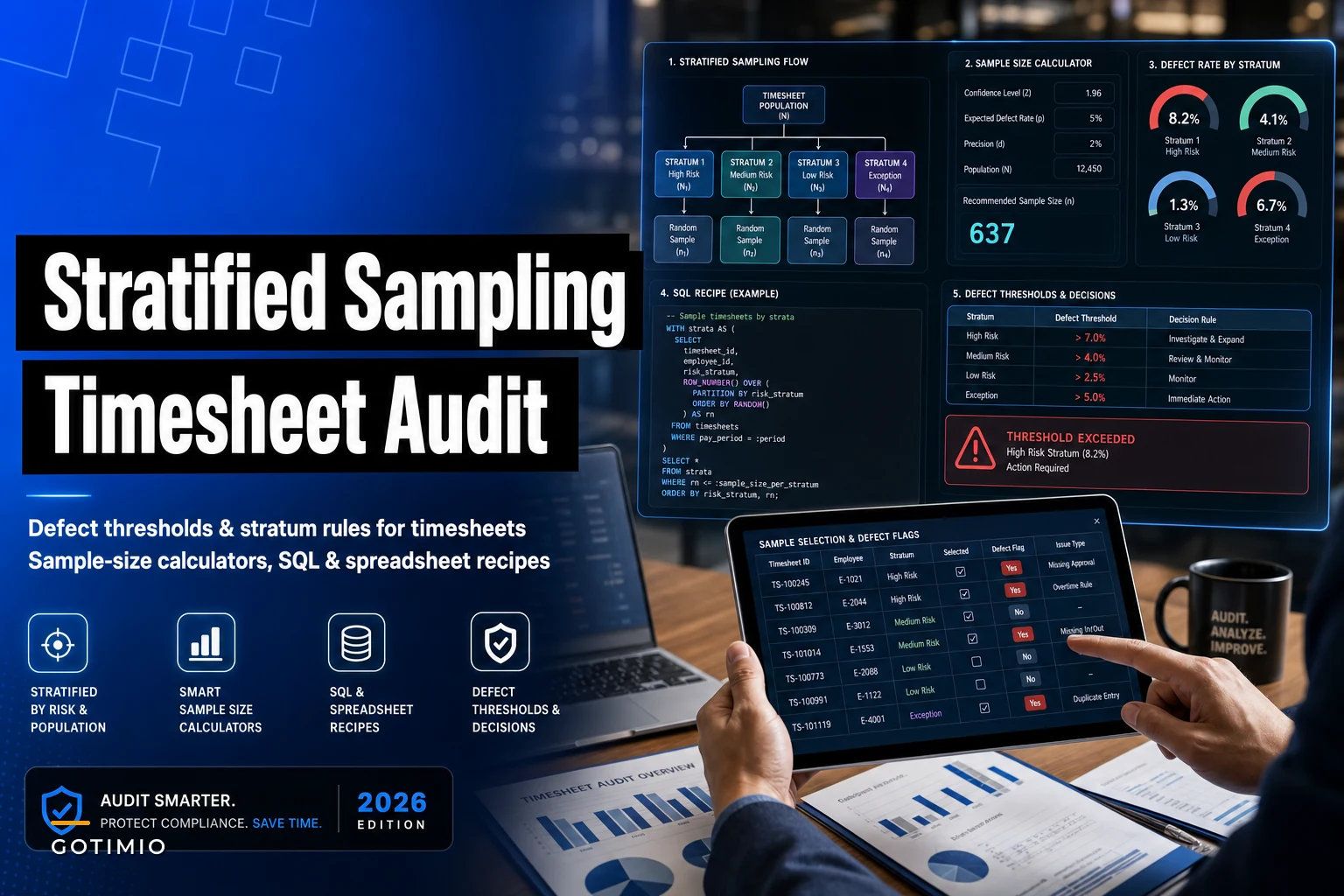

Most HR teams that decide to "audit timesheets" do one of two things. Either they pull every record for a pay period and drown in it, or they eyeball a random handful and hope nothing systemic is hiding underneath. Both approaches produce audits that fall apart the moment someone asks a hard question — a wage-and-hour attorney, a finance controller, or an auditor who wants to know why you looked at 200 records instead of 300.
The gap is sampling design. Not "grab some rows," but a defensible method that tells you how many records to pull, from which groups, and what defect rate should force you to expand the review or escalate. That's what this walks through — specifically for timesheet populations, which behave very differently from financial transactions, because errors cluster hard by department, shift type, and manager.
An audit that samples the wrong way can miss a manager who's systematically rounding up while burning three days reviewing clean office-staff punches. Stratification fixes that. Defect thresholds tell you when to stop trusting the sample and go deeper.
Why timesheet errors cluster (and why simple random sampling misses them)
Errors in timesheet populations are not spread evenly. They concentrate.
In a typical mid-size operation you'll see something like this: office and salaried staff punch clean because they barely punch at all, warehouse and field crews generate most of the missed-punch and edit noise, and one or two specific supervisors account for a disproportionate share of retroactive edits. Pull a simple random sample of 250 rows from 30,000 punches and you'll draw mostly from the largest group. If that group happens to be the clean one, your sample looks great and tells you nothing.
Stratification means you split the population into meaningful buckets first, then sample within each bucket. The buckets that matter for timesheets are almost always:
-
Employment type (hourly vs salaried — salaried rarely needs sampling at all)
-
Location or site (each site tends to have its own punch culture)
-
Shift type (overnight, split, and weekend shifts break rules more often)
-
Manager/approver (this is the one people skip, and it's the most predictive)
-
Entry method (mobile, kiosk, badge, manual admin entry — manual entries are where the risk lives)
The strata should be chosen by where you expect defects to differ, not by what's easy to group. Grouping by alphabetical last name is easy and useless. Grouping by approver is harder and tells you exactly where to remediate.
Defining what a "defect" actually is before you count anything
You cannot set a defect-rate threshold if you haven't defined a defect. And "defect" for timesheets is not one thing — it's a list, and each item needs a yes/no test that two different reviewers would score identically.
Accurate time tracking made effortless.
GoTimio empowers your team to log, monitor, and manage work hours seamlessly.
- Real-time time tracking
- Automated timesheet approvals
- Payroll and billing integration
No credit card required
| Defect class | Definition (the test) | Severity |
|---|---|---|
| Missing approval | Punch modified but no approver sign-off recorded | High |
| Retroactive edit outside window | Edit made after payroll cutoff without documented reason | High |
| Punch/schedule mismatch | Actual hours exceed scheduled by threshold with no note | Medium |
| Missing punch pair | Clock-in without clock-out (or reverse) auto-completed | Medium |
| Rounding beyond policy | Adjustment exceeds allowed grace window | High |
| Manual admin entry, no source | Admin-created entry with no punch, note, or ticket | High |
| Overlapping entries | Two active entries for the same person, same time | Medium |
The mistake is scoring on judgment. If your reviewer has to decide whether something counts, your defect rate becomes noise. Every defect definition should be reducible to a query or a checkbox. If it can't be, it's a risk flag for manual review — not a countable defect.
Split your defects into high-severity (any single instance triggers action) and medium-severity (measured as a rate). This distinction drives everything downstream. A single unauthorized retroactive edit to a paid record is a finding on its own. A 4% punch-mismatch rate might be tolerable depending on your policy.
How many records do you actually need? A sample-size approach that works in a spreadsheet
You don't need a statistics degree, but you do need to stop pulling round numbers because they feel right.
For attribute sampling (pass/fail on each record), the sample size depends on three things: how confident you want to be, the defect rate you're willing to tolerate, and how big your population is. For the populations most HR teams deal with — a few thousand to tens of thousands of records — population size barely moves the number once you're above roughly 5,000. What drives it is your tolerable defect rate.
A practical rule of thumb table for a 95% confidence level:
| Tolerable defect rate | Approx. sample size per stratum (expecting zero defects) |
|---|---|
| 10% | ~29 |
| 5% | ~59 |
| 2% | ~149 |
| 1% | ~299 |
Read that as: "If I want to be 95% confident the true defect rate is below X%, and I find zero defects in my sample, I need roughly N records." Find even one defect and the math shifts — you'd expand.
Here's the spreadsheet version. In a cell:
``
=CEILING(LN(1-0.95)/LN(1-tolerable_rate),1)
``
So =CEILING(LN(1-0.95)/LN(1-0.05),1) returns 59 for a 5% tolerable rate at 95% confidence. That's the "rule of three"-style zero-defect sizing — clean, defensible, and you can explain it in one sentence to a controller.
The part people consistently get wrong: you size per stratum, not once for the whole population. If you have four strata that matter (three risky sites plus your manual-entry pool), you're pulling around 59 from each at a 5% tolerance — not 59 total. Yes, that's more records. That's the price of a sample that actually finds clustered errors. In practice you can size smaller strata lighter and load your review budget onto the high-risk buckets, which is exactly what proportional-to-risk allocation is for.
Allocating the sample across strata
-
Proportional allocation — sample each stratum in proportion to its size. Good for estimating an overall rate. Bad when a small stratum carries most of the risk.
-
Risk-weighted (Neyman-ish) allocation — over-sample the strata where variance and expected defects are highest (manual entries, overnight shifts, specific approvers). This is what you want for a control audit, where the goal is catching problems, not producing a tidy population average.
For most HR audits, risk-weighted wins. You're not writing a research paper. You're deciding whether a control is working and where to intervene.
The workflow for moving from strata definition through to remediation follows a fairly consistent path once you've done it a few times:
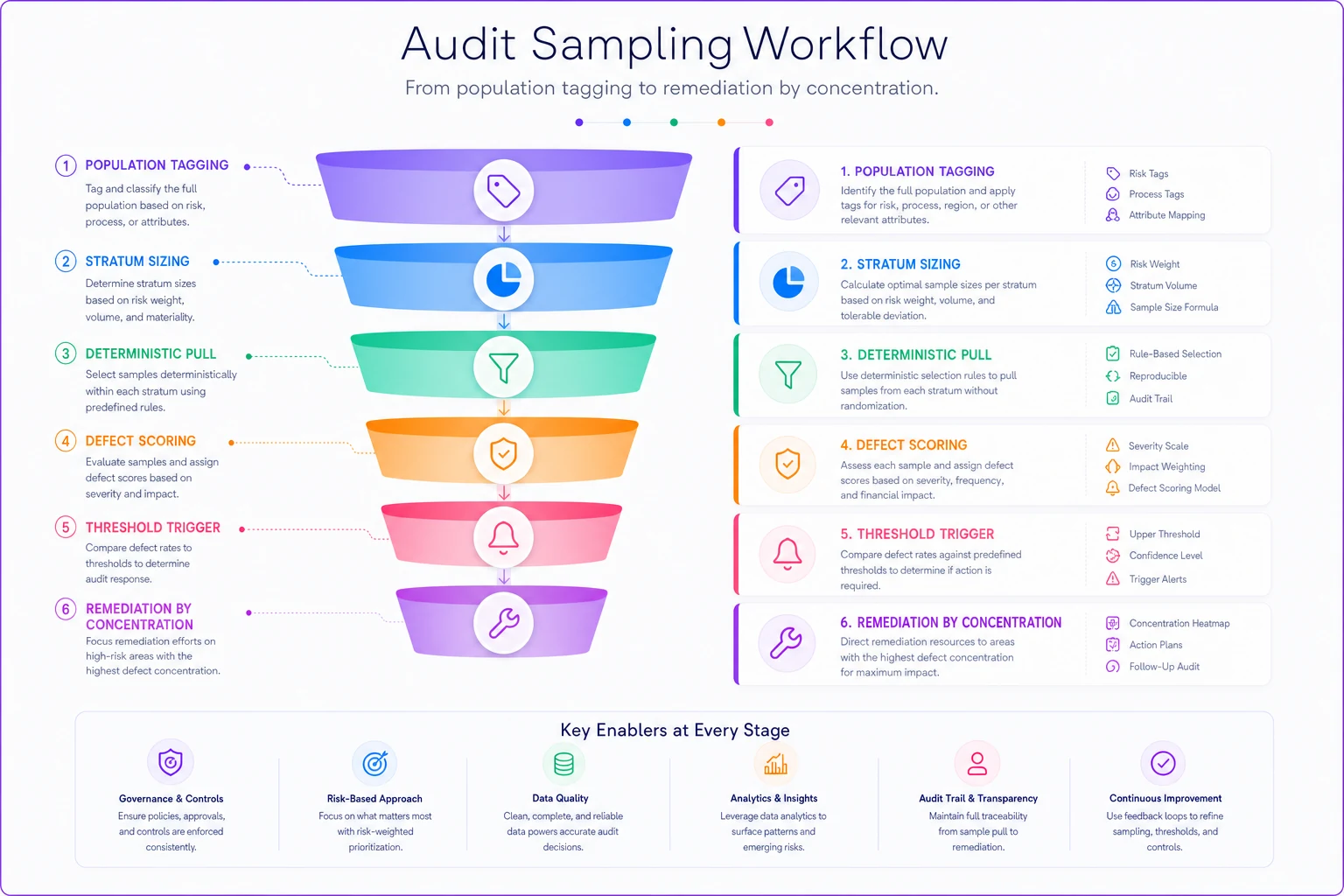
Running through this sequence the same way each period is what makes it a repeatable control rather than a one-off project.
The SQL recipes: pulling a stratified sample you can reproduce
Reproducibility is non-negotiable. If someone asks you to re-run the exact same sample in six months, you need a seeded, deterministic pull — not ORDER BY RANDOM() that gives a different answer every time. Deterministic sampling also matters for audit-trail hygiene — your sample selection itself should be a recorded, defensible artifact.
Step 1 — build the strata. Tag every record with its bucket:
``sql
WITH tagged AS (
SELECT
t.entryid,
t.employeeid,
t.siteid,
t.approverid,
t.entrymethod,
CASE
WHEN t.entrymethod = 'manualadmin' THEN 'SMANUAL'
WHEN t.shifttype IN ('overnight','split') THEN 'SHIGHRISKSHIFT'
WHEN t.siteid IN (7, 12, 19) THEN 'SHIGHRISKSITE'
ELSE 'SSTANDARD'
END AS stratum
FROM timesheets t
WHERE t.payperiodid = :period
AND t.employmenttype = 'hourly'
)
SELECT stratum, COUNT(*) AS population_size
FROM tagged
GROUP BY stratum;
``
Step 2 — deterministic ranked pull. Use a hash of a stable key so the same seed always returns the same rows:
``sql
WITH tagged AS ( / same CTE as above / ),
ranked AS (
SELECT
tagged.,
ROWNUMBER() OVER (
PARTITION BY stratum
ORDER BY MD5(CONCAT(entryid, ':', :seed))
) AS rn
FROM tagged
)
SELECT
FROM ranked
WHERE (stratum = 'SMANUAL' AND rn <= 60)
OR (stratum = 'SHIGHRISKSHIFT' AND rn <= 60)
OR (stratum = 'SHIGHRISKSITE' AND rn <= 45)
OR (stratum = 'SSTANDARD' AND rn <= 30)
ORDER BY stratum, rn;
``
Change :seed and you get a different (but still reproducible) sample. Keep it fixed and anyone can regenerate your exact selection.
Spreadsheet equivalent if you're not in SQL: export the tagged population, add a helper column =SUMPRODUCT(CODE(MID(A2,ROW(INDIRECT("1:"&LEN(A2))),1))) or, simpler, use a fixed-seed pseudo-random via a formula-driven rank, then sort within each stratum and take the top N. The key is stable ordering — avoid volatile RAND() that reshuffles on every recalc. If you must use RAND(), generate once, paste-values immediately, and record the timestamp.
Keep the :seed value recorded with the sample so anyone can reproduce the exact selection.
If you must use RAND(), generate once, paste-values immediately, and record the timestamp.
Setting defect-rate thresholds and remediation triggers
The sample tells you what you found. The thresholds tell you what to do with it. Without pre-set triggers, every audit result turns into a negotiation, and those negotiations tend to favor whoever wants to do nothing.
Set your triggers before you look at results. A workable trigger ladder:
-
Green — no action Zero high-severity defects, medium-severity rate below your tolerable threshold (say 3%). Log the result, move on.
-
Amber — expand the sample One or two medium-severity defects pushing the observed rate near threshold, OR a defect that looks isolated to one approver. Double the sample in the affected stratum before concluding.
-
Red — targeted remediation Any high-severity defect (unauthorized retro edit, manual entry with no source, rounding beyond policy), OR observed medium-rate above threshold after expansion. This triggers a named remediation, not a shrug.
The remediation trigger that people underuse is concentration. If four of your five defects trace to one approver or one site, that's not a population-wide problem — it's a targeted one. Pull that approver's full period, not everyone's. A high defect rate concentrated in one manager is a training or oversight issue. The same rate spread evenly is a policy or system issue. Same number, completely different fix.
When findings point toward possible intentional patterns rather than sloppiness, the response needs to shift from correction to investigation — and that's a different playbook entirely. Handling that without torching morale is its own discipline; there's a respectful, staged approach to detecting timesheet issues without demotivating staff worth reading before you start pulling people into rooms.
A real scenario: a 3-site logistics operation
A regional logistics company with around 260 hourly staff across three sites was running a "full review" every quarter — one payroll analyst pulling every edited record, roughly two days of work each cycle, and still getting surprised by a wage complaint that pointed to overnight-shift rounding.
The problem was that the full review wasn't actually full. The analyst ran out of time and stopped at whatever they'd covered, unevenly. The audit was both exhausting and incomplete.
They restructured into four strata: manual admin entries (around 380 records), overnight and split shifts (around 2,100), the two sites with the most edits (around 5,400), and everything else (around 6,800 standard). At a 5% tolerance they sized 60/60/45/30 — about 195 records instead of the roughly 1,900 they'd been slogging through unevenly.
First run turned up something the exhaustive review had kept missing: nearly all the high-severity defects — retroactive edits without approval — concentrated in the overnight stratum under one supervisor. Six of eight findings, one person. The concentration trigger fired, they pulled that supervisor's full period, and found a rounding habit that had been quietly adding roughly 20–30 minutes per overnight shift.
The outcome wasn't dramatic dollar recovery. The audit went from roughly two uneven days to a repeatable half-day, and it actually found the thing the bigger version kept missing. That's the whole argument for sampling done right: less work, better coverage, because you're looking where the errors actually live.
When this makes sense — and when it doesn't
When stratified sampling is the right call:
-
You have more than a few thousand records per period and can't credibly review all of them
-
Your workforce is heterogeneous — multiple sites, shift types, or entry methods
-
You need results you can defend to finance, legal, or an external auditor
-
You want a repeatable process, not a heroic one-off
When it's a bad idea:
-
Your population is small (under roughly 200 records) — just review everything, it's faster than designing strata
-
You're investigating a specific known problem — that's targeted forensics, not sampling; pull the full set for that employee or approver
-
Your defect definitions aren't nailed down yet — sampling a population you can't score consistently just produces a confident-looking wrong number
One thing worth flagging: if you don't have clean access to your punch data with the fields needed to stratify — approver ID, entry method, shift type — fix your data model first. A sampling design built on missing fields collapses immediately, and you'll spend more time joining tables than reviewing records.
The operating rhythm that keeps this useful
An audit method only pays off if it runs on a schedule and feeds back into your controls. The workflow that holds up over time:
-
Freeze the population at payroll cutoff so your sample matches what actually paid
-
Tag strata using the same logic every period (version this — if you change strata definitions, note when and why)
-
Size and pull with a recorded seed, so the selection is reproducible
-
Score against fixed defect definitions, two reviewers on the high-severity classes
-
Apply pre-set triggers — green/amber/red, no negotiating after the fact
-
Remediate by concentration — targeted when clustered, systemic when spread
-
Log everything — the seed, the strata definitions, the counts, the findings — as a permanent record
Modern time and attendance platforms make several of these steps significantly cheaper than they used to be. The strata fields — entry method, approver, shift type — are already captured, so tagging is a query rather than a data-cleanup project, and a good system keeps the immutable edit history that makes high-severity defect tests trivial to run. The quiet value isn't that software does the audit for you — it's that clean, well-structured time data turns a two-day forensic slog into a query you can rerun any period on demand.
A timesheet audit isn't about reviewing more records. It's about reviewing the right records, defining defects so tightly that anyone would score them the same way, and deciding your triggers before you look at the results. Do those three things and a 195-record sample will tell you more than a rushed pass through 1,900 ever did.
Ready to optimize your workforce time management?
Join 2,000+ companies using GoTimio to improve timesheet accuracy, reduce payroll errors, and boost team productivity.