


Payroll integrations look straightforward on paper. Send employee hours, get paid, everyone's happy. But companies lose thousands because their integration sent duplicate payments after a network timeout. Or worse — paid terminated employees for three months because the integration didn't handle status changes properly.
The problem isn't that payroll integrations are complex. It's that they fail silently. Your system says the data was sent. The payroll provider says they received it. But somewhere between those two confirmations, critical validation gets skipped, edge cases slip through, and you don't find out until employees are calling about missing overtime or the IRS sends a notice about incorrect withholdings.
After building payroll connectors for dozens of operational platforms, the pattern is pretty clear — successful integrations aren't about the happy path. They're about handling every possible failure mode gracefully. This runbook walks through the exact testing procedures, validation checks, and cutover steps that prevent those expensive surprises.
Why standard integration testing completely misses payroll's unique risks
Most integration testing focuses on whether data moves from point A to point B. Can we connect? Does the API respond? Do fields map correctly? These basics matter, but payroll has risks that standard testing completely ignores.
Take idempotency — the fancy term for "don't process the same thing twice." Your integration sends a batch of timesheets to payroll. The network times out before getting a response. Your system retries. Now you've potentially sent the same hours twice. Without proper idempotency checks, that employee gets double-paid, and you're scrambling to recover funds while explaining the mess to your finance team.
Or consider retroactive adjustments. An employee forgot to log overtime last week. The manager approves the correction today. How does your integration handle sending negative hours for the previous period while adding positive hours for the correction? Most connectors either fail silently or apply the adjustment to the wrong period entirely.
The real challenge is that errors compound. A small rounding difference becomes a compliance violation. A timezone mismatch creates overtime liability. A failed status update keeps paying terminated employees. These aren't bugs — they're architectural oversights that only surface under specific conditions.
Building your test payload library (with the weird cases that actually happen)
Every payroll integration needs a comprehensive set of test payloads that cover real-world scenarios. Not just the clean examples from the API documentation, but the messy situations that happen every week in actual businesses.
Accurate time tracking made effortless.
GoTimio empowers your team to log, monitor, and manage work hours seamlessly.
- Real-time time tracking
- Automated timesheet approvals
- Payroll and billing integration
No credit card required
Start with your baseline payload — a standard employee with regular hours:
``json
{
"employeeid": "EMP-2847",
"payperiod": "2024-01-012024-01-14",
"regularhours": 80.00,
"overtimehours": 0.00,
"ptohours": 0.00,
"holidayhours": 0.00,
"grosspay": null,
"deductions": [],
"timestamp": "2024-01-15T08:00:00Z",
"checksum": "sha256:7d865e959b2466918c9863afca942d0f"
}
``
This perfect scenario rarely happens in practice. Build test payloads for these common edge cases:
Zero-hour employees (still employed but no hours worked):
``json
{
"employeeid": "EMP-3901",
"payperiod": "2024-01-012024-01-14",
"regularhours": 0.00,
"overtimehours": 0.00,
"notes": "Employee on unpaid leave",
"status": "ACTIVE",
"processanyway": true
}
``
Negative adjustments (corrections from previous periods):
``json
{
"employeeid": "EMP-2847",
"payperiod": "2024-01-152024-01-28",
"adjustments": [
{
"type": "PRIORPERIODCORRECTION",
"originalperiod": "2024-01-012024-01-14",
"hoursadjustment": -8.00,
"reason": "Holiday incorrectly applied",
"approvalid": "MGR-4455-20240116"
}
],
"regularhours": 80.00
}
``
Split department allocations (employees working across cost centers):
``json
{
"employeeid": "EMP-5622",
"payperiod": "2024-01-012024-01-14",
"allocations": [
{
"department": "SALES",
"regularhours": 32.00,
"overtimehours": 4.50
},
{
"department": "SUPPORT",
"regularhours": 48.00,
"overtime_hours": 0.00
}
]
}
``
The trick is testing these payloads in combination. What happens when you send a negative adjustment for an employee who also has zero hours in the current period? Or when split allocations include retroactive corrections? Your integration needs to handle these gracefully or explicitly reject them with clear error messages.
Implementing idempotency checks that actually work
Idempotency in payroll integrations means more than checking if you've sent data before. It means ensuring that retries, network failures, and duplicate submissions never result in double payments or missed wages.
The three-layer idempotency strategy
Layer 1: Request-level idempotency
Generate a unique key for each integration request:
``
idempotencykey = hash(employeeid + payperiod + timestamp + payloadhash)
``
Store this key with a 72-hour TTL. If the same key arrives again, return the cached response without reprocessing.
Layer 2: Business-level idempotency
Track what you've already sent to payroll:
``sql
CREATE UNIQUE INDEX idxpayrollsubmissions
ON payrollsubmissions(employeeid, payperiodstart, payperiodend, submission_type);
``
This prevents sending the same employee's hours for the same period twice, even with different request IDs.
Layer 3: Checksum validation
Include a checksum of critical fields in every payload:
``python
def generatechecksum(payload):
criticalfields = [
payload['employeeid'],
payload['payperiod'],
payload['regularhours'],
payload['overtimehours'],
str(payload.get('adjustments', []))
]
return hashlib.sha256('|'.join(critical_fields).encode()).hexdigest()
``
The receiving system validates this checksum before processing. If the checksum doesn't match the payload, reject it immediately.
Set idempotency key TTL longer than your maximum retry window to avoid accidental reprocessing.
The receiving system validates this checksum before processing. If the checksum doesn't match the payload, reject it immediately.
Edge case testing that catches real payroll disasters
The zero-hours trap
Employees with zero hours in a period often get skipped by integrations, but they still need records for benefits, PTO accrual, and compliance reporting. Test these scenarios:
-
Active employee, zero hours (vacation week)
-
New hire, partial period, zero hours (starts next Monday)
-
Terminated employee, zero hours (term date was previous period)
-
Leave of absence, zero hours but benefits continue
Each scenario requires different handling. Your integration should explicitly process zero-hour records when needed, not silently skip them.
Retroactive adjustment chaos
Same-period adjustment (correction before payroll closes):
-
Original entry
40 regular hours
-
Correction
+8 overtime hours
-
Expected result
Single record with 40 regular, 8 overtime
Prior-period adjustment (correction after payroll closes):
-
Original entry
40 regular hours (already paid)
-
Correction
-8 regular, +8 overtime
-
Expected result
Adjustment record in current period, audit trail preserved
Multi-period adjustment (correction spanning multiple closed periods):
-
Requires separate adjustment records for each affected period
-
Must maintain clear audit trail
-
Some payroll systems reject these entirely
The decimal precision problem
Different systems handle decimal precision differently, creating penny discrepancies that compound over time. Test with these specific values:
-
33.33 hours (does it round to 33.33 or 33.3333?)
-
0.01 hours (does it get dropped as insignificant?)
-
40.005 hours (does it round up to 40.01 or down to 40.00?)
A construction company discovered their integration was truncating instead of rounding, costing employees a few cents per pay period. Across roughly 200 employees over two years, it added up to a Department of Labor investigation and around $18,000 in back wages.
Safe cutover procedure (because you only get one shot at this)
Switching payroll integrations is like performing surgery while running a marathon. The business keeps operating, employees expect paychecks, and any interruption creates immediate problems. Below is the cutover procedure that minimizes risk.
The overall flow looks like this:
``
[Pre-Cutover Testing (2 weeks out)]
        ↓
[Shadow Payroll Run (1 week out)]
        ↓
[Final Data Sync → Test Records → Gradual Rollout → Full Migration]
        ↓
[48-Hour Post-Cutover Monitoring]
        ↓
[Stable Operations or Rollback]
``
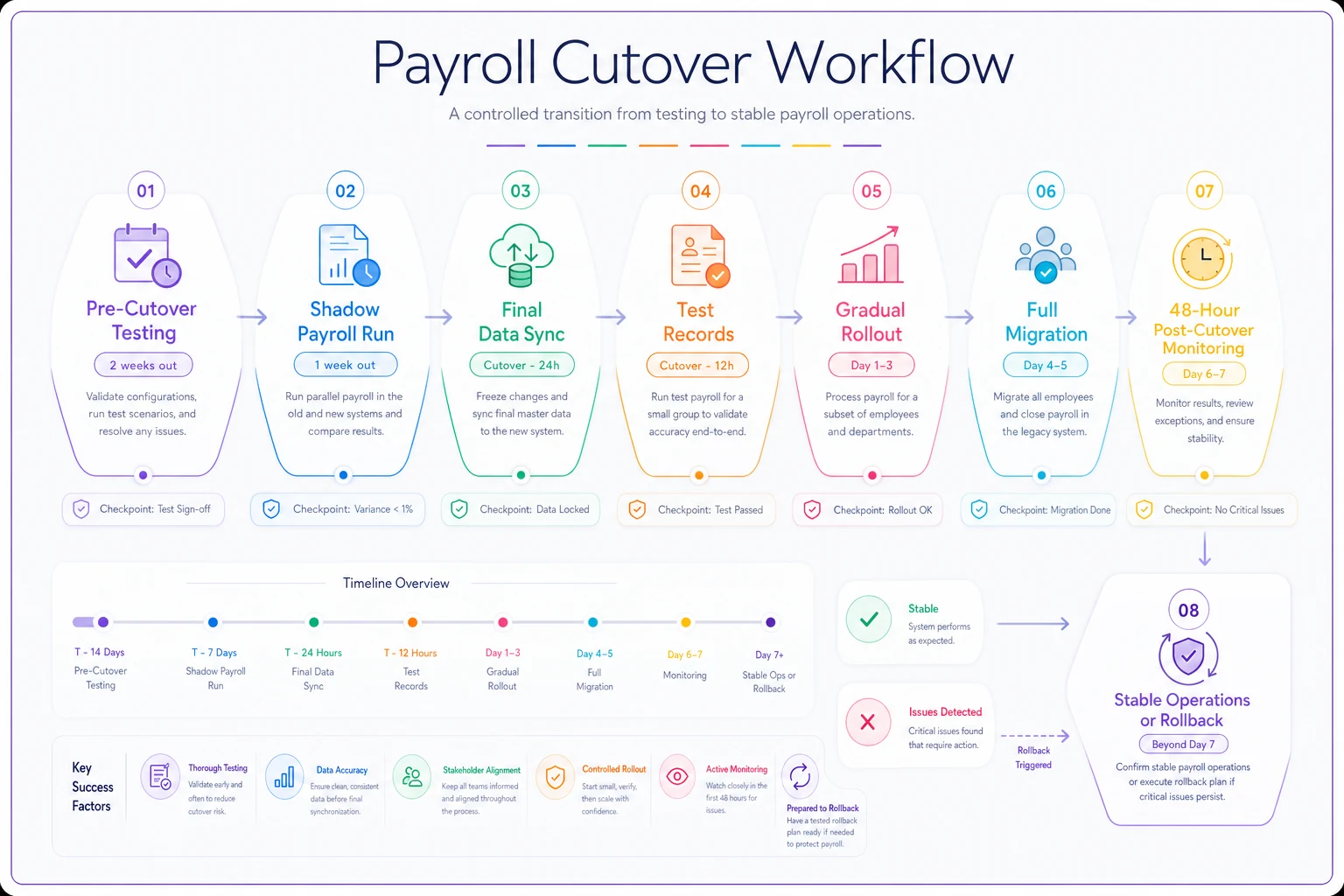
Use this flow to align stakeholders on timing and responsibilities.
Two weeks before cutover
-
Export the last three pay periods from your current system
-
Process them through the new integration
-
Compare results line-by-line
-
Document every discrepancy, no matter how small
Create your rollback plan before you need it:
-
Backup current integration configurations
-
Document manual processing steps if everything fails
-
Identify who can authorize emergency manual payments
-
Have your payroll provider's emergency contact ready
One week before cutover
Process a "shadow payroll" — run the new integration alongside the old one:
-
New integration sends to a test endpoint
-
Old integration processes actual payroll
-
Compare outputs for every employee
-
Fix any discrepancies before the real cutover
Build your verification checklist:
-
[ ] All employees present in new system
-
[ ] Pay rates match exactly
-
[ ] Deductions configured correctly
-
[ ] Tax withholdings accurate
-
[ ] Direct deposit information transferred
-
[ ] PTO balances carried over
Cutover day
Hour 0-1: Final data sync
-
Stop the old integration
-
Export final state from old system
-
Import into new system
-
Verify record counts match
Hour 1-2: Test with safe records
-
Process 5-10 manually selected employees
-
Include one from each department
-
Include at least one with complex deductions
-
Verify results before proceeding
Hour 2-3: Gradual rollout
-
Process 25% of employees
-
Check for errors or warnings
-
Verify data in payroll system
-
Continue only if clean
Hour 3-4: Complete migration
-
Process remaining employees
-
Run comprehensive verification reports
-
Compare totals to previous pay period
-
Check for any missing employees
Post-cutover validation
The first 48 hours after cutover are critical. Monitor these metrics closely:
| Metric | Expected Range | Action if Outside Range |
|---|---|---|
| Total employees processed | Within 2% of previous period | Check for missing records |
| Total regular hours | Within 5% of previous period | Verify timesheet imports |
| Total gross pay | Within 3% of previous period | Check rate calculations |
| Failed transactions | Less than 1% | Review error logs immediately |
| Processing time | Less than 2x normal | Check for performance issues |
Set up alerts for anomalies. One company discovered their integration was dropping employees with apostrophes in their names — but only after cutover, when 12 people didn't get paid.
Checksum strategies and audit trail requirements
Checksums in payroll integrations do more than detect corruption — they create an immutable audit trail that proves what data was sent, when, and by whom. This matters when an employee disputes their pay six months later or when auditors ask about a specific transaction.
Building effective checksums
Don't just hash the entire payload. Create structured checksums that help diagnose problems:
``python
def createpayrollchecksum(payload):
# Header checksum - validates the transmission
headersum = hash(
payload['batchid'],
payload['timestamp'],
payload['totalemployees']
)
# Data checksum - validates the actual payroll data
datasum = hash(
sorted([emp['id'] + str(emp['hours']) for emp in payload['employees']])
)
# Integrity checksum - validates nothing was tampered
integritysum = hash(headersum + datasum + SECRETKEY)
return {
'header': headersum,
'data': datasum,
'integrity': integrity_sum
}
``
This structure lets you identify exactly what changed if checksums don't match. Did someone modify the data? Did records get reordered? Did the transmission get corrupted?
Maintaining audit trails
Every payroll integration needs solid audit trails — not just for compliance, but for the inevitable moment when someone asks "why did this employee get paid $3,847.92 last month?"
-
Original payload (compressed)
-
Calculated checksum
-
Response from payroll system
-
Any error messages
-
Processing timestamp
-
User who initiated
-
System version/configuration
What most teams miss is tracking what didn't happen. Failed attempts, skipped records, and manual overrides all need audit entries. A retail chain got fined $75,000 because they couldn't prove they had attempted to pay an employee who claimed missing wages. Their integration had failed silently, and they had zero record of the attempt.
Proper audit trail hygiene goes beyond storage — it's about being able to quickly retrieve and explain any transaction months or years later.
Rollback procedures when things go sideways
Even with thorough testing, payroll integrations sometimes fail in ways nobody anticipated. Maybe your payroll provider changed their API without notice. Maybe a network issue corrupted data mid-transmission. Maybe someone deployed the wrong configuration. When this happens at 3 PM on payroll processing day, you need a clear rollback procedure.
The 15-minute decision point
You have roughly 15 minutes after detecting a problem to decide: fix forward or roll back. This isn't arbitrary — it's based on typical payroll processing windows. Wait longer, and you risk missing the submission deadline entirely.
Make this decision based on:
-
Can you identify the exact problem?
-
Do you have a tested fix ready?
-
Will the fix take less than 30 minutes?
-
Is this affecting all employees or just some?
Rollback execution steps
Minute 0-5: Stop the bleeding
-
Disable the integration immediately
-
Prevent any queued transactions from processing
-
Alert payroll team and provider
-
Document exactly what was processing when failure occurred
Minute 5-10: Restore previous state
-
Switch to backup integration configuration
-
Or activate manual processing runbook
-
Verify connectivity to payroll system
-
Test with single record before proceeding
Minute 10-15: Process critical payments
-
Identify employees who must be paid today
-
Process these manually if needed
-
Document any manual interventions
-
Communicate status to leadership
After crisis resolved: Root cause analysis
-
What triggered the failure?
-
Why didn't testing catch it?
-
What monitoring would have detected it sooner?
-
How do we prevent recurrence?
The manual processing fallback
Sometimes you can't fix the integration in time. That's when you need a manual processing runbook — documented steps to get payroll done without your integration. Most teams don't write this until they need it, which is exactly the wrong time.
-
How to export data from your time tracking system
-
Required format for payroll provider import
-
Which fields are mandatory vs optional
-
How to handle special cases (garnishments, multi-state employees)
-
Who has authority to approve manual processing
-
How to reconcile manual payments afterward
A logistics company avoided disaster when their integration failed during peak season. Because they had a documented manual process, they processed payroll for around 400 drivers in three hours using spreadsheet exports. Without that runbook, they would have missed payroll entirely.
Real-world integration failure: How a timezone bug cost $47,000
A healthcare staffing company learned about timezone handling the expensive way. Their integration worked perfectly during testing — timestamps converted correctly, hours calculated accurately, everything balanced. Then daylight saving time ended.
The integration pulled time entries in UTC but converted them to local time for calculation. When DST ended, it shifted all Sunday shifts by an hour. Employees who worked 11 PM Saturday to 7 AM Sunday suddenly showed 11 PM to 8 AM — an extra hour of overtime. Across 150 night-shift workers, that single hour created $47,000 in overpayments.
They caught the error three weeks later during month-end reconciliation. By then, direct deposits had cleared, and recovering the overpayments meant awkward conversations with every affected employee. Some had already spent the money. Others questioned whether the company was trying to claw back wages they'd actually earned. The whole situation took two months to resolve and did real damage to employee trust.
The fix was embarrassingly simple — store and calculate everything in UTC, only converting for display. But the lesson was expensive: timezone edge cases need explicit testing, especially around DST transitions.
Integration monitoring that catches problems before payroll runs
Most payroll integration monitoring focuses on the wrong things. Teams track API response times and error rates but miss the business-level problems that actually matter. Your integration can be technically healthy while still underpaying employees or creating compliance violations.
Business-rule monitoring
Set up monitors for patterns that indicate real problems:
Unusual totals
-
Total hours 20% higher or lower than weekly average
-
Any employee over 60 hours (unless pre-approved)
-
Departments with zero hours (did import fail?)
-
Negative total hours for any employee
Missing expected data
-
Employees with no entries (are they terminated?)
-
Departments not represented
-
Pay codes never used (is mapping broken?)
-
Zero overtime despite hours over 40
Data quality issues
-
Duplicate entries for same employee/day
-
Hours not divisible by 0.25 (your rounding logic)
-
Future-dated entries
-
Entries older than one pay period
The pre-submission validation checklist
Before any payroll batch goes to your provider, run this validation:
``python
def validatepayrollbatch(batch):
validations = {
'employeecount': checkexpectedemployees(batch),
'hourtotals': checkreasonablehours(batch),
'overtimecalc': verifyovertimecalculations(batch),
'departmentcoverage': checkalldepartments(batch),
'duplicatecheck': findduplicateentries(batch),
'ratevalidation': verifypayrates(batch),
'checksummatch': validatechecksums(batch)
}
failures = [k for k, v in validations.items() if not v['passed']]
if failures:
alertpayrollteam(failures, validations)
return False
return True
``
One pattern worth implementing — a "suspicious batch" hold. If the total payroll amount differs by more than 10% from the previous period, require manual approval before submission. This simple check has caught configuration errors, incorrect holiday processing, and mass timesheet corrections that needed a second look before going out.
Moving beyond manual reconciliation with operational software
The complexity covered in this runbook — idempotency checks, edge case handling, checksum validation, safe cutover procedures — this is exactly why manual payroll processing breaks down as companies grow. You can follow every step here perfectly, but if you're coordinating between three different systems and a stack of spreadsheets, something will eventually slip through.
Modern operational software handles these patterns automatically. Instead of building your own idempotency layer, the platform tracks every transaction and prevents duplicates at the system level. Rather than manually creating test payloads for edge cases, AI automation can generate comprehensive test suites based on your actual payroll history. The software maintains immutable audit trails, validates data before submission, and handles rollbacks when things go wrong.
The real value isn't replacing your manual processes — it's catching problems you don't even know to look for. Operational software monitors patterns across payroll runs, flagging anomalies that would slip past a manual review. The employee whose department code changed mid-period. The timesheet submitted twice with different hours. The tax calculation off by twelve cents.
That kind of operational visibility transforms payroll from a stressful monthly scramble into something predictable. Building a payroll-ready time and attendance process becomes less about preventing disasters and more about running things efficiently.
From integration paranoia to operational confidence
Running payroll integrations shouldn't require holding your breath every two weeks, hoping nothing breaks. The patterns in this runbook — comprehensive testing, robust error handling, careful cutover planning — they work. But they also represent significant operational overhead that grows with every employee you add and every system you connect.
Companies that handle payroll smoothly aren't necessarily better at following runbooks. They've recognized that payroll complexity is a systems problem, not a process problem. They use operational software that enforces these patterns automatically, freeing their teams to focus on actual decisions instead of chasing integration errors.
Whether you implement these procedures manually or through operational software, payroll integration failures aren't just technical problems — they're trust problems. Every payroll error erodes employee confidence. Every manual correction creates doubt. Building reliable integrations isn't just about moving data correctly; it's about maintaining the fundamental employment relationship: work completed, payment delivered, promises kept.
The technical details matter. The test payloads, checksums, and rollback procedures all serve a real purpose. But the actual measure of a successful payroll integration is simple: do employees get paid correctly, on time, every time? Everything else is just the machinery that makes that possible.
The technical details matter. The test payloads, checksums, and rollback procedures all serve a real purpose. But the actual measure of a successful payroll integration is simple: do employees get paid correctly, on time, every time? Everything else is just the machinery that makes that possible.
Ready to optimize your workforce time management?
Join 2,000+ companies using GoTimio to improve timesheet accuracy, reduce payroll errors, and boost team productivity.