


Three months into a new timekeeping system, and you're in an emergency meeting because half your warehouse staff entered hours wrong, managers can't approve timesheets properly, and payroll just processed tens of thousands in overtime that shouldn't exist. The vendor promised "intuitive software anyone can use," but here you are explaining to the CFO why labor costs jumped 18% while productivity somehow dropped.
This keeps happening because timekeeping system adoption gets treated like a technology project when it's actually an operational change that touches every single person who gets a paycheck. The software might work perfectly, but if your floor supervisors don't know how to handle exception requests in the new system before the Wednesday 3pm payroll cutoff, you're going to have problems regardless.
The companies that nail their rollouts don't have better software. They have better change management. They map every stakeholder before picking a vendor. They design pilots that test real-world scenarios, not ideal conditions. They give managers actual tools instead of PowerPoint slides. And they track adoption metrics that matter for operations, not just login rates.
Why timekeeping adoption fails differently than other software rollouts
Most enterprise software impacts a department. Timekeeping impacts everyone who works for you, plus payroll, plus compliance, plus client billing if you're in professional services. A marketing automation platform can limp along at 60% adoption while you work out the kinks. A timekeeping system at 60% adoption means 40% of your workforce might not get paid correctly.
The stakes create unique pressure points. Employees worry about their paychecks. Managers suddenly have new approval responsibilities they weren't trained for. Payroll has zero tolerance for errors because they're dealing with people's livelihoods. HR faces compliance exposure if meal breaks or overtime aren't tracked correctly from day one.
Traditional software rollout frameworks don't account for this. They focus on technical requirements and user training, missing the operational choreography required when you're changing how every single work hour gets captured, approved, and processed. A sales team can adapt to a new CRM gradually. When you switch timekeeping systems, everyone needs to be functional by the next payroll cycle.
The companies that succeed treat timekeeping adoption as an operational change program, not a technology implementation. The hardest part isn't teaching people which button to click — it's rewiring dozens of interconnected workflows while keeping payroll accurate and employees paid on time.
Stakeholder mapping that actually reflects who touches time data
Standard stakeholder analysis puts executives at the top and end users at the bottom. For timekeeping, that hierarchy misses the people who actually make or break your adoption. The night shift supervisor who handles all the exception requests. The payroll processor who knows every weird edge case in your pay rules. The project manager reconciling client hours every Friday morning. These aren't just "users" — they're operational linchpins whose workflows determine whether your rollout succeeds.
Accurate time tracking made effortless.
GoTimio empowers your team to log, monitor, and manage work hours seamlessly.
- Real-time time tracking
- Automated timesheet approvals
- Payroll and billing integration
No credit card required
Start with the payroll team and work backwards. Who gives them approved hours? Those managers need to understand the new approval workflows cold. Who enters the raw time data those managers review? Those employees need foolproof time entry processes. Who handles exceptions when someone forgets to clock out or needs to adjust last week's hours? Those coordinators need to know both the system and your policies inside out.
Map your stakeholders by their relationship to payroll deadlines:
-
Critical path stakeholders (must function perfectly by day one): - Employees entering time - Supervisors approving standard hours - Payroll processors running reports - HR handling basic corrections
-
Secondary operators (need functionality within first pay period): - Managers handling exceptions - Finance reconciling labor costs - Department heads reviewing overtime - Schedulers comparing planned vs actual
-
Extended ecosystem (can phase in over first month)
- Project managers allocating hours - Clients receiving hour reports - Auditors pulling compliance data - Executives viewing dashboards
The mistake most companies make is treating everyone equally in the rollout. Your CEO might want a dashboard, but if your floor supervisors can't approve timesheets by Wednesday noon, you have a crisis. Your stakeholder map should reflect operational priority, not organizational hierarchy.
For each stakeholder group, document their current time-related workflows, their technical comfort level, their physical work environment (office, shop floor, remote), and what happens if they can't complete their timekeeping tasks on schedule. That last question reveals your true implementation priorities.
Manager toolkits that go beyond "click here" training
Managers bear the weight of timekeeping adoption because they're responsible for both their own tasks and ensuring their teams comply. Yet most get a two-hour training session and a PDF manual. No wonder adoption struggles when your managers are googling "how to approve overtime requests" at 2:47pm with a 3pm payroll deadline.
Build manager toolkits around real operational scenarios, not system features. Instead of "here's the approve button," give them "here's how to handle these seven situations you'll face every week." The toolkit should feel like an experienced colleague walking them through actual problems.
Core toolkit components:
-
Decision trees for common scenarios
-
Deadline calendars with buffer zones
-
Exception handling scripts
-
Escalation paths with names and numbers
When an employee says they forgot to clock out yesterday, managers need a clear path: Check the security badge data → Verify with colleagues → Document the actual leave time → Enter the correction with notes → Get employee confirmation. Not just "enter a manual adjustment."
Don't just say "payroll closes Wednesdays at 3pm." Map out the realistic timeline: Monday 5pm - last chance for employees to submit prior week corrections. Tuesday noon - managers must complete first-pass approvals. Tuesday 5pm - HR reviews exceptions. Wednesday 9am - final manager reviews. Wednesday noon - payroll pre-processing starts. Wednesday 3pm - hard cutoff.
| Deadline | Description |
|---|---|
| Monday 5pm | last chance for employees to submit prior week corrections. |
| Tuesday noon | managers must complete first-pass approvals. |
| Tuesday 5pm | HR reviews exceptions. |
| Wednesday 9am | final manager reviews. |
| Wednesday noon | payroll pre-processing starts. |
| Wednesday 3pm | hard cutoff. |
Give managers actual language for common situations. "Hi Sarah, I noticed you have 47 hours logged this week but no overtime was approved. Can you break down which days ran long? We need to either adjust the hours or get retroactive OT approval by noon tomorrow for payroll."
Not "contact HR for complex issues" but "For meal break violations: email Jennifer Chen by 2pm. For retroactive changes beyond one pay period: submit ticket #4521 to Payroll. For system errors: text Alex Kumar at 555-0147 (responds within 30 min during business hours)."
Each manager should also get a personalized quick reference card with their specific responsibilities. Manufacturing floor supervisors need different tools than office managers. Night shift leads need procedures that work when HR is closed. Build toolkits that reflect these operational realities, not generic best practices.
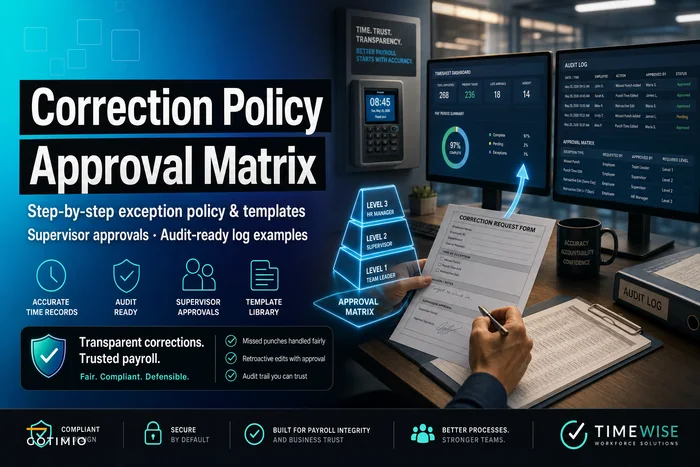
Version control these toolkits and update them based on issues that actually come up. The questions managers ask in week one become the FAQ entries for week two. The workarounds they discover become official procedures. A clear correction policy with approval matrices prevents managers from creating their own inconsistent approaches to timesheet adjustments.
Version control these toolkits and update them based on issues that actually come up.
The questions managers ask in week one become the FAQ entries for week two. The workarounds they discover become official procedures. A clear correction policy with approval matrices prevents managers from creating their own inconsistent approaches to timesheet adjustments.
Pilot designs that test reality, not ideal conditions
Most timekeeping pilots run in ideal conditions — the accounting department or IT team uses the new system for a month. They're tech-savvy, work regular hours, sit at computers all day. Then you roll out to the warehouse where workers share kiosks, work rotating shifts, and half don't have company email addresses. Suddenly nothing works like it did in the pilot.
Design pilots that stress-test actual operational complexity. Pick pilot groups that represent your hardest use cases, not your easiest. If you have field workers, remote employees, shift workers, or project-based billing, those groups should be in your pilot. The goal isn't to prove the system works — it's to find out what breaks under real conditions.
A medical practice ran what looked like a successful pilot with their administrative staff. Perfect adoption, clean data, happy users. Then they rolled out to clinical staff who bounce between exam rooms, can't access computers easily, and often work through lunch. The system fell apart within days. Nurses were writing hours on paper and entering them in batches. Doctors forgot entirely. Overtime exploded because no one was tracking hours in real time.
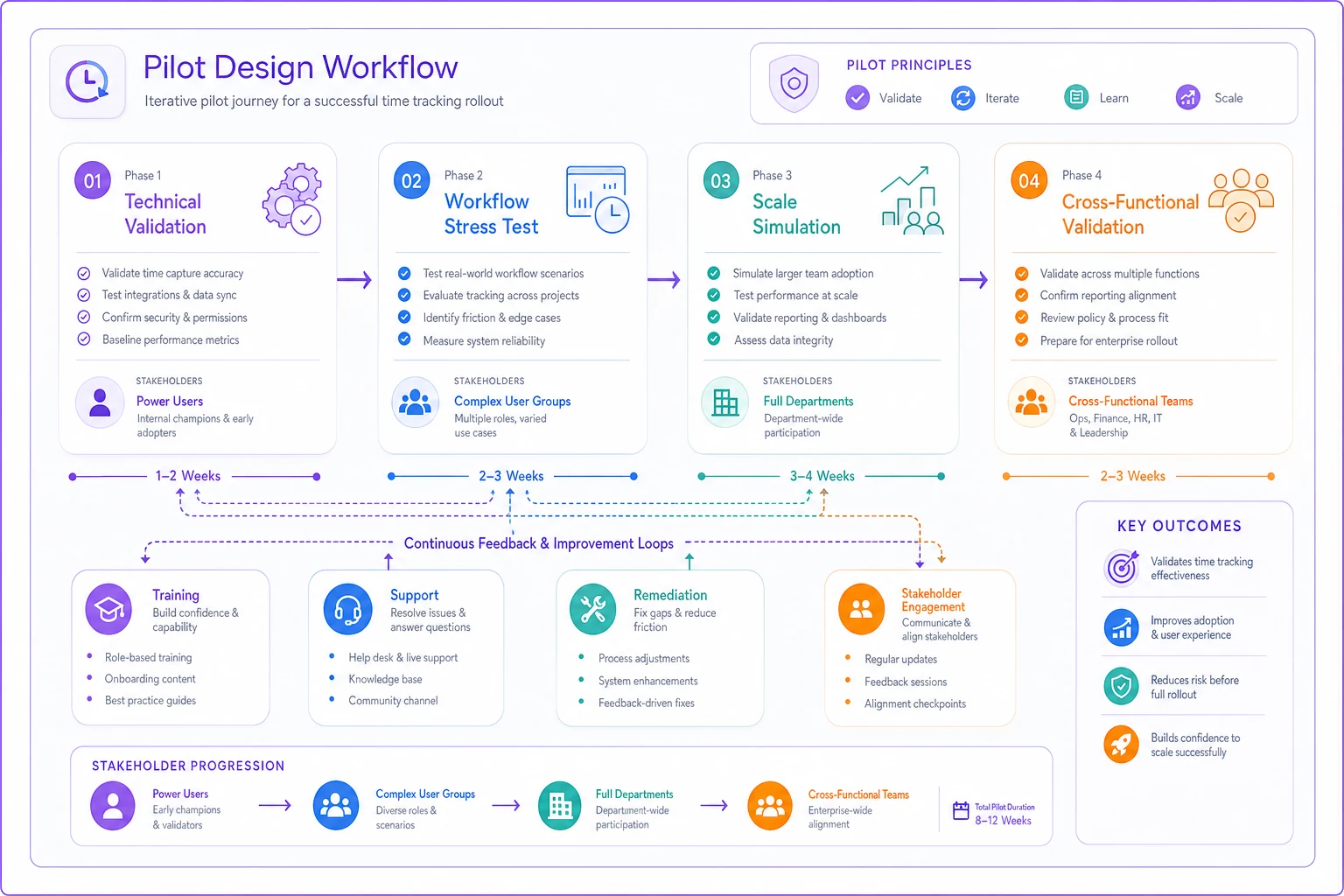
Structure your pilot phases around operational complexity:
-
Phase 1
Technical validation (1 week)
Small group of power users testing every feature, integration, and edge case. Finding system bugs before they hit operations. -
Phase 2
Workflow stress test (2 weeks)
Most complex user group running actual operations. Testing whether your meal break rules work for people who can't leave their station. Seeing if approval chains function when managers are traveling. Discovering what happens when someone needs to correct time after payroll runs. -
Phase 3
Scale simulation (2 weeks)
Full department including all edge cases. Testing the complete cycle from schedule to payroll. Measuring actual time savings versus the old system. Identifying training gaps before broad rollout. -
Phase 4
Cross-functional validation (1 week)
Testing handoffs between departments. Ensuring project hours flow to billing correctly. Validating overtime reports match what finance expects. Confirming compliance reports capture required data.
During each phase, track specific failure points: Where do people revert to paper? When do managers miss approval deadlines? Which errors repeat despite training? What workarounds are people inventing? These aren't just bugs to fix — they're operational realities to address in your rollout plan.
Your pilot should also test your support structure. Can managers get answers fast enough to meet deadlines? Do employees know who to contact when confused? Does payroll have a backup plan if data doesn't flow correctly? The pilot isn't just testing software — it's testing your entire operational readiness.
Here's a simple diagram that shows the pilot phases and feedback loops.
The pilot should also test your support structure. Can managers get answers fast enough to meet deadlines? Do employees know who to contact when confused? Does payroll have a backup plan if data doesn't flow correctly?
Adoption KPIs that measure operational success, not vanity metrics
Counting login rates and training completion tells you nothing about whether your timekeeping system actually works. An employee might log in daily but still enter hours wrong. A manager might complete training but still miss approval deadlines. You need KPIs that measure operational effectiveness, not activity.
Start with payroll accuracy as your north star. If employees are using the system correctly, payroll errors should drop. Track corrections per pay period, retroactive adjustments, and manual interventions required. Successful adoption shows steady decline in these numbers, not just high usage rates.
First-tier operational KPIs (weekly tracking):
-
Percentage of hours submitted before deadline (not just submitted)
-
Manager approval completion rate by payroll cutoff
-
Manual corrections required per 100 employees
-
Time between submission and approval
-
Exception requests handled within SLA
Second-tier behavioral KPIs (bi-weekly tracking):
-
Employees requiring support per pay period (should decrease over time)
-
Managers missing approval deadlines (should approach zero)
-
Paper timesheet submissions still occurring (should eliminate)
-
Buddy punching or credential sharing detected
-
Mobile vs desktop usage patterns (shows whether the tool actually fits the work)
Third-tier business KPIs (monthly tracking):
-
Overtime variance from forecast
-
Labor cost accuracy in project billing
-
Compliance violations detected and prevented
-
Time saved in payroll processing
-
Manager time spent on timesheet tasks
Connect system metrics to business outcomes. A construction company tracked login rates at 95% but kept having payroll issues. Deeper analysis showed workers were logging in but entering time for entire weeks at once, making daily cost tracking useless. They shifted their KPI from "login rate" to "same-day time entry rate" and finally could see the real problem.
Design your KPI dashboard for different audiences. Executives care about labor cost accuracy and compliance risk. Managers need to know if their teams are compliant. Payroll wants processing time and error rates. HR focuses on adoption struggles and support tickets. Each group should see metrics that connect to their actual responsibilities.
Build triggers into your KPIs that prompt action. If approval rates drop below 90% two days before payroll, managers get reminders. If correction requests spike well above normal, HR investigates training gaps. If overtime exceeds forecast significantly, finance gets alerts. These aren't just measurements — they're early warning systems.
Remediation playbooks for when adoption stalls
Even well-planned rollouts hit walls. A department refuses to abandon paper timesheets. Managers consistently miss deadlines. Employees find creative ways to game the system. You need remediation playbooks ready before these things happen, not assembled during a crisis.
The most common stall point hits around week three. Initial enthusiasm has worn off, old habits resurface, and the pressure of daily operations pushes people back to familiar processes. A retail chain watched their adoption metrics fall in week three when store managers realized approving timesheets daily took longer than their old weekly paper review. Without a remediation plan, they nearly lost the entire rollout.
Build remediation playbooks for predictable failure modes:
-
The Passive Resistance Pattern
-
The Manager Bottleneck Pattern
-
The Workaround Proliferation Pattern
-
The Data Quality Degradation Pattern
The Passive Resistance Pattern Signs: Consistently late submissions, "forgot to clock in" becoming routine, paper timesheets reappearing. Response: Deploy floor ambassadors who handle time entry alongside employees for one week — not training, but actual side-by-side support. Make time entry part of shift change procedures. Add visual reminders at entry points.
The Manager Bottleneck Pattern Signs: Approvals bunching at the deadline, overtime surprises, employee frustration with delays. Response: Implement staged approval deadlines by department. Create manager coverage charts for approvals. Set up automated pre-deadline reminders. Consider temporary approval delegation for overwhelmed managers.
The Workaround Proliferation Pattern Signs: Excel spreadsheets appearing, buddy punching increasing, suspicious time patterns. Response: Understand why workarounds seem easier. Often it's a specific workflow the system makes harder than it needs to be. Address the root cause, not the symptom. If nurses are buddy punching, maybe your biometric reader is in the wrong location.
The Data Quality Degradation Pattern Signs: Generic project codes, rounded hours, missing meal breaks. Response: Run accuracy audits with immediate individual feedback. Show teams how bad data affects their department budgets. Make accuracy visible, not just compliance.
Your remediation approach should escalate gradually. Start with support and education. Move to process changes if needed. Only resort to compliance enforcement when other approaches have failed. A manufacturing plant tried to force adoption through disciplinary measures and created a revolt. Another plant used peer champions and hit 98% adoption in the same timeframe.
Document every remediation action and its results. What worked for the warehouse might not work for the sales team. Build a library of interventions tagged by department type, issue category, and outcome. That becomes valuable for future rollouts and new locations.
Communication scripts aligned to your payroll calendar
Generic "system update" emails don't change behavior. Your communication needs to connect system usage to payroll outcomes, and it needs to arrive when people can actually act on it. A Friday afternoon email about Monday's new approval process guarantees Monday morning confusion.
Map your communication calendar to your payroll cycle, working backwards from critical deadlines. If payroll closes Wednesday at 3pm, managers need approval reminders Tuesday morning, not Wednesday at 2pm. Employees need submission prompts Monday morning, giving time for corrections before things get tight. Your SLA-based process should drive your communication timing.
Monday morning employee script: "Quick reminder: Last week's hours need your review by 5pm today. Check that your Thursday overtime and Friday's early departure are correctly recorded. Questions? Reply to this email or stop by HR before lunch. Corrections after today might delay payroll processing."
Tuesday morning manager script: "You have 14 timesheets awaiting approval, including 3 with overtime flags. Please review by noon today to allow time for any corrections. Johnson and Chen have exceptions requiring your notes. Payroll begins processing tomorrow morning, so approved hours become final at 5pm today."
Wednesday morning escalation script: "URGENT: 6 timesheets still pending your approval. Payroll closes at 3pm today. Any unapproved hours will delay payment to these employees: [List names]. Click here to approve now, or reply if you need immediate assistance."
Each message connects action to consequence. Not "please use the system" but "incomplete timesheets delay pay." That's not about scaring people — it's making the operational impact clear and personal.
-
For remote workers
"Since you can't check the office timecard board, here's your weekly hours summary: 38.5 recorded. Remember to log today's hours before signing off, especially if working past 5pm. Mobile app tip: save your favorite project codes for faster entry."
-
For shift workers
"Night shift reminder: Your hours for Sunday night (technically Monday) need manual entry if you crossed midnight. The system might show split days. Verify both Sunday PM and Monday AM entries are correct. Rick at extension 4521 can help until 6am."
-
For project-based teams
"Project 4472 closes Friday. All hours must be assigned by Thursday 3pm for client billing. Currently showing 127 hours allocated against a 140-hour budget. Please verify your time is correctly coded or reassign to overhead if needed."
Build response protocols into your scripts. If someone replies that they can't access the system, who handles that? If a manager says they're traveling and can't approve, what's the backup process? Your communication should anticipate problems, not just announce requirements.
The operational reality of timekeeping change
Timekeeping system adoption isn't really about the software. A construction company spent significant money on a cutting-edge platform with mobile apps, GPS tracking, and real-time analytics. Six months later, foremen were still collecting paper timesheets because nobody designed a process for workers without smartphones to clock in at remote sites.
Meanwhile, a small healthcare clinic switched from paper to a basic digital system but invested heavily in change management. They ran realistic pilots with night shift nurses. They gave charge nurses actual scripts for handling doctor pushback. They tracked payroll accuracy, not login rates. Today they process payroll in half the time with far fewer corrections.
The difference is that the clinic understood timekeeping sits at the intersection of operations, compliance, finance, and human behavior. You're not just changing how people record hours — you're rewiring dozens of interconnected processes that keep your business running.
This is where AI-powered operational platforms can genuinely help. Instead of managers manually checking every timesheet for issues, automated workflows can flag anomalies before they reach payroll. Rather than HR spending hours creating approval reminders, the platform can trigger contextual messages based on actual deadlines and individual patterns. The technology handles repetitive coordination tasks while humans focus on exceptions and judgment calls.
But even a well-designed platform fails without proper change management. The stakeholder mapping, manager toolkits, pilot design, and communication scripts aren't optional extras — they're the foundation that makes any timekeeping system actually function in the real world.
Your next timekeeping rollout doesn't have to end in emergency meetings and payroll disasters. Build your change management playbook before you pick your software. Design your pilot to test reality, not prove success. Give managers tools, not just training. Track metrics that matter for operations, not optics. And align every communication to the relentless rhythm of your payroll calendar.
The companies that nail timekeeping adoption don't have more resources or better technology. They just understand that changing how people track time means changing how their entire operation flows. Plan for that, and you have a real shot at the smooth rollout everyone promises but rarely delivers.
Ready to optimize your workforce time management?
Join 2,000+ companies using GoTimio to improve timesheet accuracy, reduce payroll errors, and boost team productivity.