

Your timesheet data isn't just a payroll input anymore. It's evidence in wage disputes, ammunition in wrongful termination lawsuits, and increasingly, the centerpiece of regulatory audits that can destroy small businesses overnight.
Most businesses are sitting on a legal time bomb they don't know exists
Most HR teams treat timesheet records like old receipts — stuff them in a digital drawer and forget they exist. But when a former employee files a wage claim two years after leaving, or when the Department of Labor shows up asking for three years of overtime records, that casual approach becomes an operational crisis fast.
What makes this particularly dangerous is how timesheet data touches every part of your business. It feeds payroll, drives project billing, justifies client invoices, validates insurance claims, and serves as the primary evidence in employment disputes. Each of those dependencies requires different retention periods, different access speeds, and different recovery formats.
The hidden complexity of timesheet data dependencies
Most businesses don't discover their timesheet data architecture problems until something breaks. A payroll provider switches systems and suddenly three years of historical data becomes inaccessible. An employee files a wage claim, and you realize the timesheet edits from their supervisor were never properly logged. A client disputes a project invoice from 18 months ago, and the detailed time entries that would prove your case were archived to cold storage that takes 72 hours to retrieve.
Accurate time tracking made effortless.
GoTimio empowers your team to log, monitor, and manage work hours seamlessly.
- Real-time time tracking
- Automated timesheet approvals
- Payroll and billing integration
No credit card required
The operational reality is that timesheet data exists in multiple states simultaneously. The same record actively feeding this week's payroll run is also potential evidence in next year's audit. The correction a supervisor made yesterday might become the key document in a wrongful termination suit filed months from now.
This creates a fundamental tension between operational efficiency and legal preparedness. Your payroll team needs immediate access to recent records. Your legal team needs comprehensive audit trails going back years. Your IT team wants to minimize storage costs. Your compliance officer needs everything readily available for surprise audits.
Building a lifecycle map that actually works
Not all timesheet data ages the same way. Current period timesheets feeding active payroll runs need millisecond response times. Last quarter's records might need hourly access for corrections. Last year's data might only need daily access for reporting. But data under legal hold needs to be frozen regardless of age, and data tied to ongoing projects needs special handling regardless of when it was created.
A practical lifecycle map for a 150-employee professional services firm looks something like this:
Hot Tier (0–90 days)
-
Primary database with full indexing
-
Sub-second query response
-
Full audit trail capture
-
Immediate supervisor access
-
Real-time sync to payroll systems
-
Storage cost
~$0.12 per employee per month
Warm Tier (91 days – 2 years)
-
Secondary database with selective indexing
-
5–30 second query response
-
Audit trails compressed but searchable
-
Manager access with approval
-
Batch sync for corrections
-
Storage cost
~$0.03 per employee per month
Cold Tier (2+ years)
-
Object storage with metadata indexing
-
1–4 hour retrieval time
-
Audit trails archived separately
-
HR/Legal access only
-
Manual restore process
-
Storage cost
~$0.008 per employee per month
Most businesses implement these tiers based purely on age, which is where things go sideways. A timesheet from three years ago might look like a cold storage candidate until you realize it's tied to an ongoing client dispute. A record from last week might need to be frozen because the employee was just terminated and litigation is likely.
Legal hold complications that break standard workflows
Legal holds are where carefully planned lifecycle maps fall apart. When an employee files a discrimination claim, every piece of data related to that employee must be preserved exactly as it exists at that moment — not just their timesheets, but their supervisor's edits, peer comparisons, department averages, and often data from employees in similar roles.
Legal holds cut across your entire tier structure. You might have relevant data in hot storage from last week, warm storage from last year, and cold storage from three years ago. All of it needs to be frozen simultaneously, exported in specific formats, and made available to legal counsel without disrupting ongoing operations.
Most businesses handle this by panic-exporting everything to spreadsheets, which creates three immediate problems. The export process often loses critical metadata like edit histories and approval chains. The exported data becomes disconnected from ongoing operations, so corrections need to be tracked separately. And the export format rarely matches what legal counsel actually needs for discovery.
A manufacturing client learned this expensively when they exported two years of timesheet data for a wage dispute, only to discover during depositions that the export didn't include supervisor approval timestamps. Those timestamps would have proved overtime was properly authorized. Because they weren't part of the standard export, the company settled for $340,000 instead of fighting a case they likely would have won.
E-discovery formats that courts actually accept
Courts don't care about your internal data formats. They care about authenticity, completeness, and chain of custody. Your beautifully structured database needs to transform into something lawyers can present as evidence.
Standard e-discovery format requirements include:
Native Format Preservation
-
Original database records with all fields intact
-
System-generated timestamps (not just user-entered times)
-
IP addresses and device identifiers for clock events
-
Complete audit trails with before/after values
Load File Requirements
-
Concordance or Relativity-compatible formats
-
Bates numbering for every record
-
Parent-child relationships maintained
-
Metadata extracted and indexed
Production Formats
-
PDF/A for long-term preservation
-
CSV with documented schemas
-
XML with validation rules
-
TIFF for any embedded documents
The technical challenge is maintaining these export capabilities as your systems evolve. A database migration that seems purely technical can accidentally break your e-discovery exports. A minor schema change can make historical exports incompatible with current formats. These aren't hypothetical risks — they're the kind of thing that surfaces at the worst possible moment.
RTO and RPO targets based on real dependencies
Recovery Time Objective (RTO) and Recovery Point Objective (RPO) for timesheet data can't be set in isolation. They depend entirely on downstream processes and legal requirements.
| Dependency | RPO | RTO | Validation Requirement |
|---|---|---|---|
| Payroll Processing | 4 hours | 2 hours | Transaction-level consistency |
| Client Billing | 24 hours | 48 hours | Project-level completeness |
| Regulatory Audits | 0 (no data loss) | 24–72 hours | Full audit trail integrity |
| Legal Discovery | Point-in-time preservation | 5–30 days | Forensic-level authentication |
Setting uniform RTO/RPO targets across all timesheet data is a mistake. It either results in excessive costs from treating everything like payroll-critical data, or dangerous gaps from treating payroll data like archived records.
Testing restore procedures before disaster strikes
Having a restore plan isn't the same as having a tested restore capability. The number of businesses that discover their backups don't actually work during an active crisis is genuinely alarming.
-
Test relationship integrity between timesheets and employee records. A restore that brings back timesheet data but loses the connection to employee classifications makes it impossible to validate overtime calculations.
-
Verify audit trails survive the restore process. Many backup systems capture the current state but lose the history of changes. For legal purposes, knowing an employee worked 45 hours is less important than proving when and how that number was recorded.
-
Confirm downstream systems can actually consume the restored data. Your payroll system might require timesheet data in a specific format with specific field mappings. A restore that brings data back in an incompatible format is operationally useless.
Include downstream system validation in every restore test to catch format incompatibilities early.
Testing should happen monthly for hot tier data, quarterly for warm tier, and annually for cold tier. Each test should include a full operational validation, not just a file integrity check.
The integration challenge with HR and payroll systems
Timesheet data doesn't exist in isolation. It feeds into payroll systems, HR information systems, project management tools, and workforce analytics platforms that need consistent data architectures. Each integration point creates both a dependency and a potential failure point for your lifecycle management.
These systems often have conflicting requirements. Your payroll system might need timesheet data in 15-minute increments with specific overtime codes. Your project management system might need it in decimal hours with task-level allocation. Your HR system might need it aggregated by pay period with leave balances included.
This creates a synchronization problem when you need to restore historical data. A timesheet record from two years ago might need to be restored not just to your time tracking system, but also retroactively synced to payroll for amended tax filings, project management for a client audit, and HR systems for leave balance recalculation.
Modern audit trail practices help by maintaining transformation logs that document how timesheet data was converted for each system. But most businesses don't realize they need those logs until they're already trying to reconstruct historical data for a lawsuit.
Building automated lifecycle transitions
Manual data lifecycle management doesn't scale. Once you're past 50 employees generating timesheet data across multiple locations and systems, manual archiving becomes a full-time job that nobody does properly.
Automation seems like the obvious answer, but most automated lifecycle tools are built for simple document management, not complex operational data with multiple dependencies. They'll happily archive a timesheet to cold storage without checking if it's tied to an open workers' comp claim or an unresolved client dispute.
Effective automation requires policy engines that understand business context, not just data age. That means building rules that consider legal hold status across multiple cases, project completion status for client billing, employee termination dates and litigation risk, regulatory audit cycles and look-back periods, and payroll amendment windows and tax filing deadlines.
The technical implementation typically involves trigger-based workflows that evaluate multiple conditions before transitioning data between tiers. The real challenge is handling exceptions. What happens when an automated archive job tries to move data that's suddenly needed for an urgent payroll correction? How do you handle partial transitions when some records in a batch are under legal hold?
These aren't theoretical edge cases. They happen regularly, and without explicit handling built into the automation, they create exactly the kind of data gaps that turn into legal liabilities.
> GRAPH: Automated lifecycle transition flow — Trigger evaluation → condition checks (legal hold status, project completion, termination risk, regulatory audit cycle, payroll amendment window) → tier assignment decision → exception handling path → archive or hold confirmation.
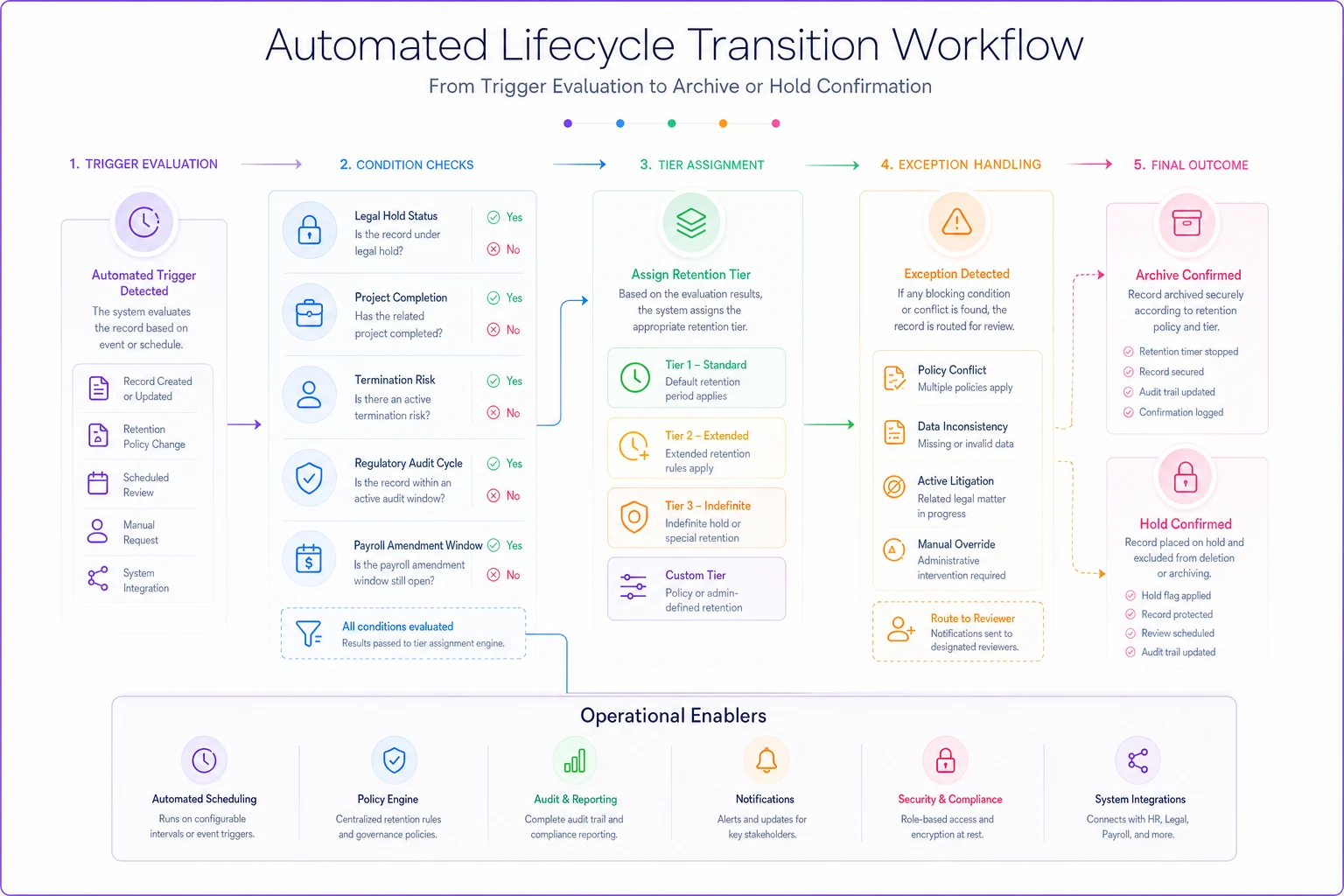
When these workflows are running correctly, lifecycle transitions happen in the background without anyone thinking about them. When they're not, you find out at the worst possible time.
The real cost of getting this wrong
The immediate costs of poor timesheet lifecycle management are obvious — failed audits, lost lawsuits, payroll disasters. The hidden operational costs often dwarf the compliance penalties.
When supervisors can't access historical timesheets quickly, they stop investigating discrepancies. When HR can't produce clean data for audits, they overpay settlements to avoid discovery. When IT can't restore data reliably, the business operates in perpetual defensive mode.
A construction company without proper lifecycle management was spending roughly $72,000 annually on manual data retrieval, emergency restores, and ad-hoc exports. After implementing automated lifecycle management with clear tier definitions and tested restore procedures, those costs dropped to under $8,000 annually. More importantly, they won two wage disputes that would have cost over $200,000 combined, simply because they could produce comprehensive timesheet records with full audit trails within 24 hours of the request.
Implementation priorities for resource-constrained teams
If you're reading this thinking "great, another massive IT project we can't afford," here's the practical reality: you can build effective timesheet lifecycle management incrementally.
Start with legal hold procedures. Most employment lawsuits provide some warning — an EEOC complaint, a demand letter from an attorney, or even just a contentious termination. Having a documented process to freeze relevant data immediately prevents spoliation of evidence claims that turn winnable cases into expensive settlements.
Next, focus on e-discovery formats for your most common scenarios. If you're in healthcare, that might be overtime calculations for nurse scheduling. If you're in construction, it might be prevailing wage compliance. Build and test export templates for these specific scenarios before worrying about everything else.
Then tackle tiered storage for cost optimization. Moving data from expensive primary storage to cheaper archive storage can fund the rest of your lifecycle improvements. A 200-employee company can often save $15,000–20,000 annually just by implementing proper storage tiers.
Finally, address restoration testing and automation. These provide the most operational value but require the foundational elements to be in place first.
Timesheet data is permanent, whether you plan for it or not
Even when you delete timesheet data from your systems, it still exists in email threads, downloaded spreadsheets, payroll provider archives, and increasingly in employee personal records thanks to labor law requirements around pay stub access.
That permanence means two choices: manage timesheet data lifecycle proactively with clear policies, tested procedures, and automated workflows — or react to each crisis as it emerges and hope your ad-hoc exports are good enough to avoid disaster.
Businesses that handle this well recognize timesheet data for what it actually is: the authoritative record of the employment relationship, with all the operational, financial, and legal weight that carries. They build systems that treat this data accordingly while keeping day-to-day operations running smoothly.
AI-powered operational platforms are making this balance more achievable by automating classification, tiering, and legal hold management that used to require constant manual oversight. These systems can flag timesheet records that need special handling, manage complex restoration scenarios, and maintain audit trails that satisfy both operational and legal requirements without someone manually babysitting the process.
The key is starting before you need it. By the time you're facing an audit or a lawsuit, it's too late to implement proper lifecycle management. But with even basic tiering and retention policies in place, you transform timesheet data from a liability into something that actually protects your business.
Ready to optimize your workforce time management?
Join 2,000+ companies using GoTimio to improve timesheet accuracy, reduce payroll errors, and boost team productivity.