

Most HR teams think time tracking is straightforward — employees clock in, clock out, hours get recorded. But once you dig into the actual data architecture required to make those hours usable for payroll, analytics, and compliance simultaneously, the complexity explodes.
The real challenge isn't capturing time entries. It's maintaining consistency when Sarah from accounting needs yesterday's numbers for payroll, Mike from operations wants real-time visibility for scheduling, and the audit team requires immutable records from 18 months ago — all while field workers submit offline punches that sync whenever they find WiFi.
Having built time tracking systems for businesses ranging from 15-person HVAC companies to 800-employee manufacturing plants, the same architectural patterns keep surfacing. The businesses that scale smoothly implement proper time data architecture from the start. The ones that struggle end up with fragmented systems, reconciliation nightmares, and analytics nobody trusts.
Why traditional timesheet schemas break at scale
The typical small business starts with a simple timesheet table: employee ID, date, hours worked, maybe a project code. Works fine for 20 employees submitting weekly timesheets. Then growth happens.
-
Multiple clock events per day (lunch breaks, job switches)
-
Overlapping shift differentials
-
Retroactive edits with approval chains
-
Different validation rules per department
-
Time zone conversions for remote workers
-
Partial day PTO calculations
That simple schema can't handle it. Most businesses respond by bolting on exception tables, manual processes, and Excel workarounds. By the time they hit 100+ employees, the technical debt is crushing.
Core Event Schema:
``
timestamputc: 2024-03-15T14:32:18Z
employeeid: EMP4521
eventtype: CLOCKIN
locationid: WAREHOUSE02
deviceid: KIOSKWEST
jobcode: PICKING
metadata: {shiftdifferential: true, overtimeeligible: true}
validation_status: PENDING
``
This approach preserves the complete audit trail while enabling complex calculations. When Sarah needs to retroactively adjust Monday's hours on Friday, you create a new ADJUSTMENT event rather than mutating the original record. The payroll system then applies business rules to determine which events to include.
CDC vs batch ingestion: picking the wrong pattern costs thousands in reconciliation
The ingestion pattern you choose fundamentally determines your operational capabilities and constraints. Most businesses default to batch processing without really thinking through the tradeoffs.
Accurate time tracking made effortless.
GoTimio empowers your team to log, monitor, and manage work hours seamlessly.
- Real-time time tracking
- Automated timesheet approvals
- Payroll and billing integration
No credit card required
Batch Processing Reality:
-
Managers can't see today's labor costs until tomorrow
-
Missed punches discovered at 4 PM can't be fixed until next morning
-
Payroll cutoff requires manual intervention every Wednesday
-
Integration failures mean 48-hour delays before anyone notices
The company was losing roughly $2,800 a month in overtime they could have caught with real-time visibility, plus another 15 hours of manual reconciliation work.
Change Data Capture (CDC) Alternative:
-
Supervisors receive alerts within 3 minutes when employees approach overtime
-
Scheduling adjustments happen based on actual vs planned hours
-
Payroll prep dropped from 8 hours to 90 minutes
-
Compliance violations get flagged before they become penalties
But CDC isn't universally better. The implementation complexity and infrastructure costs often aren't justified for smaller operations.
| Factor | Choose Batch When | Choose CDC When |
|---|---|---|
| Employee Count | Under 50 | Over 100 |
| Clock Events/Day | Less than 500 | More than 2,000 |
| Real-time Need | Next-day visibility acceptable | Same-hour decisions required |
| IT Resources | Limited or outsourced | Dedicated team available |
| Integration Count | 1-2 systems | 4+ downstream systems |
| Compliance Risk | Standard labor laws only | Multi-state, complex rules |
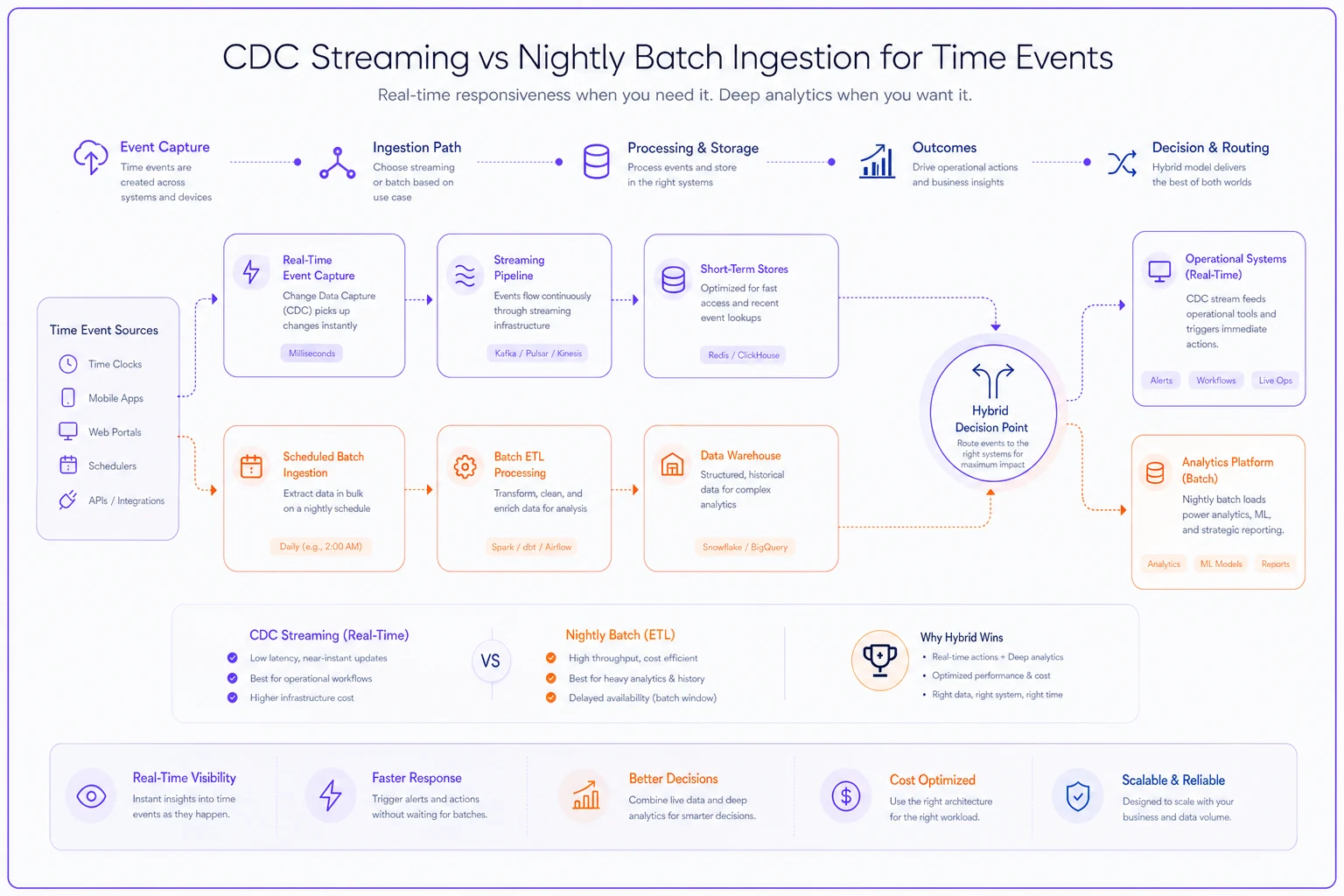
The hybrid approach often works best: CDC for clock events, batch for calculations. Real-time visibility without sacrificing computational efficiency.
Deterministic reconciliation rules that prevent payroll disasters
Reconciliation failures cause more payroll errors than anything else. The problem gets worse when multiple systems touch the same time data — time clocks, scheduling software, project tracking tools, mobile apps.
A construction company learned this when their field crews used three different methods to track time:
-
Foremen submitted paper timesheets
-
Office staff used the scheduling system
-
Field workers punched in via mobile app
Without deterministic rules, the same employee showed different hours in each system. Payroll spent 20+ hours weekly playing detective and still processed incorrect checks around 15% of the time.
Implementing Deterministic Reconciliation:
-
Biometric/badge reader
Highest authority
-
Manager-approved mobile punch
Secondary
-
Scheduled hours
Only if no actual punches exist
-
Manual entry
Lowest priority, requires approval
Then establish reconciliation rules that remove ambiguity:
``
Rule 1: Latest Valid Event Wins
IF multiple clock-ins exist within 15 minutes
THEN use the latest timestamp
UNLESS earlier event is from higher-authority source

Rule 2: Automatic Break Deduction
IF continuous work > 5 hours
AND no break punch exists
THEN insert 30-minute unpaid break at hour 4
UNLESS state law requires different treatment

Rule 3: Shift Boundary Handling
IF clock-out occurs > 15 minutes after scheduled end
THEN flag for manager approval
IF approved, pay actual time
ELSE pay scheduled time
``
-
Deterministic
Same input always produces same output
-
Auditable
Every decision traceable to a specific rule
-
Versioned
Rule changes tracked with effective dates
That construction company implemented similar rules and cut payroll processing from 20 hours to 3, while eliminating check corrections entirely.
Retention tiering that balances compliance, analytics, and storage costs
Time data accumulates faster than most businesses expect. A 200-employee company generates roughly 1.5 million time-related records annually when you factor in punches, edits, approvals, and calculations. Keeping everything forever isn't practical. Deleting too early creates compliance nightmares.
Tier 1: Hot Data (0-90 days)
-
Full detail, immediately accessible
-
Supports operational decisions
-
Enables quick corrections
-
Powers real-time dashboards
Tier 2: Warm Data (3-24 months)
-
Compressed but queryable
-
Historical comparisons available
-
Payroll reconciliation possible
Tier 3: Cold Archive (2-7 years)
-
Legal minimums only
-
Restored on-demand for audits
-
Aggregated for trend analysis
-
Original events preserved
Tier 4: Purged
-
Data beyond statutory requirements
-
Personally identifiable information removed
-
Aggregated metrics retained
A wholesale distributor implemented this structure and reduced storage costs by around 70% while actually improving query performance. Turns out 95% of queries touched only the last 60 days of data, so keeping older records in expensive hot storage was just waste.
| Data Type | Legal Minimum | Analytics Value | Recommended Retention |
|---|---|---|---|
| Raw punches | 3 years (FLSA) | 6 months | 3 years cold |
| Approved timesheets | 3-7 years (varies) | 2 years | 7 years tiered |
| Edit history | 3 years | 1 year | 3 years warm |
| Daily summaries | 3 years | 5 years | 5 years cold |
| Biometric data | 3-10 years (state law) | None | Per jurisdiction |
Retention decisions should be driven by legal requirements first, storage costs second. Don't let the cost conversation override the compliance conversation.
Operational validation gates that catch errors before they cascade
Most time tracking errors compound through multiple systems before anyone notices. An incorrect punch becomes wrong payroll, which becomes incorrect job costing, which becomes bad project estimates. By the time someone catches it, the damage is done.
Validation gates act as checkpoints that stop bad data from propagating. But poorly designed gates create bottlenecks that frustrate employees and slow everything down.
Gate 1: Point of Entry
-
GPS location within geofence
-
Scheduled vs actual variance
-
Previous punch status (can't clock in twice)
-
Device authorization
These checks happen instantly, giving employees immediate feedback to fix issues on the spot.
Gate 2: Supervisor Review
-
Hours exceed scheduled by 15%
-
Location mismatches
-
Unusual patterns (Sunday work, overnight shifts)
-
Missing punches
A landscaping company reduced timesheet corrections by 80% just by implementing location validation and same-day supervisor alerts. Previously, errors weren't caught until payroll processing, which meant a lot of back-and-forth.
Gate 3: Pre-Processing
-
Total hours reasonableness check (nobody works 200 hours a week)
-
Minimum wage compliance
-
Overtime calculations
-
PTO balance verification
Gate 4: Cross-System Reconciliation
-
Scheduling system
-
Access control logs
-
Project management tools
-
Customer billing records
The validation has to be smart enough to catch real issues without flagging legitimate exceptions. A restaurant chain learned this after their system flagged every employee who stayed 5 minutes late to help close — hundreds of false alerts daily.
Schema patterns that support both real-time operations and historical analytics
The fundamental tension in time data architecture: operational systems need normalized, mutable data while analytics requires denormalized, immutable records. Most businesses pick one and suffer the consequences of the other.
Operational Schema (OLTP)
``
employees (employeeid, name, departmentid, hourlyrate)
timeevents (eventid, employeeid, timestamp, type, locationid)
shifts (shiftid, employeeid, starttime, endtime, status)
approvals (approvalid, eventid, approverid, timestamp, notes)
``
Analytics Schema (OLAP)
``
dailysummaries (
  date, employeeid, employeename, department,
  regularhours, overtimehours, totalcost,
  location, jobcodes, breakminutes
)

weeklyanalytics (
  weekstarting, employeeid, totalhours,
  overtimehours, averagedaily, cost_variance
)
``
A manufacturing plant using this dual-schema approach reduced report generation from hours to seconds while maintaining sub-second punch processing. Their analytics revealed scheduling patterns that cut overtime costs by $48,000 annually.
The schemas sync via ETL processes that follow a consistent sequence:
-
Extract events from operational tables
-
Apply business rules and calculations
-
Load into analytics structures
-
Maintain consistency checksums
A manufacturing plant using this dual-schema approach reduced report generation from hours to seconds while maintaining sub-second punch processing.
Migration patterns for moving from spreadsheets to proper architecture
The path from Excel-based time tracking to proper time data architecture feels overwhelming. Most businesses delay until the pain becomes unbearable, then rush the implementation and create new problems.
Phase 1: Parallel Capture (Weeks 1-4)
-
Employees still submit paper/Excel
-
Admin enters into both old and new systems
-
Compare outputs to identify discrepancies
-
Build confidence without risk
Phase 2: Passive Validation (Weeks 5-8)
-
Employees use new time capture
-
Automated comparison with legacy calculations
-
Flag and investigate variances over 0.5%
-
Maintain Excel as backup
Phase 3: Controlled Cutover (Weeks 9-12)
-
Start with tech-comfortable teams
-
Provide extra support during first pay period
-
Document and resolve edge cases
-
Build internal champions
Phase 4: Legacy Shutdown (Week 13+)
-
Archive historical data
-
Disable write access to old system
-
Maintain read-only access for 6 months
-
Document all custom calculations
A 150-employee logistics company followed this pattern and completed migration without a single payroll error. The gradual approach also surfaced dozens of undocumented business rules buried in Excel formulas — rules that would have broken payroll if they'd been missed.
Start cutovers with teams that are comfortable with technology to create internal champions and surface edge cases early.
A 150-employee logistics company followed this pattern and completed migration without a single payroll error. The gradual approach also surfaced dozens of undocumented business rules buried in Excel formulas — rules that would have broken payroll if they'd been missed.
Building analytics-ready time data without sacrificing compliance
The conflict between analytics and compliance requirements creates real architectural headaches. Analytics wants aggregated, transformed data. Compliance demands immutable audit trails. Most businesses end up maintaining separate systems, which doubles both complexity and cost.
Immutable Event Stream:
-
Every punch, edit, approval preserved
-
Cryptographic hashes ensure tamper-evidence
-
Retention meets regulatory requirements
-
Court-admissible audit trail maintained
Materialized Analytics Views:
-
Rebuilt nightly from event stream
-
Business rules applied consistently
-
Historical recalculation possible
-
Performance optimized for queries
This architecture enabled a healthcare staffing agency to pass a Department of Labor audit with zero findings, reduce report generation from 4 hours to 5 minutes, identify $31,000 in unbilled overtime, and maintain compliance across 8 states.
Think of time events the way you'd think about financial transactions. You wouldn't edit bank records directly — you'd create adjusting entries. Same principle applies here, and the compliance benefits are just as real.
When AI-powered platforms actually make sense for time data management
Not every business needs sophisticated time data architecture. A 10-person consulting firm can probably stick with spreadsheets. But once complexity increases — multiple locations, varied schedules, compliance requirements, analytics needs — manual approaches start breaking down pretty fast.
AI-enhanced operational platforms help by automatically detecting anomalies in punch patterns, predicting overtime before it happens, identifying optimal shift patterns from historical data, flagging potential compliance violations, and streamlining approval workflows.
A regional retail chain implemented an AI-powered time tracking platform and found their Monday morning shifts were consistently overstaffed by 30% based on transaction patterns. Scheduling optimization alone saved $67,000 annually.
Automation particularly helps with reconciliation. Instead of manually comparing three systems, the platform continuously monitors for discrepancies and either auto-resolves using predetermined rules or escalates to humans with context and recommended actions.
But automation isn't magic. You still need clean data architecture underneath, clear business rules, proper validation gates, and human oversight for exceptions. The businesses that get the most out of these platforms treat them as operational tools layered on top of good architecture — not a substitute for it.
Architecture determines whether time data becomes an asset or a liability
Time data architecture might seem like technical overkill for something as simple as tracking hours. But businesses that treat it as an afterthought inevitably hit scaling walls — payroll errors multiply, compliance risks emerge, analytics become unreliable, and manual reconciliation consumes entire teams.
Start with the basics: implement a proper schema, choose the right ingestion pattern, establish clear reconciliation rules. Add sophistication as you scale. The investment in proper time data architecture pays back quickly through reduced errors, faster processing, and analytics that actually drive better decisions.
Time data touches everything — payroll, billing, compliance, analytics, operations. Getting the architecture right early saves an enormous amount of pain later.
Ready to optimize your workforce time management?
Join 2,000+ companies using GoTimio to improve timesheet accuracy, reduce payroll errors, and boost team productivity.