

Most timesheet security conversations die in a meeting where IT starts talking about AES-256 and the HR lead nods politely while deciding this isn't their department. Then a payroll admin account gets compromised, or an auditor asks "who can read the raw punch data and how would you know if they did?" — and suddenly it very much is HR's problem.
Timesheet data sits in a weird ownership gap. IT owns the servers. Payroll owns the outputs. HR owns the policy and the liability. Nobody clearly owns whether the encryption keys got rotated last quarter or whether the CFO's admin login shows up anywhere in a security dashboard.
This checklist is written for that gap. It's ordered by what actually reduces risk fastest, not by what sounds most impressive in a vendor demo. You don't need to understand cryptography to use it — you need to know what to ask for, what "done" looks like, and what a healthy log line should contain so you can tell when something's off.
Start with what's actually exposed, not what's fashionable
Before touching encryption settings, it helps to know where timesheet data physically lives. In most small and mid-sized setups, the same time record exists in more places than anyone realizes:
-
The timekeeping app's primary database
-
Nightly backups (often a different vendor, sometimes a different country)
-
The payroll export file — frequently a CSV sitting in a shared drive or an email attachment
-
A reporting copy someone set up two years ago and forgot about
-
Individual laptops where managers downloaded exports "just to check something"
When running the inventory, prioritize ad-hoc copies like exports and shared inboxes — they're the likeliest exposures.
That last one is where breaches quietly start. Encryption on the primary database means nothing if a manager has an unencrypted export of six months of employee punches, wage rates, and personal IDs sitting in their Downloads folder.
So the first item on any real timesheet security checklist isn't a technical control — it's an inventory. Where does this data exist, who put it there, and does that copy still need to exist? The riskiest data usually isn't in the system of record. It's in the ad-hoc copies floating around the org.
The prioritized checklist
Here's the order that gives you the most risk reduction per unit of effort. Work top to bottom.
Accurate time tracking made effortless.
GoTimio empowers your team to log, monitor, and manage work hours seamlessly.
- Real-time time tracking
- Automated timesheet approvals
- Payroll and billing integration
No credit card required
-
Kill unnecessary data copies. Delete stale exports, lock down shared drives holding payroll CSVs, and set a policy that raw timesheet exports never leave approved systems. This costs nothing and removes your worst exposure.
-
Encrypt data at rest and in transit. Confirm the database, backups, and any file storage use encryption. Confirm every connection (app, API, payroll integration) uses TLS. Get this in writing from your vendor.
-
Establish key rotation with a schedule. Encryption is only as good as key management. Rotate on a cadence and after any personnel change involving someone who had key access.
-
Turn on privileged-account monitoring. Every admin, super-user, and service account that can read or edit raw time data needs to be watched. This is where fraud and breaches actually surface.
-
Feed logs into a SIEM (or at minimum a centralized log store). Scattered logs are useless during an incident. Centralize them and set alerts.
-
Define retention cadences for each log type. Keep what you need for audits and investigations, delete the rest on schedule to reduce liability.
Notice encryption isn't step one. A perfectly encrypted database with twelve people holding admin rights and no monitoring is far more dangerous than a modestly encrypted one where three people are watched closely.
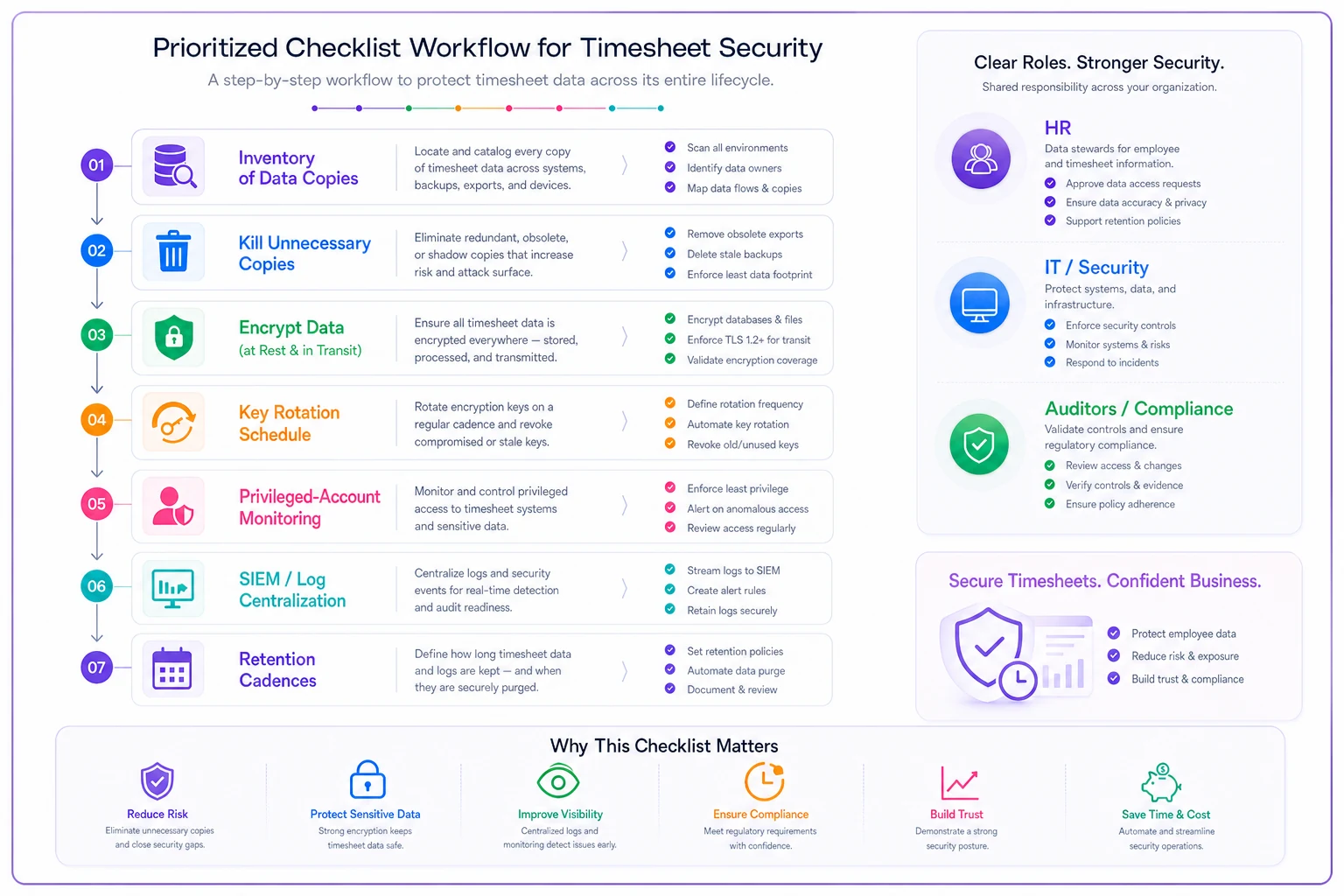
The diagram above shows the recommended order to tackle the checklist and which teams typically need to be involved at each step.
Encryption: get the boring confirmations in writing
Encryption at rest and in transit is largely table stakes now, and most reputable timekeeping platforms handle it. The mistake HR teams make isn't skipping encryption — it's assuming it's on and never confirming.
A common version of this: a company runs a mid-tier SaaS timekeeping tool and everyone assumes backups are encrypted because the main product is. Turns out the nightly backup went to a third-party storage bucket configured years ago without encryption enabled. Nobody lied. Nobody checked.
What to actually confirm:
| Data location | Question to ask vendor | Acceptable answer |
|---|---|---|
| Primary database | Is data encrypted at rest? | Yes, AES-256 or equivalent |
| Backups | Are backups encrypted, and where are they stored? | Yes, encrypted, known region |
| Data in transit | Is TLS enforced on all connections and APIs? | Yes, TLS 1.2 minimum |
| Payroll export files | Are exports encrypted or password-protected? | Yes, or delivered via secure channel |
| Mobile/offline cache | Is locally cached punch data encrypted on device? | Yes |
The mobile row catches people off guard. Field teams using offline capture often store punches locally until sync — if that cache isn't encrypted and a phone gets lost, that's a data exposure event regardless of how locked-down your servers are.
Key rotation: the part everyone forgets after setup
Encryption keys aren't set-and-forget. If the same key has been protecting your data for five years, and someone with key access left two years ago, you've been running on borrowed trust the whole time.
Key rotation means periodically generating new encryption keys and re-encrypting data so old keys become useless. Most cloud platforms support automated rotation — the issue is that nobody turns it on or defines when it should happen.
-
Data-encryption keys rotate every 6–12 months automatically
-
Key-encryption keys (the master keys) rotate every 12 months
-
Event-driven rotation always rotate after an admin or engineer with key access leaves, and after any suspected compromise
-
API keys and integration secrets (payroll connector, SSO)
rotate every 6 months and immediately if exposed
The event-driven trigger matters more than the calendar one. The highest-risk moment is right after someone with elevated access departs — and that's usually the moment least likely to prompt anyone to rotate anything, because everyone's focused on the offboarding checklist and transition work.
Tie key rotation to your offboarding process the same way you'd tie it to badge collection. If it lives only in IT's head, it won't happen consistently.
Privileged-account monitoring: where problems actually show up
This is the highest-value item on the list and the most neglected. Encryption protects data from outsiders. Privileged-account monitoring protects it from misuse by people who legitimately have access — which is where most timesheet integrity problems actually originate.
A privileged account is anyone who can do more than enter and view their own time: payroll admins, HR system admins, IT super-users, and service accounts that integrations run under. These accounts can read wage data, edit historical punches, change approval statuses, or export everything at once.
What you're watching for:
-
Admin accounts reading or exporting large volumes of records outside normal patterns
-
Edits to time records after payroll cutoff
-
Access at unusual hours (a payroll admin login at 2 a.m. on a Sunday deserves attention)
-
Service accounts suddenly behaving like humans — interactive logins on an account meant only for API calls
-
New privileged accounts being created without a clear owner
This ties directly into how you've structured roles in the first place. If you haven't nailed down separation of duties, monitoring gets noisy fast because too many people have too much access. Our breakdown on policy-to-configuration RBAC for timekeeping systems walks through the separation-of-duties and SSO/MFA structure that makes privileged monitoring actually workable. Fewer privileged accounts means cleaner signal.
Sample logging statements
timestamp=2025-03-14T02:41:07Z event=timesheet.record.edit actor=adminjlee actorrole=payrolladmin authmethod=ssomfa sourceip=203.0.113.44 targetemployee=emp20481 fieldchanged=hoursworked oldvalue=7.5 newvalue=9.5 payperiod=2025-03-012025-03-15 aftercutoff=true justification="manager approved missed punch" sessionid=a1b2c3d4
Three fields people consistently leave out and later regret: authmethod (was MFA actually used?), aftercutoff (was this edit made after payroll locked?), and justification (is there a documented reason?). Those three turn a vague "someone changed a number" into a defensible, explainable record.
timestamp=2025-03-14T09:12:33Z event=timesheet.export.bulk actor=adminmsmith actorrole=hradmin recordcount=4,812 exportformat=csv destination=download sourceip=198.51.100.9 session_id=e5f6g7h8
If record_count is in the thousands and destination=download, that's the kind of event you want an alert on — not because it's necessarily bad, but because it's exactly what data exfiltration looks like too.
SIEM integration: centralize before you optimize
A SIEM (Security Information and Event Management) tool collects logs from across your systems, correlates them, and alerts on suspicious patterns. For a large org, this is standard. For a small business, "SIEM" might just mean a centralized log store with a few alert rules — and that's fine. The principle is what matters: logs scattered across five systems are worthless during an incident.
The failure pattern is predictable. Something suspicious happens, HR asks IT to investigate, and IT discovers the timekeeping app's logs only go back 30 days, the payroll connector logs are somewhere else entirely, and nobody can line up timestamps across systems. The investigation stalls not from a lack of data, but because the data was never brought together.
What to route into your SIEM or central log store from the timekeeping side:
-
All privileged-account authentication events (success and failure)
-
All record edits after payroll cutoff
-
All bulk exports above a threshold (say, more than 100 records)
-
All permission and role changes
-
All key rotation and access events
-
Integration/API authentication failures
Then set a small number of high-signal alerts. Don't try to alert on everything — you'll drown in noise and start ignoring it, which is worse than no alerts at all. Start with: failed MFA on a privileged account, bulk export over threshold, and any edit to a locked pay period.
Retention cadences: keep enough, but not forever
Logs are both an asset and a liability. Keep them too briefly and you can't investigate or defend an audit. Keep them forever and you're storing sensitive access data that becomes its own breach risk.
A workable retention cadence for timesheet-related security logs:
| Log type | Retention | Reason |
|---|---|---|
| Privileged-account auth logs | 1 year | Investigation window, security audits |
| Record-edit/change logs | 3–7 years | Wage-and-hour audit and dispute defense |
| Bulk export logs | 1–2 years | Detecting slow data exfiltration |
| Key rotation events | 3 years | Prove key hygiene to auditors |
| Failed login / API auth failures | 90 days | Short-term attack detection |
| Permission/role change logs | 3–7 years | Separation-of-duties audit trail |
Note the split: security-detection logs can be short-lived, but anything tied to the content of pay records needs to align with wage-and-hour retention law, which often runs several years. Your change logs are effectively part of your payroll audit trail, not just security data. For how those retention windows and export formats fit into a defensible records practice, our piece on audit-trail hygiene for HR and finance covers the retention schedules and export templates in more depth.
When this level of rigor makes sense — and when it's overkill
Not every business needs a full SIEM and automated key rotation on day one. Being honest about that keeps this from becoming security theater.
This full checklist makes sense when: you have more than a handful of privileged users, you run payroll integrations that move data between systems, you operate across jurisdictions with real wage-and-hour exposure, or you handle regulated data. The more people who can touch raw time data, the more this matters.
A lighter version is fine when: you're a small team where the owner is the only admin, you use a single reputable SaaS timekeeping platform, and there are no custom integrations. In that case, confirm encryption is on, enable MFA, turn on whatever audit logging the platform offers, and keep exports off personal devices. That covers most of your realistic risk.
Who should not overthink this: a five-person shop with one login doesn't need a key rotation calendar. They need MFA and a habit of not emailing payroll spreadsheets around. Match the control to the actual exposure.
A real scenario
A regional home-services company with around 60 field staff ran timekeeping through a solid SaaS platform but had gotten sloppy on the operational side. Four office staff had admin access, two former employees still had active logins months after leaving, and payroll exports were regularly emailed as plain CSVs to an outside bookkeeper.
Nothing had gone wrong yet — which is exactly why nobody had looked. When they finally ran an inventory, they found roughly a dozen unencrypted payroll exports sitting in a shared inbox, some over a year old, each containing names, pay rates, and partial IDs for the entire crew.
The fix wasn't dramatic. They cut admin access from four accounts to two, killed the dormant logins, switched the bookkeeper to a secure shared folder instead of email, enabled MFA on all privileged accounts, and set alerts for bulk exports and after-cutoff edits. Key rotation got tied to their offboarding checklist. Total effort was maybe a week of focused work spread across HR and IT.
The measurable change was mostly in exposure, not dollars: they went from a dozen-plus loose copies of sensitive data down to zero uncontrolled ones, and from no visibility into privileged activity to a weekly review that took about ten minutes. Six weeks later that alerting caught a legitimate-but-unusual bulk export by a new office hire who'd been told to "pull everyone's hours" — flagged, reviewed, cleared quickly. That's the system working.
Where to start this week
If this feels like a lot, start with the two items that cost nothing and remove the most risk: run the data inventory (find every copy of timesheet data) and cut privileged access to the minimum. Those two alone eliminate the majority of realistic exposure for most small businesses.
Encryption confirmation, key rotation cadence, SIEM routing, and retention schedules build from there. The point isn't to check every box perfectly on day one — it's to close the ownership gap where timesheet security quietly falls through the cracks between IT, payroll, and HR. Somebody has to own it. The checklist just gives that person a defensible order to work in.
If this feels like a lot, start with the two items that cost nothing and remove the most risk: run the data inventory (find every copy of timesheet data) and cut privileged access to the minimum. Those two alone eliminate the majority of realistic exposure for most small businesses.
Encryption confirmation, key rotation cadence, SIEM routing, and retention schedules build from there. The point isn't to check every box perfectly on day one — it's to close the ownership gap where timesheet security quietly falls through the cracks between IT, payroll, and HR. Somebody has to own it. The checklist just gives that person a defensible order to work in.
Ready to optimize your workforce time management?
Join 2,000+ companies using GoTimio to improve timesheet accuracy, reduce payroll errors, and boost team productivity.