


Your payroll team spends Monday mornings fixing timesheet mistakes. Project codes in the wrong field. Overtime hours missing. Lunch breaks recorded as billable time. Each correction takes somewhere between 3 and 9 minutes to verify, adjust, and document. Multiply that across 150 employees submitting weekly, and you're burning a serious chunk of time every pay period on problems that shouldn't exist.
The frustrating part? Most of these errors happen because the forms fight against how people actually think about their workday. Employees aren't careless — they're rushed, multitasking, or filling out forms on phones between meetings. When a timesheet requires someone to recall exact project codes or mentally calculate break deductions, mistakes are pretty much guaranteed.
When you apply the right UX patterns, the numbers shift noticeably. Construction companies see first-pass accuracy jump from the mid-60s to high 80s. Marketing agencies cut payroll processing from 8 hours to under 3. Healthcare practices eliminate most overtime disputes. These aren't massive system overhauls — they're relatively simple interface adjustments that guide users toward correct entries without making the form feel like a chore.
Required fields that actually prevent problems (not annoy users)
Most timesheet systems mark nearly everything as required. This creates form fatigue where employees rush through just to make the red asterisks disappear. The smarter move is focusing required fields on the ones that actually cause downstream problems when blank.
A logistics company tracked their timesheet corrections for three months and found 78% of fixes involved missing project codes. But their form marked 14 fields as required, including "notes" and "supervisor name" — fields that rarely caused payroll issues. After restructuring based on actual correction data, their error rate dropped 35% in the first month.
The decision matrix for required fields
| Field Type | Make Required When | Keep Optional When | Real Impact |
|---|---|---|---|
| Project/Client Code | Billable hours involved | Internal admin time | Prevents $2-3k monthly billing leaks |
| Break Duration | Shift exceeds 6 hours | Under 6-hour shifts | Avoids compliance violations |
| Overtime Reason | OT hours entered | Regular hours only | Reduces approval delays by 2 days |
| Location/Site | Multi-site operations | Single location | Eliminates 80% of mileage disputes |
| Task Description | Client-facing roles | Back-office work | Cuts invoice questions by half |
Required fields should prevent expensive mistakes, not enforce data completeness for its own sake. A dental practice found their hygienists were spending 4 extra minutes per timesheet filling out "treatment codes" that billing never actually used. Making that field optional saved 20 hours monthly without touching billing accuracy.
Progressive disclosure helps a lot here. Show overtime justification fields only when someone enters hours beyond their standard schedule. Display project allocation fields only for billable roles. Employees see 3-4 required fields instead of 12, which dramatically reduces how much mental effort the form demands.
Smart defaults that match actual work patterns
Default values in timesheets usually reflect wishful thinking about how work should happen. Standard 9-5 schedules when most staff work 8:30-4:30. Alphabetical project lists when 80% of hours go to the same three projects. These mismatches force unnecessary edits that introduce errors.
Accurate time tracking made effortless.
GoTimio empowers your team to log, monitor, and manage work hours seamlessly.
- Real-time time tracking
- Automated timesheet approvals
- Payroll and billing integration
No credit card required
Watch someone fill out a timesheet and patterns become obvious fast. They enter the same start time most days. They work on the same 2-3 projects. They take lunch at roughly the same time. Smart defaults leverage these patterns to reduce manual entry.
Before vs After: Default configurations
Traditional approach:
-
Start time
Blank field
-
End time
Blank field
-
Project
"Select from list" dropdown
-
Break
30-minute default for everyone
-
Location
Company headquarters
Pattern-based defaults:
-
Start time
Their median clock-in from the last 10 days
-
End time
Calculated from typical shift length
-
Project
Most-used project from the previous week
-
Break
Their actual average break duration
-
Location
Where they worked yesterday
An HVAC company implemented pattern-based defaults and tracked the impact: employees changed default values only 23% of the time, compared to 67% with generic defaults. When they did override defaults, those entries were 90% accurate versus 72% accuracy for fields without smart defaults.
The implementation doesn't require complex algorithms. Track each user's last 5-10 entries, use the mode for categorical fields like projects, and use the median for time entries to avoid outliers. Update defaults weekly so they stay relevant without reacting too aggressively to one-off variations.
Update defaults weekly so they stay relevant without reacting too aggressively to one-off variations.
One caution worth mentioning: avoid being too clever with predictions. A marketing agency tried predicting project codes based on calendar appointments, but employees found the constantly shifting defaults confusing. Stick to simple, stable patterns that users can actually anticipate.
Inline validation that catches mistakes immediately
Traditional timesheets validate everything on submission, presenting users with a wall of error messages after they've mentally moved on. At that point, they can't remember why they entered specific values and often make hasty corrections that create new problems.
Inline validation checks entries as users type, flagging issues while context is still fresh. But poorly implemented inline validation feels naggy and disruptive. The difference comes down to timing, tone, and specificity.
Validation patterns that actually help
For time entries:
Instead of "Invalid time format," try "Looks like you meant 2:30 PM?" with a one-click correction. A construction firm found that suggesting probable intended values reduced re-entry errors by 60% compared to just highlighting mistakes.
For project codes:
Don't just mark invalid codes red. Show the three closest matches: "Did you mean: PRJ-2847, PRJ-2845, or PRJ-2841?" This is especially useful for companies with numbered project codes where transposition errors are common.
For overtime thresholds:
-
At 45 hours
"You're approaching overtime (50+ hours)"
-
At 50 hours
"This triggers overtime rates — intentional?"
-
At 60 hours
"Requires manager approval — add justification?"
Healthcare facilities using this approach saw overtime documentation improve from 45% complete to 85%, which basically eliminated the follow-up conversations.
The anti-pattern to avoid
Never validate while users are still typing. A retail chain implemented validation that checked project codes with every keystroke, causing the form to flash red constantly. Stress went up, accuracy went down, IT got flooded with complaints. Wait for field blur or a brief pause — around 800ms works well — before validating.
Microcopy that eliminates confusion
Field labels and help text seem minor, but unclear microcopy causes a surprising amount of rework. "Duration" — is that decimal hours or hours:minutes? "Project" — the project code, name, or client name? These ambiguities create consistent error patterns you can predict and prevent.
A professional services firm analyzed 500 timesheet corrections and found 31% came from misunderstanding what specific fields wanted. Their "Task" field accepted either task codes or descriptions, producing a mix that made reporting useless. Clear microcopy fixed the problem without touching the underlying system.
High-impact microcopy improvements
Time format clarity:
-
Weak
"Start Time"
-
Better
"Start Time (e.g., 9:00 AM)"
-
Best
Dynamic placeholder showing "9:00 AM" that updates to the user's typical start
Project specification:
-
Weak
"Project"
-
Better
"Project Code"
-
Best
"Project Code (e.g., MKT-2024-015)"
Break handling:
-
Weak
"Break Duration"
-
Better
"Unpaid Break (minutes)"
-
Best
"Lunch/Break (deducted from total)"
The real power comes from contextual microcopy that appears exactly when needed. When someone enters 25 hours for a single day, show "Did you mean 2.5 hours?" directly below the field. When they select a project marked inactive, display "This project closed March 15 — use SKU-2847 for similar work."
When someone enters 25 hours for a single day, show "Did you mean 2.5 hours?" directly below the field. When they select a project marked inactive, display "This project closed March 15 — use SKU-2847 for similar work."
Testing microcopy improvements
Run a simple A/B test: randomly show half your users improved microcopy for one problematic field. Track correction rates for that specific field across both groups. A consulting firm tried this with their "Billing Category" field and saw errors drop from 18% to 7% just by adding "(Internal/Client/Non-billable)" to the label.
A consulting firm tried this with their "Billing Category" field and saw errors drop from 18% to 7% just by adding "(Internal/Client/Non-billable)" to the label.
A/B tests HR teams can actually run
Most HR departments think A/B testing requires technical expertise they don't have. It doesn't. You can run meaningful tests with basic spreadsheet skills and your existing timesheet system. The key is testing one change at a time and measuring specific outcomes.
Test 1: Default values impact
Week 1-2: Current defaults (baseline)
Week 3-4: Pattern-based defaults for top 20% of users
Measure: Edit rate per field, correction requests, time-to-submit
A manufacturing company ran this test and found pattern-based defaults reduced submission time by just over 3 minutes per timesheet. Across 200 employees, that added up to 10+ hours saved weekly.
Test 2: Validation timing
Group A: Validation on form submission
Group B: Inline validation with a 1-second delay
Measure: Error messages shown, resubmission rate, support tickets
Inline validation consistently reduces resubmissions by 40-50%, but only when properly delayed. Instant validation increases abandonment.
Test 3: Required field reduction
Phase 1: Track which "required" fields are most often left blank or filled with placeholder data
Phase 2: Make the bottom 30% optional for a test group
Measure: Data quality scores, correction time, user satisfaction
Surprising result from multiple companies: making fields optional often improves data quality. When forced entry is removed, employees who do fill out the fields tend to be more accurate.
Test 4: Microcopy variations
Create three versions of problematic field labels:
-
Current version
-
Clarified version with format example
-
Simplified version with tooltip
Rotate versions weekly and track error rates. An accounting firm found that examples in labels outperformed both tooltips and standalone help text, reducing errors by 45% for complex fields.
Quick visual of the A/B test workflow.
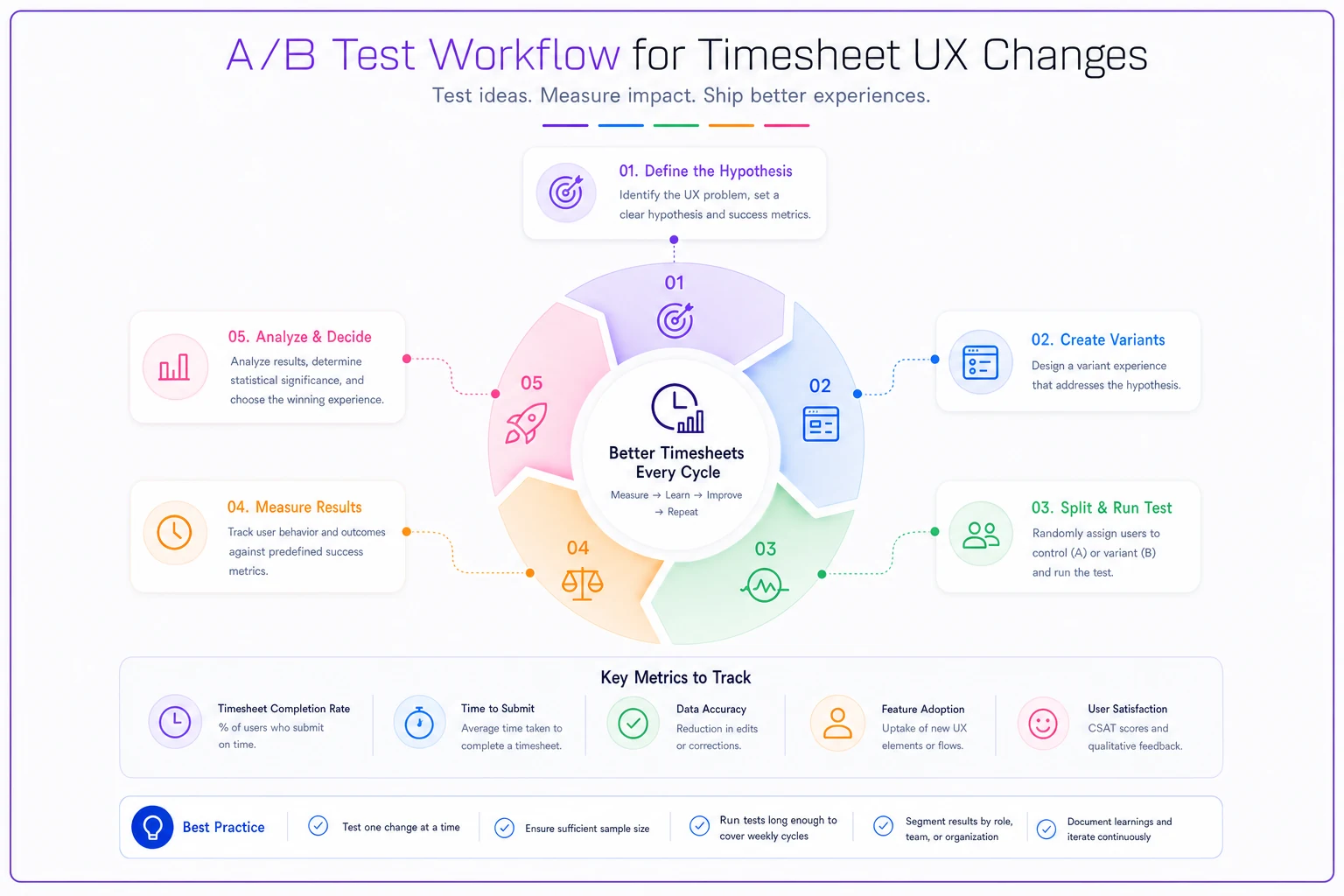
This shows the basic flow teams can follow.
The correction effort calculator
Understanding the real cost of timesheet corrections helps prioritize which UX improvements to tackle first.
Per-correction cost:
-
Identify error
45 seconds
-
Verify correct value
90 seconds
-
Make adjustment
60 seconds
-
Document change
45 seconds
-
Potential re-approval
5 minutes
-
Total
4-9 minutes per correction
Monthly impact formula:
(Average corrections per timesheet) × (Number of employees) × (Submissions per month) × (Minutes per correction) × (Hourly rate / 60)
A 150-person company averaging 3.5 corrections per timesheet at $35/hour for HR staff spends roughly $3,600 monthly on timesheet fixes — before considering downstream impacts on payroll processing, billing accuracy, and compliance risks.
When these patterns backfire
Smart defaults fail for irregular schedules. A catering company implemented pattern-based defaults, but their event-driven schedule meant previous week patterns almost never applied. They switched to template-based entry where employees select "Wedding," "Corporate Lunch," or "Private Party" templates with pre-filled standard hours.
Inline validation can overwhelm mobile users. Small screens mean validation messages cover other fields, creating a frustrating experience. For mobile-heavy workforces, batch validation at natural breakpoints — end of each day's entry — works better than field-level validation.
Required field logic also breaks down with contractor timesheets. Unlike employees who share common fields, contractors often have unique billing requirements. One construction company made "Union Classification" required for all users, causing non-union subcontractors to enter false data just to submit.
Microcopy localization extends beyond language translation too. A multinational used "fortnight" in their UK interface and "bi-weekly" in the US, which created confusion when UK managers reviewed US timesheets. Stick to universal terms like "14 days" or "two weeks" for global operations.
Building your improvement roadmap
Start by auditing your current correction patterns. Pull three months of timesheet adjustments and categorize them. You'll typically find 80% of corrections cluster around 3-4 specific issues. Fix those first.
Week 1-2: Baseline measurement
-
Track current correction rates
-
Survey users about pain points
-
Time the correction process
-
Document most common errors
Week 3-4: Quick wins
-
Improve microcopy on problem fields
-
Adjust default values
-
Remove unnecessary required fields
-
Add format examples
Week 5-8: Validation improvements
-
Implement inline validation for high-error fields
-
Add smart suggestions for common mistakes
-
Create contextual help text
-
Test mobile experience
Week 9-12: Advanced patterns
-
Deploy pattern-based defaults
-
Build role-specific forms
-
Create entry templates
-
Measure improvement and iterate
A dental practice following this roadmap reduced timesheet corrections from 47 per week to 12. Hygienists now spend under 2 minutes per timesheet versus the previous 8-minute average. Payroll processing moved from Tuesday afternoon to Monday morning completion.
The AI automation opportunity
Modern timesheet platforms increasingly use AI automation to prevent errors before they occur. Rather than relying solely on static UX patterns, these systems learn from correction history and adapt interfaces accordingly.
AI-powered operational software can detect when certain employees consistently make specific mistakes and adjust the interface for them specifically. If someone regularly forgets to log overtime reasons, the system makes that field more prominent only when they exceed standard hours. That kind of personalization is hard to achieve through manual UX configuration.
These platforms also use pattern recognition to suggest entries before users even type. When an employee typically works on Project A every Monday morning, the system pre-fills that project for Monday entries — reducing entry to a quick confirmation rather than actual data input.
What makes this particularly useful for correction-heavy workflows is the ability to catch error patterns that humans might not notice. The system might find that errors spike when employees submit timesheets from mobile devices on Fridays, then automatically switch those users to a simplified mobile interface on Friday afternoons.
Measuring what matters
Track these metrics before and after implementing timesheet UX patterns:
Accuracy metrics:
-
First-pass accuracy rate (timesheets needing no corrections)
-
Corrections per timesheet
-
Field-specific error rates
-
Resubmission frequency
Efficiency metrics:
-
Average time to complete timesheet
-
HR hours spent on corrections
-
Days to payroll close
-
Support tickets related to timesheets
Satisfaction indicators:
-
Submission timeliness
-
Field completion rates
-
User feedback scores
-
Voluntary field usage
An engineering firm tracked these metrics through their UX improvement process. First-pass accuracy improved from 62% to 84%. Average completion time dropped from 11 minutes to 4. On-time submission rates increased from 73% to 91% — employees procrastinate less when forms don't frustrate them.
The compound effect is what really matters. When employees spend less time on timesheets, they're more likely to submit on time. When submissions are accurate, payroll runs smoother. When payroll runs smoother, trust in the system grows. That cycle transforms timesheet submission from a dreaded task to a minor administrative checkbox.
Making the changes stick
Start with power users. Choose 5-10 employees who submit the most complex timesheets. Get their feedback on proposed changes, implement their suggestions where reasonable, and make them champions for the rollout. When others see the most demanding users endorsing changes, adoption accelerates.
Phase the rollout by department rather than going company-wide immediately. This lets you catch department-specific issues before they affect everyone. A logistics company discovered their warehouse team needed different validation rules than their drivers — something they wouldn't have found in a universal rollout.
Document the "why" behind each change. Employees resist changes that seem arbitrary. Explain that simplified required fields exist because "analysis showed 89% of corrections involved just these three fields" or that new defaults "match your actual schedule 75% of the time based on last month's data."
And measure improvements publicly. When corrections drop 40%, tell everyone. When payroll finishes a day earlier, make a point of sharing that. It reinforces that changes benefit the whole team, not just HR.
Timesheet accuracy isn't really about making employees more careful — it's about designing systems that work with human behavior rather than against it. Whether you're dealing with field teams struggling with mobile entry or office workers rushing through end-of-week submissions, the right interface patterns make accuracy the path of least resistance.
Start with your biggest pain point. Run one test. Measure the impact. Build from there. Within three months, you'll have shifted timesheet submission from a source of weekly frustration into a process that employees mostly get right the first time.
Ready to optimize your workforce time management?
Join 2,000+ companies using GoTimio to improve timesheet accuracy, reduce payroll errors, and boost team productivity.