


The bug almost nobody catches until it burns them: a worker in Denver clocks out at 11:52 PM Mountain, but payroll runs on Eastern, so the punch lands on the next calendar day. Suddenly a Tuesday shift shows two hours on Wednesday, the overtime calculation splits across two days, and the weekly total looks fine — until someone runs a daily-overtime state rule and the math falls apart.
That's the whole problem in one sentence. Time isn't a single number. It's a moment — a real instant on Earth — and a rendering of what a human saw on a wall clock. When those two things get confused, or worse, collapsed into one column in a database, payroll breaks in ways that are genuinely hard to trace.
This post is narrow on purpose. It's about timezone aware timekeeping: how to define a canonical timestamp, how to keep display time separate from that canonical value, and how to reconcile hours when local time and payroll time disagree. No general "here's what timezones are" filler. If you run payroll for people in more than one timezone, or you have field crews who cross zone lines mid-shift, this is for you.
The core mistake: storing what the clock *showed* instead of the *instant*
Almost every messy timezone situation traces back to one decision made early and never revisited — storing local wall-clock time as if it were the truth.
A punch comes in reading 2024-11-03 01:30. Looks harmless. But on that date, most of the US "fell back" for daylight saving. So 01:30 happened twice. Without a zone offset attached, you literally cannot tell which 01:30 a worker meant. If they were on an overnight shift, that's a full hour of pay hanging on a coin flip.
In real operations, this usually happens because the timekeeping capture layer writes a naive string — no offset, no zone — and everyone downstream assumes it's "obviously" local time. Then payroll, analytics, and the mobile app each apply their own assumption about what "local" means, and the three never agree.
The fix conceptually is simple, even if the rollout isn't:
-
Capture the instant as UTC (or with an explicit offset), always.
-
Record the IANA timezone name the event occurred in (
America/Denver, not "MST" — abbreviations are ambiguous and don't survive DST). -
Never overwrite either of those. Display formatting is a view, computed at read time.
That third rule is the one people skip. They store local time "for convenience," and then convenience quietly becomes the source of every reconciliation ticket for the next two years.
Canonical vs display: two jobs that should never share a column
Here's where teams lose weeks: blurring the line between what gets stored and what gets shown.
Accurate time tracking made effortless.
GoTimio empowers your team to log, monitor, and manage work hours seamlessly.
- Real-time time tracking
- Automated timesheet approvals
- Payroll and billing integration
No credit card required
Canonical time is the immutable instant. It's what you do math on — durations, overtime thresholds, cutoffs, SLA windows. It should be stored as UTC plus the originating IANA zone. It never changes after capture. Corrections create new records with audit trails; they don't mutate the original.
Display time is what a human should see, in the timezone that makes sense for that human's context. A Phoenix employee sees their punch in Arizona time. Their manager in Chicago, reviewing the same punch, might see it in Central — with the original zone labeled so nothing gets lost.
| Concern | Canonical time | Display time |
|---|---|---|
| Stored as | UTC instant + IANA zone | Nothing — computed on read |
| Used for | Duration math, OT, cutoffs, reconciliation | Timesheets, dashboards, worker confirmations |
| Changes over time | Never (append-only corrections) | Recomputed anytime, per viewer |
| DST handling | Offset is unambiguous at the instant | Rendered per the zone's rules for that date |
| Who cares | Payroll engine, auditors, analytics | Employees, managers |
The pattern that quietly saves you: store the instant and the zone, but let every screen decide its own rendering. When someone asks "why does this punch show 6 PM to me and 4 PM to the field lead," you have an actual answer instead of a debugging session.
If you want the deeper storage and pipeline side of this — CDC vs batch, schema shapes, deterministic joins — that's covered in the canonical time-data architecture for workforce analytics write-up. This post assumes you've at least decided what to store and focuses on the payroll consequences.
Which timezone "wins" for payroll? Pick a rule and write it down
This is where teams argue in circles. When a Denver worker's shift math needs to land on a payroll calendar, whose day is it?
There are only a few defensible policies, and the mistake isn't picking the "wrong" one — it's never picking one at all, so different parts of the system silently disagree.
The three that actually hold up:
-
Work-location zone governs the day. The shift belongs to whatever calendar day it was in where the work happened. A punch at 11:52 PM Denver is a Denver-Tuesday event, full stop. This is usually the correct choice for daily-overtime states like California and Colorado, because those laws are tied to the physical worksite.
-
Employer/payroll zone governs the day. Everything is bucketed by the company's payroll timezone. Simpler for a single payroll run, but it will misclassify daily overtime for anyone in a different zone. Only safe when nobody you employ is in a daily-OT jurisdiction.
-
Employee home zone governs. Rare, mostly for fully-remote salaried workers where "which day" barely matters for pay but matters for accrual and reporting.
The failure isn't complexity — it's inconsistency. Payroll uses rule 2, the analytics dashboard uses rule 1, and the two weekly totals differ by a few hours every single pay period. Nobody can reconcile it because they're answering different questions with the same-looking number.
Write the policy as one sentence per pay rule. "Daily overtime is computed in the work-location IANA zone. Weekly totals are bucketed by the work-location zone's calendar week. Cutoff for a pay period is 11:59:59 PM in the employer payroll zone." Once it's written, the config can match it. Until it's written, the config is guessing.
A worked reconciliation: the overnight punch across two zones
A support company runs payroll out of America/NewYork. A worker sits in America/LosAngeles. Overnight shift, no DST involved.
-
Clock in
2024-06-11 22:00Pacific → canonical2024-06-12 05:00 UTC -
Clock out
2024-06-12 06:30Pacific → canonical2024-06-12 13:30 UTC -
Duration
8.5 hours. Unambiguous — it's just
outinstant − ininstant. Zones don't matter for duration, only for which day.
Now the day-bucketing question. Under work-location zone (Pacific), the whole shift starts June 11. Under employer zone (Eastern), clock-in is 2024-06-12 01:00 AM — a June 12 event.
The same 8.5-hour shift is a Tuesday-night shift under one rule and a Wednesday shift under the other. If your weekly cutoff falls between those days, that shift lands in a different pay period depending on which rule you use. That's how a fully accurate set of punches produces a "missing" shift on one report and a "duplicate" on another.
The reconciliation move: always join on the canonical UTC instant, then apply the zone bucket as a labeled, explicit step — never as an assumed default. When your reconciliation query says WHERE workdate = ..., that workdate must be a derived column computed from the canonical instant plus the chosen zone, and the query should carry a comment naming which policy produced it.
The DST traps that specifically wreck durations
Plain offset differences are annoying but tractable. Daylight saving is where silent, hard-to-find errors live.
-
Spring-forward gap. On the "spring ahead" night,
02:30local doesn't exist. If a scheduled shift or a manual correction is entered at a non-existent local time, naive conversion either errors out or silently shifts by an hour. Manual entries near the transition are the usual culprit. -
Fall-back overlap.
0130 local happens twice. A shift spanning that hour is genuinely 60 minutes longer in real elapsed time than the wall clock suggests — and workers are owed that hour.
-
Cross-zone shift where only one end crosses DST. Field crews driving across a zone line during a shift, on a DST-boundary date. The clock-in zone and clock-out zone have different offsets and one of them just changed. This is the compound case, and it's why you compute duration from UTC instants and never from local wall-clock subtraction.
One rule avoids all three: duration is always canonicalout − canonicalin in UTC. The moment someone writes TIMESTAMPDIFF on two local wall-clock strings, DST will eventually hand them a wrong paycheck.
Reconciliation workflow: how the pieces move end to end
Understanding the flow matters more than any individual rule. The problem with most broken setups isn't that people made the wrong call on zone policy — it's that the zone decision happens in five different places instead of one. Once you centralize where that decision gets made, the rest of the chain is straightforward.
Here's a simple view of the end-to-end flow.
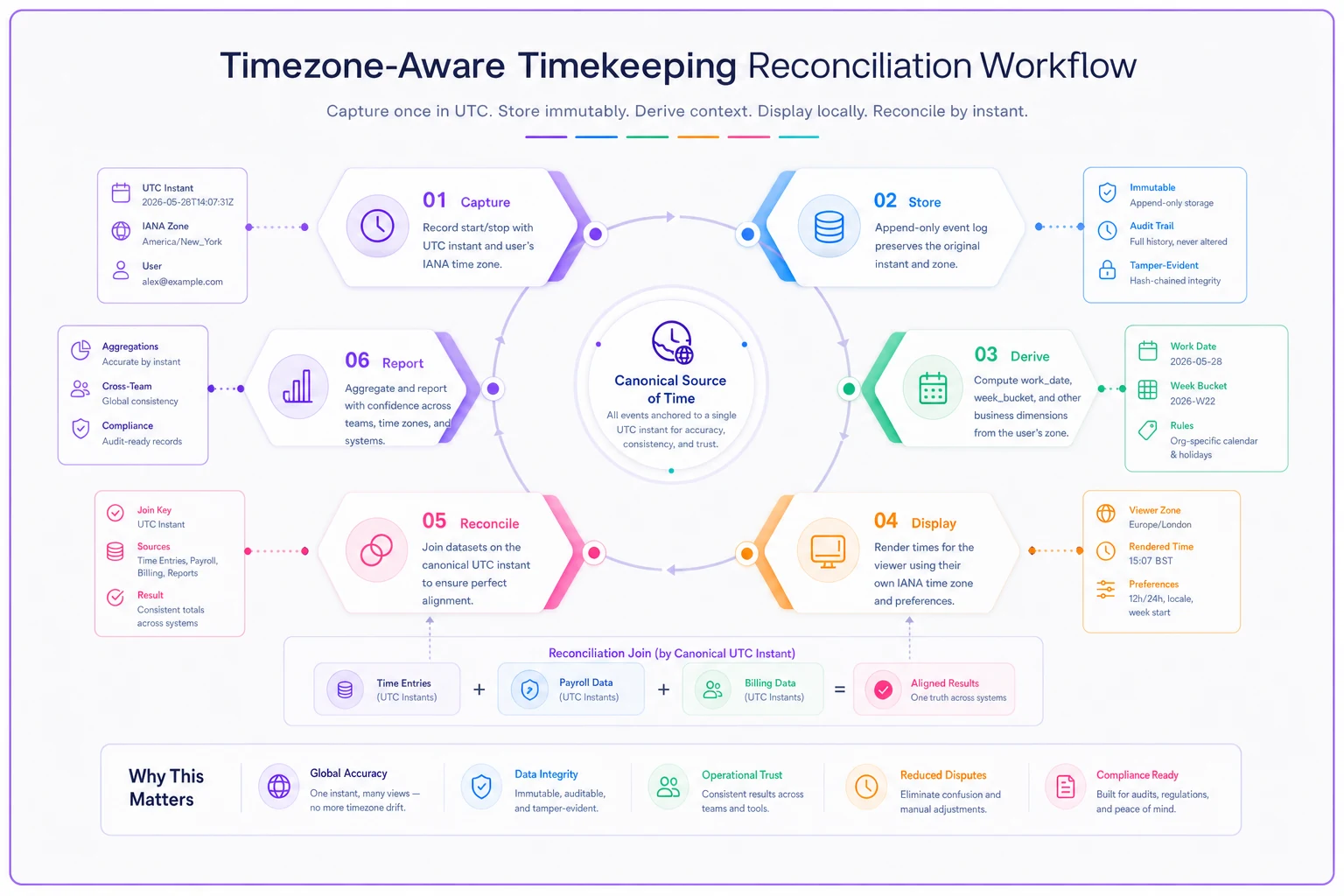
Capture — the device (badge reader, mobile app, kiosk) records the event. It writes the UTC instant and the IANA zone of the device's current location. If the device can't resolve a real zone, it flags the punch rather than guessing.
Store — canonical instant and zone land in an append-only table. Nothing downstream is allowed to overwrite them. Corrections come in as new linked records.
Derive — a computed layer produces workdate and weekbucket columns from the canonical values, using the written pay-rule policy. This is the only place zone-to-calendar decisions happen, so there's exactly one source of truth for "which day."
Display — every UI renders the canonical instant into the viewer's context zone at read time. Managers reviewing another zone see both the local render and a label of the originating zone.
Reconcile — payroll totals join on canonical instants, group by the derived buckets, and compare against the display-side totals workers confirmed. Because everything traces back to the same UTC instant, discrepancies point to a policy difference (which bucket rule), not a data mystery.
The property that makes this whole chain trustworthy: you can always answer "why does this number look different over here?" by walking back to the canonical instant. Systems that store local time as truth can't do that — they can only argue.
When a single payroll zone is actually fine
Not every business needs the full apparatus.
When one payroll zone is genuinely okay:
-
Everyone works in the same physical zone, and always will.
-
No daily-overtime jurisdictions in play.
-
No field crews crossing zone lines mid-shift.
In that world, storing UTC plus one fixed zone and rendering everything in it is clean and low-risk. Don't over-engineer.
When you need the canonical/display split:
-
Employees or worksites in more than one timezone.
-
Any daily-overtime state where the worksite determines the rule.
-
Crews that move across zones during a shift.
-
Overnight shifts that can straddle the payroll cutoff.
Who should not try to bolt this on halfway: teams still storing naive local strings with no zone column at all. Adding display logic on top of ambiguous storage doesn't fix ambiguity — it hides it behind a nicer UI. Fix the storage first, then the display rules become almost trivial.
A short checklist before your next multi-zone payroll run
Run through this before the next payroll cycle if you're operating across more than one timezone. None of these items are hard to check — but skipping them is how the phantom-hour problems start.
-
[ ] Every punch stores a UTC instant and an IANA zone name (not an abbreviation).
-
[ ] Canonical timestamps are append-only; corrections create new records.
-
[ ]
workdateandweekbucketare derived columns with the pay-rule policy written in plain English next to them. -
[ ] Duration is computed from UTC instants, never from local wall-clock subtraction.
-
[ ] DST spring-forward and fall-back cases have explicit handling and test punches.
-
[ ] The pay-period cutoff names exactly one zone, and it's documented.
-
[ ] Display renders per-viewer, and cross-zone views label the originating zone.
-
[ ] Reconciliation joins on canonical instants, then groups by derived buckets.
If more than two of those aren't in place yet, the storage layer is the place to start — everything else flows from getting that right.
Real scenario: a regional install crew across three zones
A mid-sized commercial installation company ran crews across Central, Mountain, and Pacific, with payroll administered from a Central-zone office. Punches were stored as naive local strings — whatever the tablet showed.
Every pay period, someone in HR spent a chunk of Monday chasing "phantom" hours: shifts that appeared to move days, overnight jobs that split across the weekly cutoff differently on the ops report than on the payroll export. Somewhere between 15 and 25 punches a period needed manual investigation, and a couple of DST-week paychecks each year came out short by an hour and had to be corrected after the fact — never a great look with the crew.
The change wasn't dramatic technically. They added an explicit IANA zone to every captured punch, moved canonical storage to UTC, made work_date a derived column governed by a written "work-location zone governs daily OT" rule, and set the cutoff explicitly to Central. Duration math moved to UTC-instant subtraction.
The Monday reconciliation dropped to a handful of genuine exceptions instead of a pile of phantom ones, and the DST-week short-pay problem stopped happening because the fall-back overlap now counted the real extra hour automatically. The hours didn't change — the disagreement about the hours went away.
The one habit that prevents most of this
Store the instant and the zone, compute everything else. Local time is a rendering, not a fact to be saved. The moment you treat a wall-clock string as the truth, you've signed up for reconciliation tickets that no amount of downstream cleverness fully cures.
Always record the IANA zone with the UTC instant at capture time.
Getting the storage model right also makes the human side of a transition far calmer — workers stop seeing confusing times on their timesheets, and managers stop arguing about which day a shift belongs to. If you're rolling this into an existing setup, the sequencing and change-management side is worth planning deliberately; the timekeeping adoption playbook walks through doing that without blowing up a payroll run mid-transition.
Timezone-aware timekeeping isn't hard math. It's discipline about what you store and what you compute — keep those two straight, write your pay-rule zones down in plain language, and the reconciliation headaches mostly disappear on their own.
Ready to optimize your workforce time management?
Join 2,000+ companies using GoTimio to improve timesheet accuracy, reduce payroll errors, and boost team productivity.