

Your payroll processor confirms Tuesday's run completed successfully. Wednesday morning, three employees report missing overtime. You dig in and find that punch corrections from Monday afternoon never reached payroll — the webhook failed silently, retried four times, then gave up. The correction is sitting orphaned in your timekeeping system while payroll already ran.
The cascade that starts with one dropped webhook
Time tracking generates hundreds of events daily. Clock-ins, break starts, shift swaps, supervisor approvals, retroactive edits. Each event needs to flow downstream — to payroll, scheduling, billing. When even 0.5% of those events fail to sync properly, the damage compounds fast.
One distribution center I worked with discovered their webhook failures after six weeks of payroll corrections. Their time system sent roughly 2,400 events per day across 180 warehouse workers. At a 99.2% success rate (sounds fine, right?), they still had around 19 failed events daily. Over six weeks, that's close to 800 time records sitting in limbo.
The worst part? Their payroll team spent four hours every Monday morning manually checking for discrepancies — and they assumed this was just normal. Nobody realized the failures weren't random. They followed predictable patterns tied to network timeouts during shift changes, when hundreds of workers clocked out at the same time.
Why standard retry logic makes payroll timing worse
Most webhook implementations use exponential backoff. First retry after 5 seconds, then 25, then 125. That sounds reasonable until you map it against actual payroll cutoff windows.
Accurate time tracking made effortless.
GoTimio empowers your team to log, monitor, and manage work hours seamlessly.
- Real-time time tracking
- Automated timesheet approvals
- Payroll and billing integration
No credit card required
A typical bi-weekly payroll schedule:
-
Sunday 11
59 PM: Timecard submission deadline
-
Monday 8
00 AM: Supervisor approval deadline
-
Monday 2
00 PM: Final data sync to payroll
-
Tuesday 10
00 AM: Payroll processing begins
A webhook failing at 1:45 PM Monday gets these retry attempts:
-
1
45:05 PM (fails)
-
1
45:30 PM (fails)
-
1
48:35 PM (fails)
-
1
58:50 PM (fails)
-
2
28:50 PM (succeeds — too late)
That successful retry at 2:28 PM is useless. Payroll already pulled data at 2:00 PM. The event becomes an orphan that needs a manual correction next cycle.
Building time-aware retry strategies that respect cutoffs
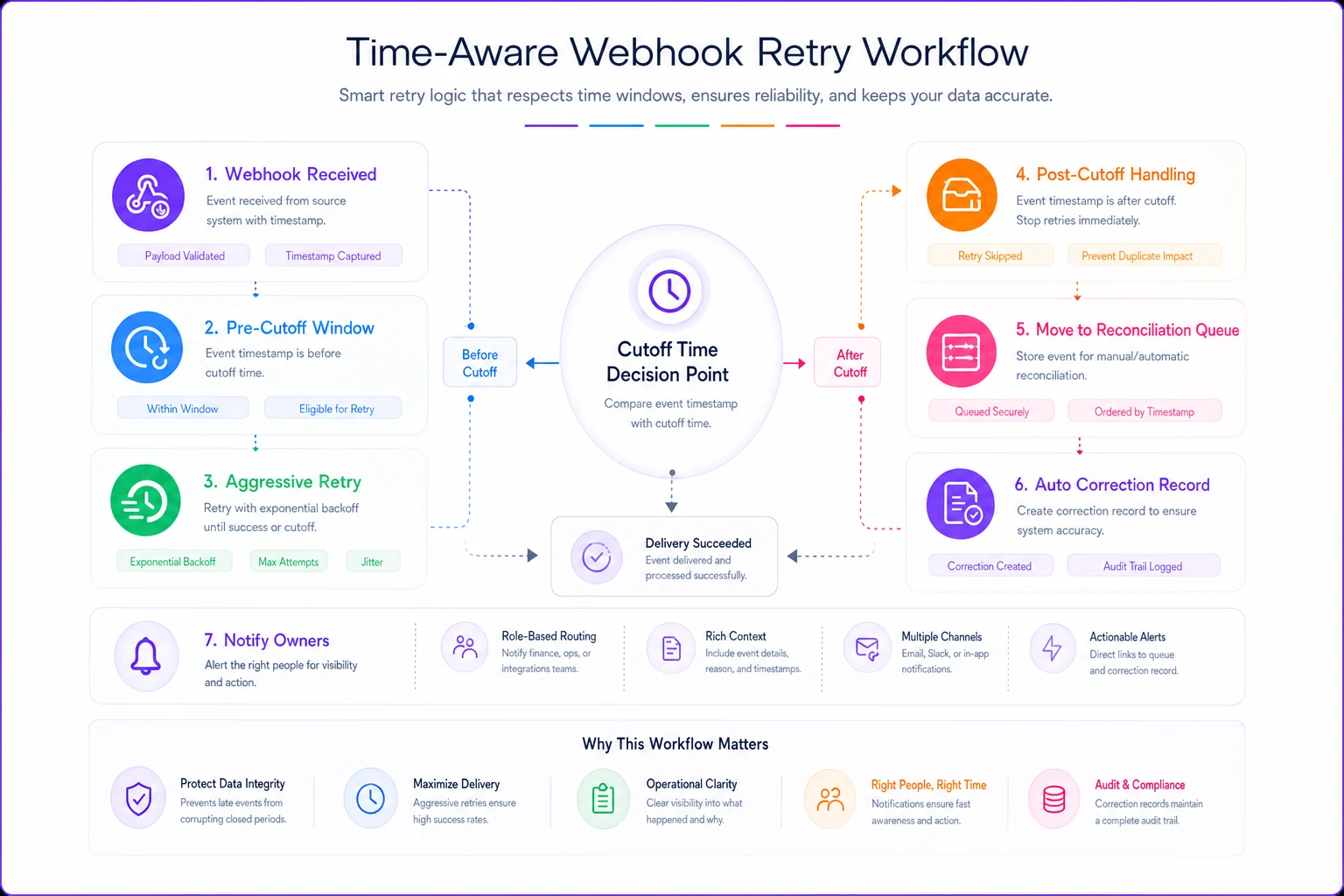
Standard webhook retry patterns ignore business time constraints entirely. For time event webhook reliability to actually work, retries need to know about operational deadlines.
A retry strategy that actually works with payroll timing:
Pre-cutoff aggressive retries:
-
0–60 minutes before cutoff
Retry every 30 seconds, max 10 attempts
-
60–120 minutes before
Retry every 2 minutes, max 5 attempts
-
120+ minutes before
Standard exponential backoff
Post-cutoff handling:
-
Immediate notification to designated owner
-
Event moves to reconciliation queue
-
Automatic creation of correction record for next cycle
-
Audit trail preserving original timestamp
Here's a quick visual of the workflow.
A healthcare staffing agency implemented this across 14 client hospitals. They were running around 40 manual time corrections weekly. After switching to time-aware retries, that number dropped to 8–12 weekly — and most of those were legitimate late submissions, not technical failures.
Idempotency patterns that prevent duplicate time entries
Retrying failed webhooks creates a different problem: duplicates. An employee's 8-hour shift becomes 16 hours in payroll because both the original event and the retry succeeded.
Basic idempotency keys aren't enough here. A punch correction might legitimately send multiple updates for the same clock event. You need compound keys that capture intent, not just identity.
Effective idempotency key structure for time events
| Event Type | Key Components | Example |
|---|---|---|
| Clock Punch | employeeid + punchtimestamp + punch_type | EMP1232024-03-15T08:00:00IN |
| Punch Edit | originalpunchkey + edittimestamp + editversion | EMP1232024-03-15T08:00:00IN2024-03-15T14:30:00V2 |
| Shift Swap | shiftid + fromemployee + toemployee + approvaltimestamp | SHIFT789EMP123EMP456_2024-03-15T10:45:00 |
| Approval | timecardid + approverid + approvaltimestamp + approvalaction | TC456MGR7892024-03-16T09:00:00_APPROVE |
The edit versioning matters. Without it, a supervisor makes a correction, the system retries the original incorrect punch, and the correction gets overwritten. It's a quiet failure that shows up in payroll as an underpayment or overpayment.
Dead letter queues that surface patterns, not just failures
Most dead letter queues become graveyards. Failed events pile up and nobody reviews them. For time events, dead letters need active monitoring tied to actual business impact.
Structure your dead letter handling with operational context:
Priority 1 — Immediate escalation:
-
Events affecting the current pay period
-
Overtime calculations
-
Compliance-critical events (meal breaks, minor's hours)
-
Events from employees on final paycheck
Priority 2 — Next business day:
-
Future-dated events
-
Non-overtime regular hours
-
PTO requests
-
Schedule changes beyond current week
Priority 3 — Weekly review:
-
Historical corrections beyond statute limitations
-
Duplicate detection patterns
-
System health indicators
One manufacturing client had over 1,100 events in their dead letter queue accumulated over three months. When we analyzed the data, 78% were timeout failures during their 6 AM shift change. Invisible when looking at individual failures, obvious in aggregate. They adjusted their webhook timeout from 3 seconds to 8 seconds during that window and eliminated most of the failures.
Reconciliation deltas mapped to operational owners
Reconciliation without ownership turns into a finger-pointing exercise. Each gap between systems needs a designated owner based on event type and timing.
An ownership matrix that actually gets followed:
Payroll team owns:
-
Final cutoff reconciliation (2 hours before processing)
-
Gross pay impacting events
-
Tax and deduction changes
-
Multi-state allocation issues
HR operations owns:
-
Attendance policy violations
-
Leave balance discrepancies
-
Compliance hour tracking
-
New hire first punch verification
Department supervisors own:
-
Daily punch exceptions
-
Overtime pre-approval variances
-
Shift swap confirmations
-
Project hour allocations
IT/Systems owns:
-
Failed webhook patterns
-
Timeout investigations
-
Integration health monitoring
-
Dead letter queue management
The key is that ownership triggers automatic notifications with specific required actions. A supervisor gets "Review 3 unapproved overtime punches by 2 PM today" — not "System reconciliation needed."
Observable patterns that predict tomorrow's failures
Time event failures follow patterns. Monday morning timeout spikes when everyone checks weekend timecards. Wednesday afternoon failures when project allocations update. Friday evening delays during next-week scheduling. Once you know the patterns, you can anticipate them.
Metrics worth tracking for early warning:
Response time percentiles by hour:
-
P50, P95, P99 response times
-
Separate metrics per event type
-
Overlaid against shift patterns
Queue depth indicators:
-
Unprocessed events older than 1 hour
-
Retry queue size
-
Dead letter accumulation rate
Business impact metrics:
-
Events affecting current pay period
-
Dollar impact of unprocessed overtime
-
Compliance risk event count
A retail chain noticed P99 response times jumping from 2 seconds to 14 seconds every Sunday between 6–8 PM. That window coincided with managers submitting schedule changes for the upcoming week. Adding a separate queue for future-dated events stopped those bulk updates from blocking real-time punches.
Runbooks that HR can actually execute
Technical runbooks written for developers don't help when payroll cutoff is 30 minutes away and IT is unreachable. HR needs executable steps using tools they already have access to.
Sample HR-executable runbook for webhook failures
Symptom: Employees report punches not showing in payroll preview
Step 1 — Verify the gap (5 minutes):
-
Open time system report
"Punches Last 48 Hours"
-
Open payroll system report
"Imported Time Records"
-
Export both to Excel
-
Use VLOOKUP on employee ID + date to find gaps
-
Note count and affected employees
Step 2 — Check sync status (3 minutes):
-
Open integration dashboard (bookmark this URL)
-
Look for red indicators in "Time to Payroll" section
-
Screenshot any error messages
-
Check "Last Successful Sync" timestamp
Step 3 — Force reconciliation (10 minutes):
-
If before cutoff
Click "Manual Sync Now" button
-
Wait for completion message (usually 3–5 minutes)
-
If after cutoff
Export gap records to CSV
-
Email to payroll@company with subject "Manual Time Corrections — [Date]"
-
CC
supervisor of affected employees
Step 4 — Document for pattern analysis:
-
Log incident in shared tracker with
- Time discovered - Number of affected records - Sync timestamp when it failed - Resolution method used
-
If this is the third failure this week
Escalate to IT with pattern details
This works because it uses tools HR already knows and gives specific actions instead of vague troubleshooting steps. There's no "check with your system administrator" anywhere in it.
Building your time event reliability baseline
Before implementing any improvements, establish where you actually stand. Most organizations are completely blind to their webhook reliability until payroll errors force an investigation.
Track for two pay periods:
-
Total time events generated
-
Successful first-attempt deliveries
-
Retry success rate
-
Dead letter count
-
Manual corrections required
-
Hours spent on reconciliation
A professional services firm thought they had "occasional" sync issues. Baseline measurement showed 4.7% of billable time entries required manual intervention — roughly $320,000 of monthly billings sitting in reconciliation at any given point. That baseline turned a minor annoyance into a board-level priority pretty quickly.
The compound effect of reliability improvements
Moving from 96% to 99% reliability sounds marginal. For a 500-employee organization generating around 8,000 time events weekly, that's the difference between 320 and 80 manual corrections per week.
At 15 minutes per correction, that's 60 hours a month freed up — enough for someone to focus on actual workforce analytics instead of data plumbing.
Operational platforms with built-in reliability patterns make this shift accessible without rebuilding everything from scratch. For teams ready to go deeper on integration architecture, the payroll integration runbook on connector testing and idempotency checks covers the technical side in more detail. And once your real-time events are flowing reliably, canonical time-data architecture becomes a realistic next step rather than a distant goal.
The real win here isn't technical though. When time events sync reliably, payroll week stops feeling like a crisis. Supervisors trust what they see in the system. HR stops spending Monday mornings firefighting. That's the actual outcome worth building toward.
Ready to optimize your workforce time management?
Join 2,000+ companies using GoTimio to improve timesheet accuracy, reduce payroll errors, and boost team productivity.