

Most payroll teams only discover their blind spots mid-crisis — usually around 4pm on a cutoff day when a feed silently dropped half a batch and nobody noticed until direct deposits bounced. By then you're not running a process, you're doing damage control, and the forensic trail you need to explain what happened to finance, auditors, or an employee's lawyer is scattered across six systems and three people's memories.
Another runbook sitting in a wiki won't fix that. Practicing the failure before it happens, under realistic time pressure, with outcomes you can actually grade — that's what a proper payroll incident simulation gives you. A controlled rehearsal where your team hits the same walls they'd hit in a real incident, except nobody's pay is actually at risk.
This is the part most HR and payroll teams skip. They'll build retention policies, SLAs, reconciliation scripts — all reasonable — but they never pressure-test whether the humans and systems actually hold together when a cutoff is ticking and something's gone sideways.
Why payroll incidents get expensive after the fact
The direct cost of a payroll error is rarely the biggest cost. A missed overtime calc for 40 people might be a few thousand dollars to true up. The expensive part is everything that follows: hours reconstructing what happened, no clean way to prove whether it was a config change or a bad import, the auditor who now wants to sample three quarters instead of one, and employees who stop trusting their check is right.
In real operations this plays out the same way every time. The incident gets "fixed" — someone reruns the batch, patches the numbers, employees get paid. Then two weeks later finance asks why net pay for a department jumped and nobody can answer cleanly. There's no frozen snapshot of the pre-incident state. The logs rolled over. The person who made the manual correction is on PTO. What should have been a 20-minute explanation turns into a two-day archaeology project.
The pattern underneath all of this: teams treat payroll incidents as one-off fires instead of a recurring category of event with shared root causes. The import that failed silently this quarter will fail again next quarter in a slightly different form. Without a disciplined practice of simulating these events and capturing evidence the moment they occur, every incident starts from zero.
What breaks at scale
A five-person company can get away with payroll heroics. One person knows the whole flow, remembers the quirks, and can mentally reconstruct what happened. That doesn't scale, and the failure mode when it finally breaks is ugly.
Accurate time tracking made effortless.
GoTimio empowers your team to log, monitor, and manage work hours seamlessly.
- Real-time time tracking
- Automated timesheet approvals
- Payroll and billing integration
No credit card required
Here's what changes as headcount and complexity grow:
-
More integration seams. You go from a single system to time capture → middleware → payroll engine → GL → banking. Each hop is a place where a partial failure can hide. A batch of 500 records where 487 posted looks "successful" on most dashboards.
-
More jurisdictions and pay rules. Overtime, premium pay, split shifts, retro changes — each rule is a potential incident source, and each needs its own acceptance test.
-
More people touching data. Supervisors editing time, HR making corrections, finance adjusting the GL. Every hand in the data becomes a forensic question later: who changed what, when, and under whose approval.
-
Tighter cutoffs. At scale, the window between "data final" and "money moves" shrinks. A problem you could absorb at 50 employees becomes a hard deadline miss at 2,000.
Teams that handle this well have usually quantified what a payroll failure actually costs them before it happens. If you haven't done that work, the executive framework for time-data risk quantification and downside exposure is worth reading first — it gives you the dollar figures to justify the hours you'll spend building this program.
Designing a payroll-specific tabletop that actually tests something
A tabletop exercise is a facilitated walkthrough of a realistic incident where your team talks through — and ideally executes against a sandbox — exactly what they'd do. The trick is making it payroll-specific and tied to a real cutoff, not a generic "imagine the system is down" conversation.
Generic drills fail because they don't force decisions under the constraints that actually exist. Real payroll pressure comes from the cutoff clock, the banking submission deadline, and the fact that you can't just "pause" payday. Your scenarios need to carry those constraints.
-
A trigger event tied to a real step — "the time feed posted 94% of records 90 minutes before cutoff."
-
A hard constraint — "banking file must submit by 3
00pm or deposits slip a day."
-
A hidden complication — "the missing 6% are all from the night shift with premium pay, so the dollar impact is disproportionate."
-
A measurable outcome — did the team detect, diagnose, decide, and document within the window?
Here's a set of scenario archetypes worth rotating through across the year:
| Scenario | Trigger | What it tests | Primary measurable outcome |
|---|---|---|---|
| Silent partial import | Feed posts 90% of records | Detection + reconciliation under time pressure | Time-to-detect; % of missing records recovered before cutoff |
| Retro rate change collision | Approved rate change lands mid-run | Decision authority, ledger adjustment discipline | Correct records adjusted; audit fields complete |
| Duplicate batch | Same import runs twice | Idempotency controls, rollback | Duplicate pay prevented or caught pre-submission |
| Config drift | Overtime rule changed without notice | Change detection, who-approved-what trail | Change traced to source within X minutes |
| Cutoff miss | Upstream delay blows the banking window | Escalation path, employee comms, exception payroll | Decision made with full evidence; comms sent on time |
The measurable column is what lets you grade the exercise. A tabletop with no score is just a meeting. Record time-to-detect, time-to-decide, and whether evidence was captured cleanly, and you've got a baseline to improve against quarter over quarter.
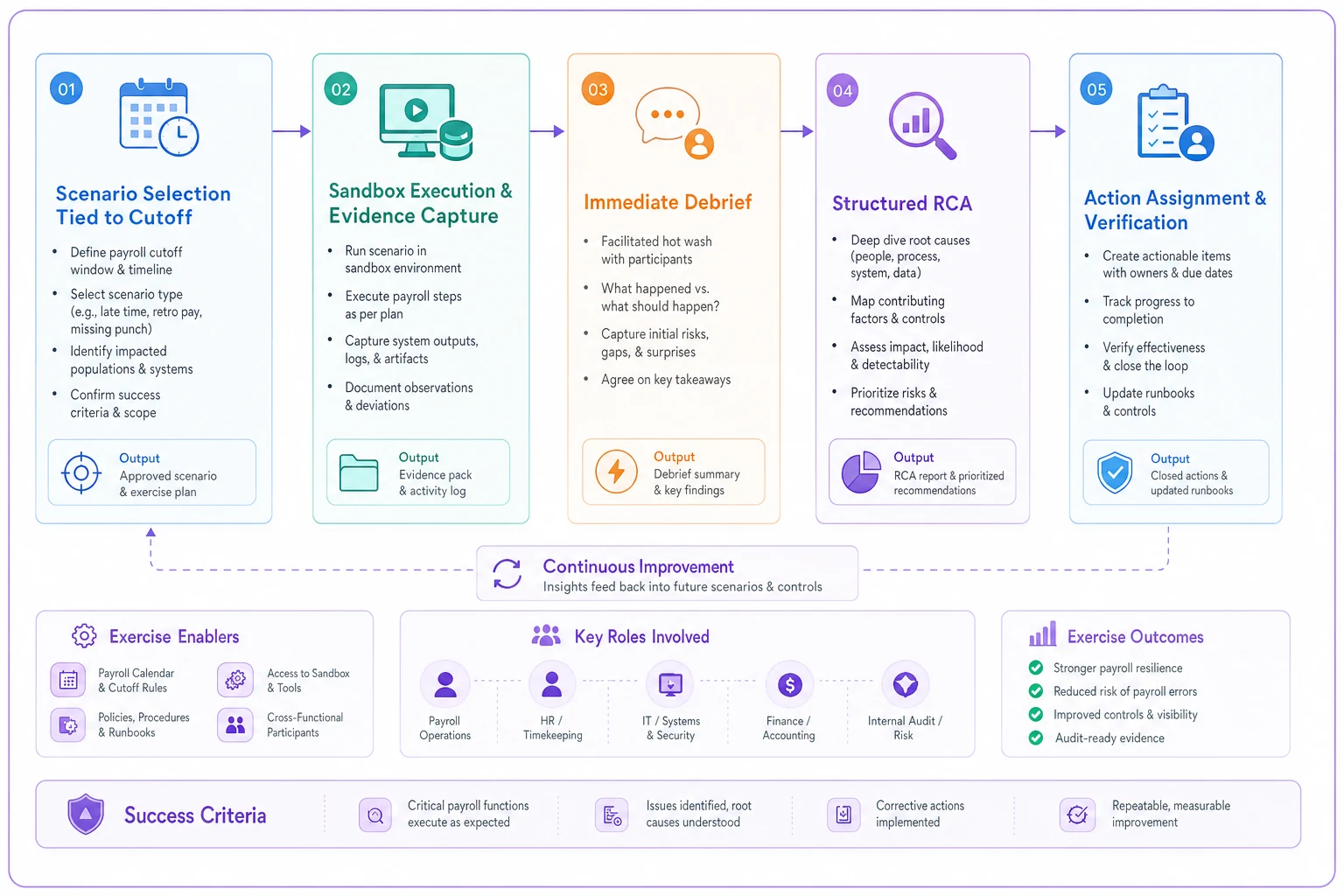
This illustration shows the end-to-end flow from scenario design through verification so teams can align on who does what at each step.
Evidence-capture templates: the part everyone skips
Most teams handle the incident reasonably well in the moment and then have almost nothing to show for it afterward. The whole value of running simulations is building the muscle to capture evidence while the incident is unfolding — because that's exactly the muscle you need in a real one.
Your evidence-capture template should be something a stressed person can fill in without thinking. In real incidents, nobody writes good documentation if it requires composing paragraphs. Make it fields, not prose.
-
Timestamps — detection time, each decision point, resolution time (in a canonical timezone so there's no ambiguity later)
-
System state snapshots — record counts before/after, batch IDs, feed status codes, the exact query results that confirmed the problem
-
Who did what — every manual action, the person, the approval, and the authority they acted under
-
The decision log — what options were on the table, what was chosen, and why (one line each is fine)
-
Hashes or export IDs — of any data pulled for the record, so you can prove it wasn't altered after the fact
Export something, hash it, and log the hash as soon as you capture evidence so later comparisons are trivial.
That last point matters more than people realize. Audit-ready evidence isn't just "we have the data" — it's "we can prove this data is what existed at the time and hasn't been touched since." Export something, hash it, log the hash. That single habit turns a defensive scramble into a two-minute answer.
One template field that's easy to overlook but genuinely useful: "what would have made this worse." During the exercise, capture the near-misses. They're invisible unless you write them down in the moment, and they're often the most useful input for improving your controls.
The post-exercise RCA cadence
Running the tabletop is half the work. The other half is the root-cause analysis that turns findings into actual changes. Teams that run the exercise and don't follow through are arguably worse off — they've built a false sense of readiness.
-
Immediate debrief (same day, 30 minutes). While it's fresh. Capture what felt hard, where people hesitated, what information was missing. Don't fix anything yet — just record.
-
Structured RCA (within one week). Go past the surface cause. The import failed — fine, but why didn't anyone notice until 90 minutes before cutoff? That's usually the real finding. The technical fault is often less important than the detection gap.
-
Action assignment with owners and dates. Every finding becomes a named action with a deadline. Vague "we should improve monitoring" items die. "Add a record-count variance alert at the middleware step, owned by [person], done by [date]" survives.
-
Verification in the next quarter's exercise. The fixes from last quarter become acceptance tests this quarter. This closes the loop — you're not just finding problems, you're confirming you actually solved the last batch.
That quarterly rhythm separates teams that genuinely improve from teams that run the same drill with the same gaps for years. Each cycle, the acceptance tests get sharper because they encode real failures you've already lived through.
The most useful RCA findings are almost never about the technical fault. They're about the gap between when something broke and when a human knew. If detection consistently lags your cutoff, no amount of fast fixing saves you. Which is why the payroll-aware SLOs for time systems approach pairs naturally with this work — the alerts and dashboards it describes are often exactly what your RCA will tell you to build.
Audit-ready forensic export recipes tied to cutoffs
When an auditor or an employee dispute comes, the question is always some version of "show me the state of payroll at this moment, and prove nothing changed." If you can produce that in minutes, you're in control. If you can't, you're negotiating with people who assume the worst.
A forensic export recipe is a pre-built, documented procedure for pulling a defensible snapshot. Key word: recipe — written down, tested, and runnable by anyone trained on it. You do not want to be inventing the export query during an audit.
-
The finalized time records as of cutoff, with their source feed IDs
-
Every adjustment made between cutoff and payment, with approver and timestamp
-
The reconciliation output showing time-side totals matching pay-side totals
-
The change log for any pay rules or rates touched in the period
-
A manifest file listing everything exported, with hashes and the export timestamp
The acceptance test for this recipe is simple: hand it to someone who didn't build it and see if they can produce a complete, defensible package without asking questions. If they can't, the recipe isn't finished.
Tie each recipe to the cutoff calendar. A snapshot taken at the wrong moment — before finalization, or after adjustments — tells the wrong story. Part of your simulation should include practicing the export at the correct cutoff point, because getting the timing of the snapshot right is as important as getting the content right. The storage and restore side of this is covered in the timesheet data lifecycle blueprint for RTO/RPO and e-discovery, which maps how long these snapshots live and how fast you can actually retrieve them when you need them.
A real scenario
A regional healthcare staffing operation — around 1,100 employees across several facilities, heavy on night-shift premium pay — had been through two rough payroll cycles in a single year. Both times a time feed partially failed, both times it surfaced after cutoff, and both times reconstructing what happened ate most of a week of the payroll lead's time. Finance had started asking pointed questions.
They introduced quarterly payroll incident simulations built around their actual cutoff calendar. The first exercise was the silent partial-import scenario. It did not go well — the team burned through most of their available window just confirming that records were actually missing, and the "evidence" they captured was a handful of screenshots and some Slack messages. Embarrassing for everyone involved, which was kind of the point.
By the third quarter things looked different. They'd built a record-count variance alert at the integration step that fired within minutes of a partial import, cutting detection time from most of the cutoff window down to under 15 minutes. They had an evidence template that got filled in by reflex. Their forensic export recipe had gone from a multi-day reconstruction project to something the payroll lead could produce in roughly half an hour.
The real payoff showed up when an actual partial failure hit the following quarter. It was detected early, recovered before cutoff, fully documented, and explained to finance the same day. The dollar amount at risk was somewhere in the $8k–$10k range in premium pay — but the time and credibility saved was the thing that actually mattered.
When this makes sense — and when it doesn't
When quarterly payroll simulations are worth it:
-
You have multiple integration seams between time capture and pay
-
You run premium pay, multi-jurisdiction rules, or anything beyond flat hourly
-
Past incidents have taken days to reconstruct
-
Auditors or finance have started asking questions you couldn't answer quickly
-
Payroll knowledge is concentrated in one or two people
When it's probably overkill:
-
Very small teams on a single, simple payroll system with no integrations
-
Organizations with no recurring incident history and genuinely low complexity
Who should not try to stand this up all at once: teams with no evidence-capture discipline yet. If you're starting from screenshots and memory, don't build five scenarios on day one. Run one scenario, build one evidence template, establish the RCA cadence, then expand. Trying to stand up the full program in a single quarter usually collapses under its own weight, and you end up with elaborate docs nobody uses.
Pulling it together
Payroll incident readiness isn't a document — it's a practiced capability that degrades if you don't exercise it. The teams that stay calm when a feed drops half a batch 90 minutes before cutoff aren't smarter or luckier. They've rehearsed it, they capture evidence by reflex, they run a real RCA afterward, and they can produce a defensible snapshot without panic.
Start small. Pick one realistic scenario tied to your next cutoff, grade it honestly, capture the evidence properly, run the RCA, and assign owners. Next quarter, verify those fixes and add a scenario. Over a year you'll have built something most payroll teams never have: proof that when things break — and they will — you'll know within minutes, recover before the deadline, and be able to explain exactly what happened to anyone who asks.
Start small. Pick one realistic scenario tied to your next cutoff, grade it honestly, capture the evidence properly, run the RCA, and assign owners. Next quarter, verify those fixes and add a scenario. Over a year you'll have built something most payroll teams never have: proof that when things break — and they will — you'll know within minutes, recover before the deadline, and be able to explain exactly what happened to anyone who asks.
Ready to optimize your workforce time management?
Join 2,000+ companies using GoTimio to improve timesheet accuracy, reduce payroll errors, and boost team productivity.